PAGE 21
© 2022. All rights reserved. Used under license by Schlüter-Systems KG.
Eco Function
Eco Function reduces the energy spent on unnecessary heating if you leave the
room/house during a scheduled heating event.
When the Eco Function is enabled, the thermostat enters an energy-saving state,
in which the lowest setback temperature in the event schedule is used as the
temperature setpoint. At the next scheduled event change, the thermostat returns to
normal Scheduled Operation.
To be able to use the Eco Function, it has to be enabled under User Settings/Eco
Function
With Eco Function enabled in the User Settings:
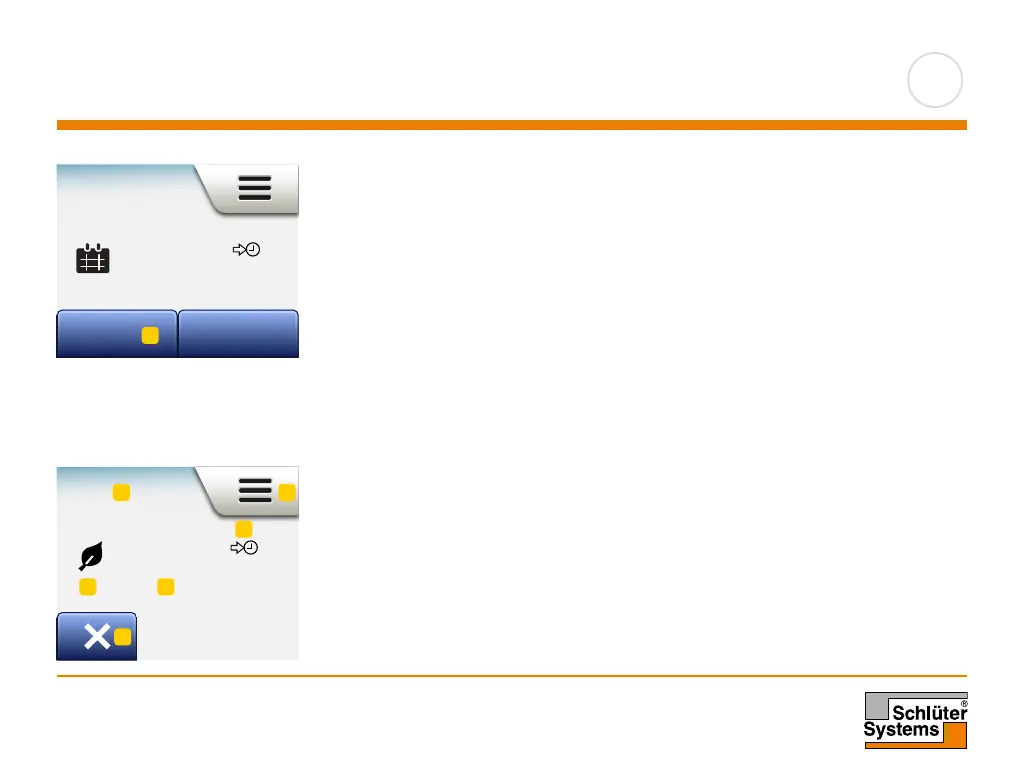
1. Tap the “Eco” button on the Scheduled Operation home screen to access the
Eco Function.
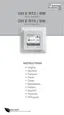
The thermostat will then display the Eco Function home screen.
Eco Function home screen:
1. Indication of Eco Function.
2. Tap here to access the menus.
3. Icon indicating the current operating mode (leaf = Eco Function).
4. Current target/setpoint temperature (if shown in red, heating is being provided).
5. The time at which the thermostat will return to Scheduled Operation.
6. Tap here to return to Scheduled Operation.
Mon 11:15
11:00
24.5
°
Eco Other...
Eco
16.0
°
11:00
1 2
3 4
6
5
1



 To Next Page