Operation
Startup 250:Users:Danny:Desktop:Operation manuals:line pumps:maverick
(P305):pHseriesOPERATION.fm
27
Operation Manual - SP 305
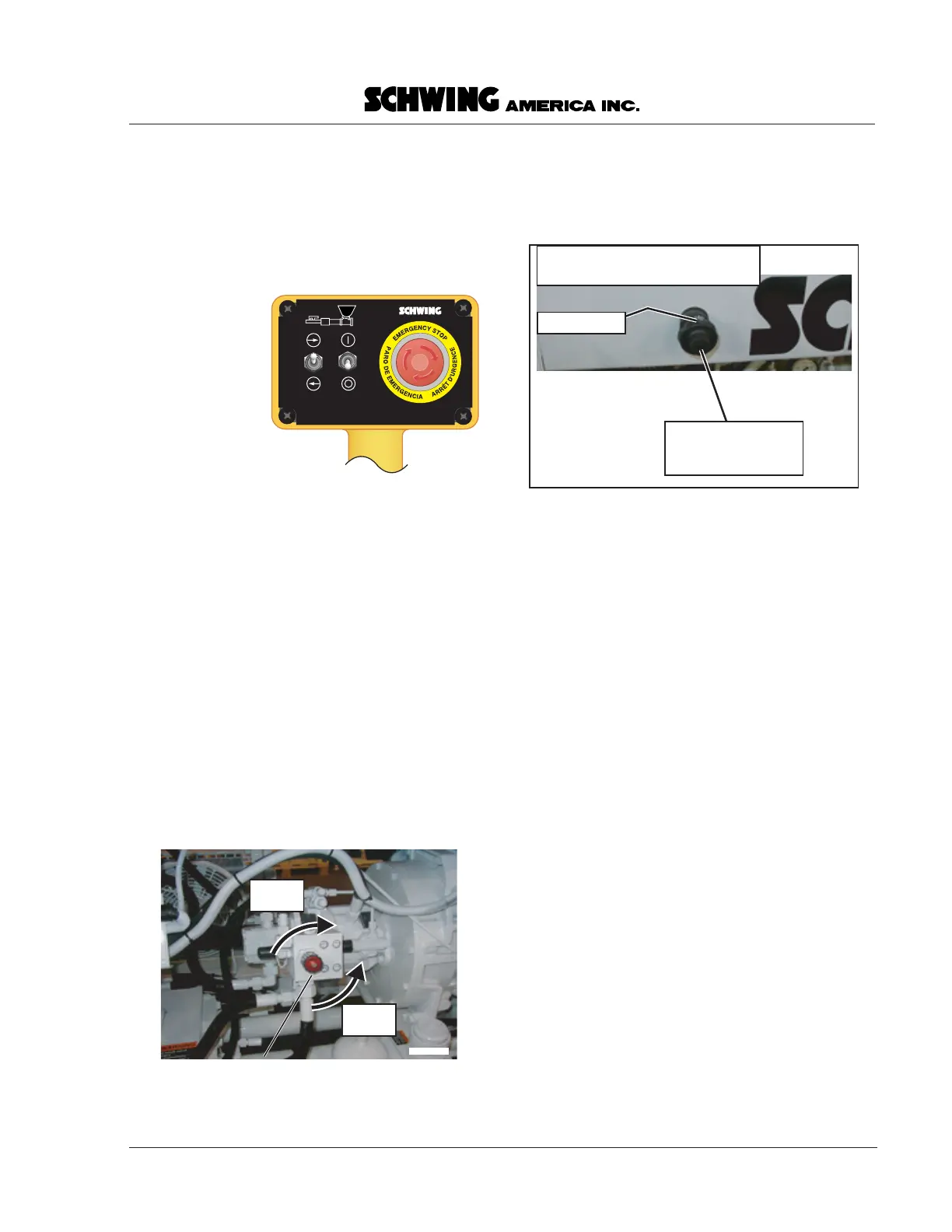
The remote control box
The cable remote control box (Figure 13) transfers the
forward - off - reverse
functions of the control panel
to a handheld electrical enclosure. The remote control
can be carried away from the pump to allow the
operator to select the best vantage point to see both the
point of discharge and the pump.
Note about the electric system
• The machine cannot be operated unless either the
dummy plug or the remote control cable is plugged
into the remote control cable receptacle on the
control panel. The emergency stop circuit is
completed by either device.
The volume control knob
(Also known as the stroke limiter) (Figure 14). This
knob tells the hydraulic pump to put out more or less
oil (independent of the motor speed) to control the rate
of concrete output.
Turning the knob
clockwise
(CW) causes less oil and,
therefore, less strokes per minute.
Turning the knob
counterclockwise
(CCW) causes the
pump to put out more oil and, therefore, more strokes
per minute.
Throttle control
Push the button on the end of the knob (Figure 15),
then pull the knob and cable
out
to increase RPM. Push
the button on the end of the knob, then push the knob
and cable
in
to decrease RPM.
The pressure gauge
This gauge indicates pressure in the hydraulic circuit
that pushes the concrete and includes the accumulator.
NOTE! Because accumulators store hydraulic energy,
it is critical that this gauge work at all times.
Do not
operate the unit unless this pressure gauge is
functional!
Starting the Pour
Concrete mixes
This machine is capable of pumping many different
mix types, up to and including one inch rock, but the
mix must be graded with some components in all of the
different sieve sizes. Generally speaking, any durable,
good quality concrete will pump. If you have trouble
pumping a mix, look at the mix design. Sieve sizes #4,
#8, and #16 must be present for the concrete to have
good pumping characteristics.
Preparing for concrete
When concrete arrives on the job, have the ready-mix
driver discharge a small amount of concrete onto the
chute so you can look at it. The concrete should be well
mixed, meaning that you won’t see just large rocks or
remboxonly.eps
30362341
Figure 13
The cable
remote control
box
volumeknob.eps
Volume control knob
(stroke limiter)
Less
strokes
More
strokes
Figure 14
The volume control knob
THROTTLE
Pull cable OUT to increase RPM,
push IN to decrease RPM.
throttle.eps
Friction ring
Using your thumb,
push button on end
of knob to release
Figure 15
Adjusting the throttle


 To Next Page