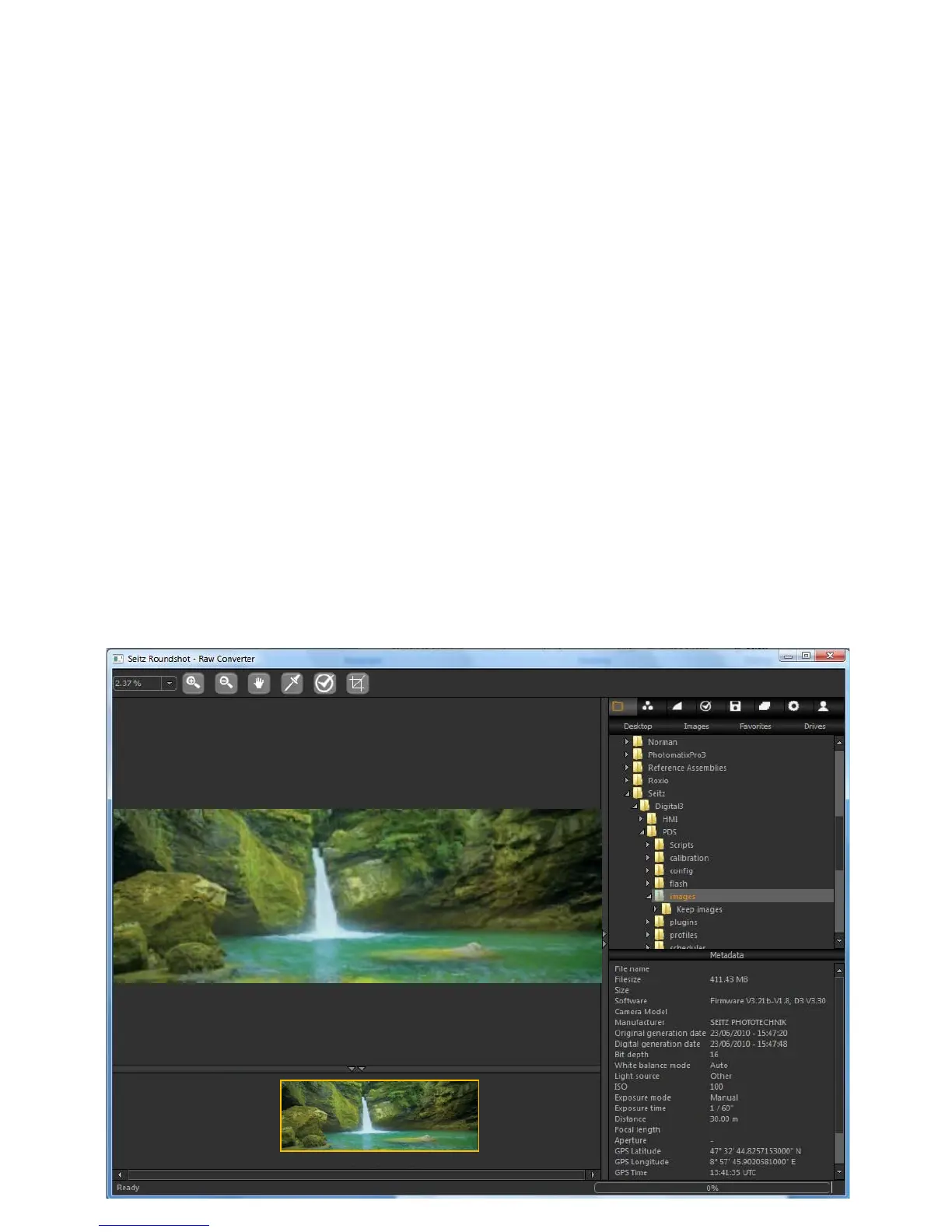
The Seitz Raw converter is divided into 4 fields for an optimised usability and image
conversion workflow:
Tool bar: located on the top of the window, the tool bar is used for direct image
editing and image navigation
Thumbnail: Located on the bottom part of the window, the thumbnail field displays
the thumbnails of all DNG images located in the current folder. It is useful for image
selection and loading. It is possible to minimise this field when the image is loaded.
Preview: located in the centre of the window, the preview filed contains the image
preview. It is possible to navigate and zoom up to 200% in the image.
Parameter menu: located on the right side of the window, the parameter menu
contains all the raw conversion parameters to be applied on the image. It is
structured into 8 tabs following the logical raw conversion workflow (Image
browsing, colour adjustment, tone mapping ...)
2008-09-15-1631.dng
2008-09-15-1631.dng
2008-09-15-1631.dng
21,250 x 7,500 pixels
Seitz 6x17 Digital
90mm
5.2 RAW workflow: Seitz raw converter (continued)
Instruction Manual Seitz 6x17 Digital - version 4.05 - May 2013- © by Seitz Phototechnik AG / Switzerland www.roundshot.ch page 67



 To Next Page