
 Need help?
Do you have a question about the Selco M4200 and is the answer not in the manual?
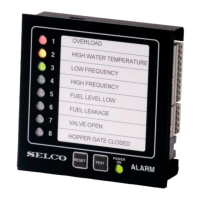
Description of controls and indicators on the front panel.
Description of rear panel connections and controls.
Default connection diagram for a single M4200 unit.
How to synchronize LEDs across multiple M4200 units.
Configuration for relay outputs operating in normally de-energized mode.
Configuration for relay outputs operating in normally energized mode.
Operation of open collector outputs in normally de-energized state.
Operation of open collector outputs in normally energized state.
Maximum load capacity for open collector outputs.
Example configuration for NC input contacts.
Example configuration for cable monitoring.
Explanation of input reference settings used with cable monitoring.
Example configuration for negative input reference (GND).
Explanation of rotary switch modes and positions.
Overview of dip switch functions and their dependence on rotary switch position.
Procedures for setting and restoring factory defaults for dip switches and all settings.
Dip switch settings for input parameters and general functions.
Description of the SET button and ACK LED indicator functions.
Steps to locate, install, and configure HyperTerminal for PC communication.
Saving and managing HyperTerminal connections.
Command to retrieve the current configuration of the alarm monitor.
Detailed list and explanation of system parameters for PC configuration.
Procedures to save configuration to a text file and load it back.
 General
| Brand | Selco |
|---|---|
| Model | M4200 |
| Category | Security System |
| Language | English |

 To Next Page