M4200 - User manual
Revision: 07.03.2017 Page 12
Cable monitoring
Cable monitoring provides extra security to the alarm system. Cable faults are indicated with short flashing
pulses on the corresponding alarm channels. Cable fault indications will be overridden by activation of input
alarms and indicated with normal alarm flash or steady light indication.
IMPORTANT: It is only recommended to use the example below if the alarm monitor is still in factory default
mode. If there is any possibility that the alarm monitor has been programmed previously, please refer to the
section Factory default - dip switches on page 15.
Example
The example below refer to input 1, terminal 1:
1. Set rotary switch in position 1 (acknowledge LED change into red colour).
2. Set dip switch 1-3 to On (Cable monitoring).
3. Press Set button until Acknowledge LED shortly turns into green light.
4. Release Set button.
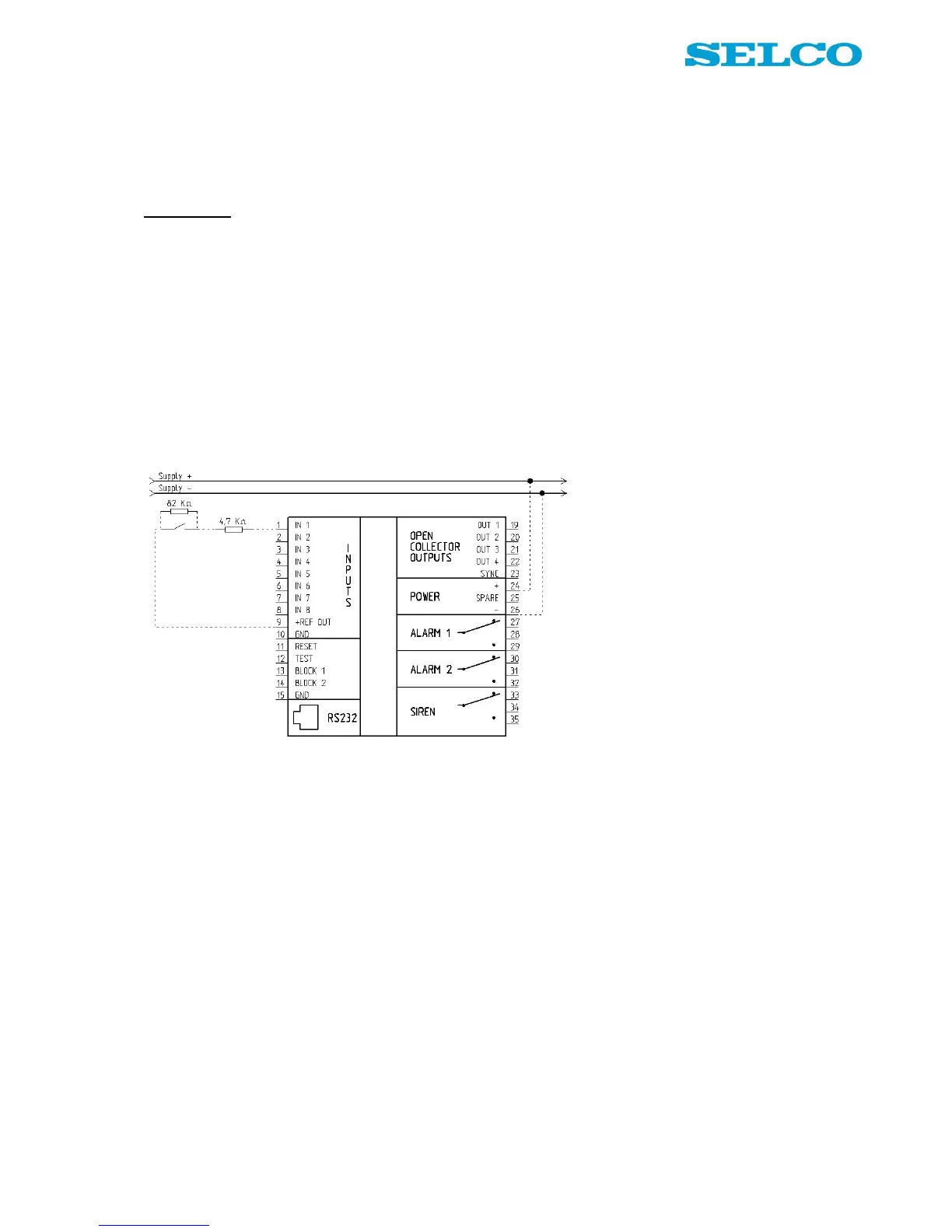
Now it is possible to connect input 1 as shown in Figure 8 and
Figure 8. Wiring example, cable monitoring on input 1
If cable monitoring is needed on any other input channel, please select the input number on the rotary switch
and follow step 3 and 4 above.
Notice that two measuring resistors (1 in series and 1 in parallel) are needed for each of the inputs operating
with cable monitoring. It is very important that both resistors are mounted close to the input contact.
Input reference
In the example above + REF OUT (9) is used as input reference. It is possible to use both + Ref (9) and
GND Ref (10) with cable monitoring without further configuration.
Normally open inputs
The resistor in parallel is monitoring cable break.
The resistor in serial is monitoring short circuit.
Normally closed inputs
The resistor in parallel is monitoring short circuit.
The resistor in serial is monitoring cable break.
Inputs in general
However the input is operating as, normally open or normally closed, same size of resistors is used.


 To Next Page