M4200 - User manual
Revision: 07.03.2017 Page 23
Create a new connection
HyperTerminal is now fully installed and it is time for creating a new connection:
1. Click on the Start button (in the lower left corner of the Windows
®
screen).
2. Click on the menu item All
programs*
)
.
3. Click on the menu item Accessories.
4. Click on the menu item Communication.
5. Click on the menu item HyperTerminal.
When the New connection dialogue appears on the screen:
6. Type in Direct COM1 (assuming that COM1 is used for the connection) in the input field Name.
7. Click on the button OK.
When the Connect to dialogue appears on the screen:
8. Click on the drop down menu, opposite the input field Connect to, and choose which COM port you
want to connect to, e.g. .
9. Click on the button OK.
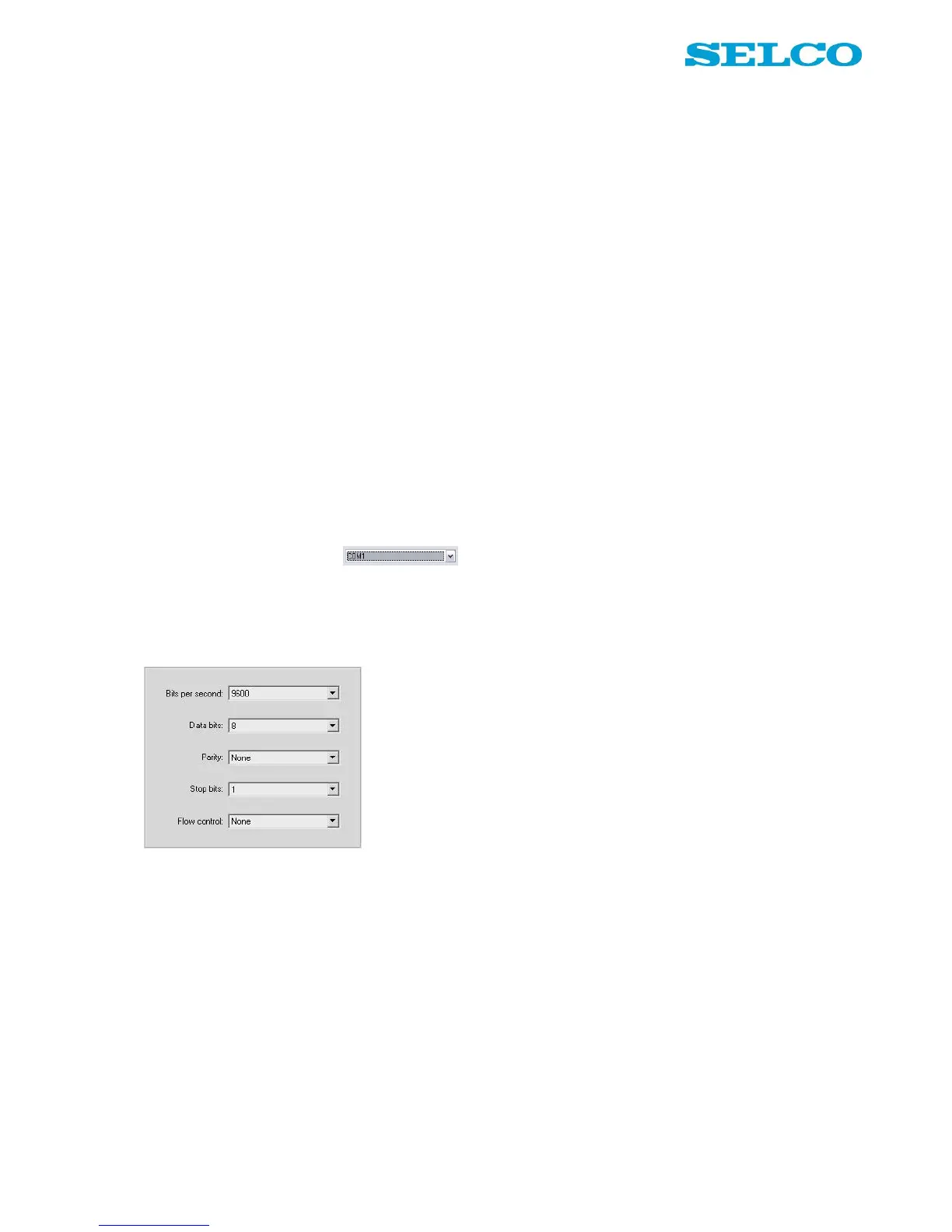
When the Port Settings dialogue appears on the screen:
Please make sure that the dialog is filled out exactly like the picture above!
10. Click on the button OK.
*
)
On Windows
®
XP the button is named All programs. If the operating system is older than Windows
®
XP, the button is only named
Programs.


 To Next Page