M4200 - User manual
Revision: 07.03.2017 Page 11
NC input contacts
IMPORTANT: It is only recommended to use the example below if the alarm monitor is still in factory default
mode. If there is any possibility that the alarm monitor has been programmed previously, please refer to the
section Factory default - dip switches on page 15.
Example
Input 1 - 8 accept any combination of NO or NC contacts. Default configuration only supports NO contacts. If
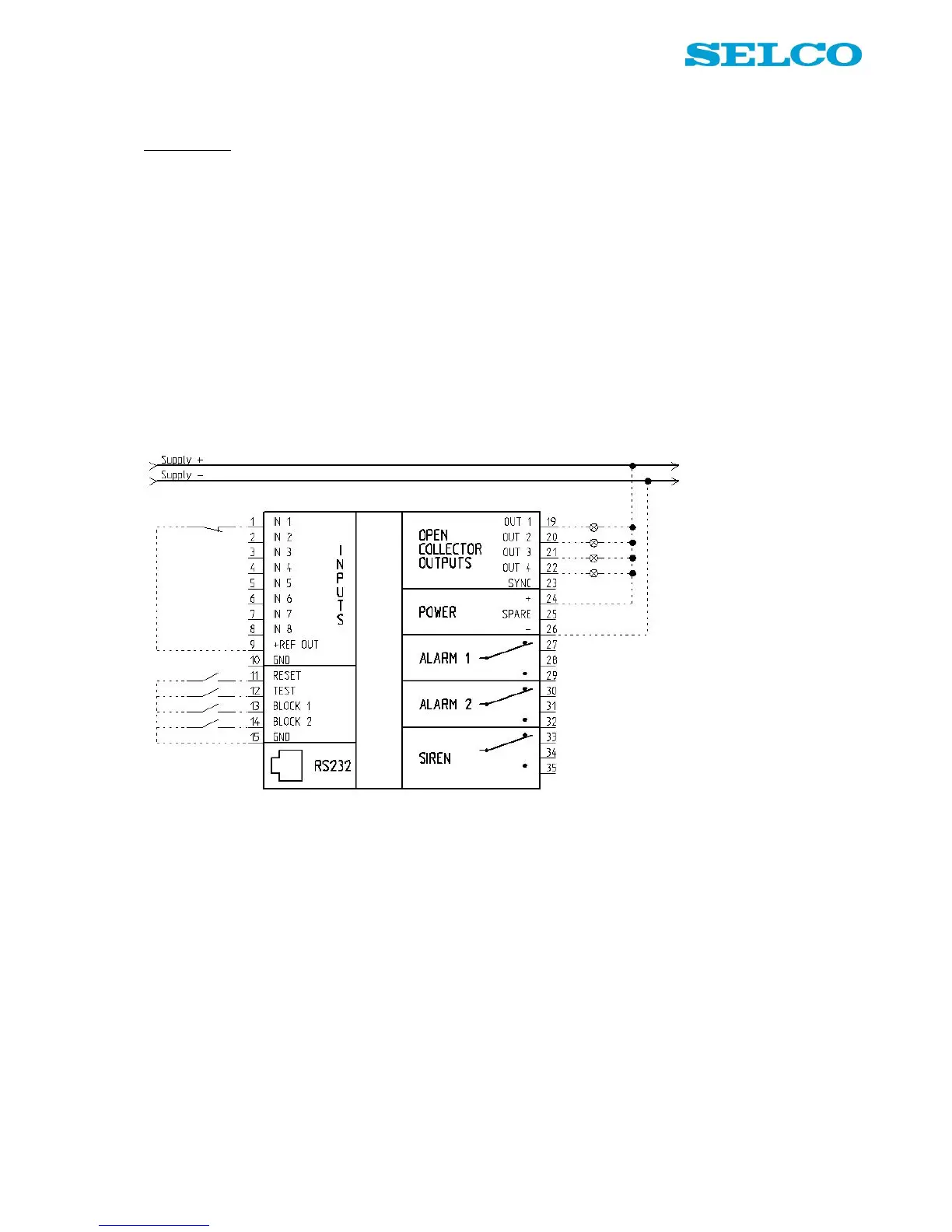
NC contacts are used, please follow the example below regarding input 1, terminal 1:
1. Set rotary switch in position 1 (acknowledge LED change into red colour).
2. Set dip switch 1-1 to On (NC contact).
3. Press Set button until Acknowledge LED shortly turns into green light.
4. Release Set button.
Now it is possible to connect input 1 as shown in Figure 7:
Figure 7. Wiring example, NC input
If NC contacts are needed on any other input channels, please select the input number on the rotary switch
and follow step 3 and 4 above.


 To Next Page