Maintenance, Repair and Troubleshooting
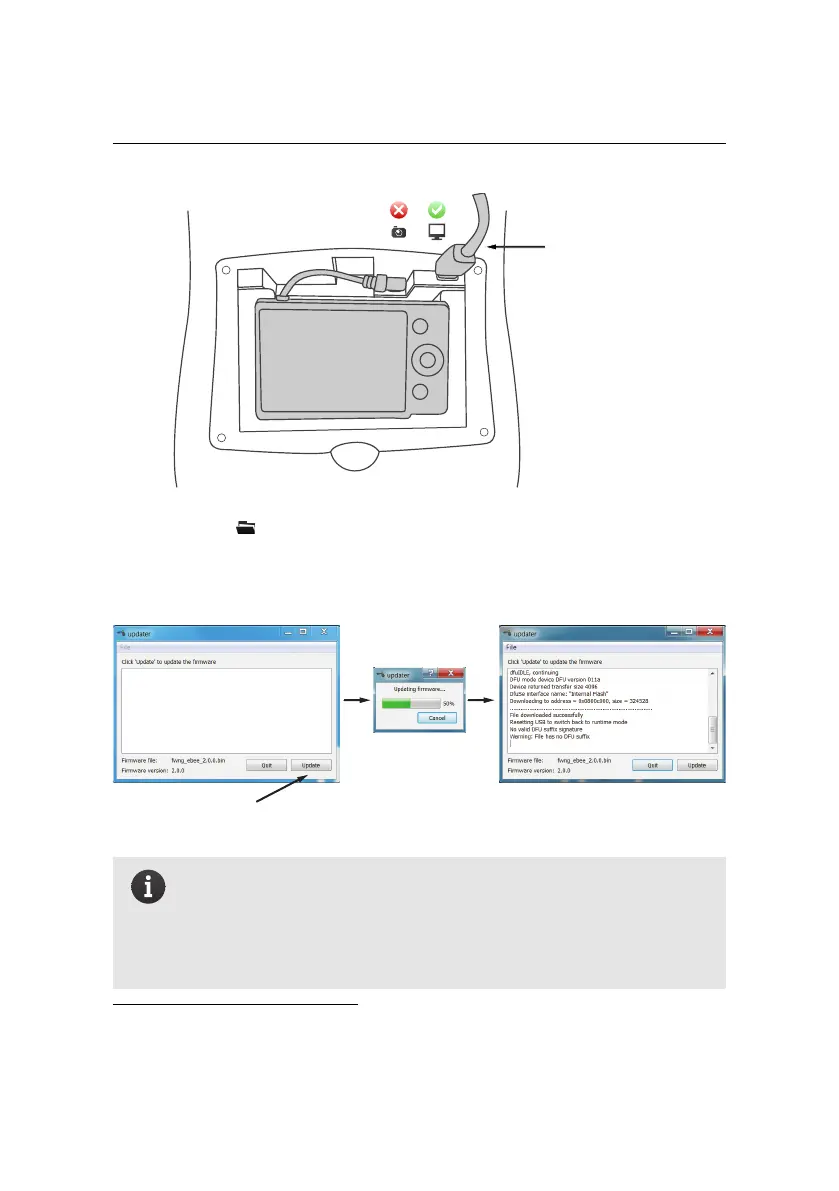
connect USB cable
to autopilot
3. Click the icon and select ‘Updater eBee...’⁵¹.
4. Click ‘Update’ to begin the updating process. Wait until the process is com-
plete, which is indicated by the text ‘File downloaded successfully’.
Click Update
Wait for update
to complete
File downloaded
successfully
Note: You may need to install a driver the first time you upgrade your
firmware. Thedriver will be installed automatically but may cause the
firmware update to fail. If this is the case, retry the update process by
clicking ‘Update’ again, without disconnecting the battery or cable
from the drone or closing the ‘Updater eBee’ program.
⁵¹ also available in the ‘eMotion’ folder in the Start menu in Windows
130



 To Next Page