Quick start guide
Note: If the drone detects a condition that prevents correct take-off
a Take-off veto will be displayed in eMotion and the status LED will
start pulsing blue. Section ‘Take-off vetoes’ on page 141 describes
the possible Take-off veto messages and the user action that should
be taken to remove them. For example, if the drone is not oriented
horizontally the status LED will start pulsing blue until you re-orient
it horizontally, at which point the status LED turns solid green again.
Caution: It is imperative to launch the drone directly against the
wind, otherwise it will be unable to gain enough speed during take-
off and likely crash. Likewise, launching the drone in high winds
above the specified safe wind speed of 12 m/s is dangerous and can
result in a crash.
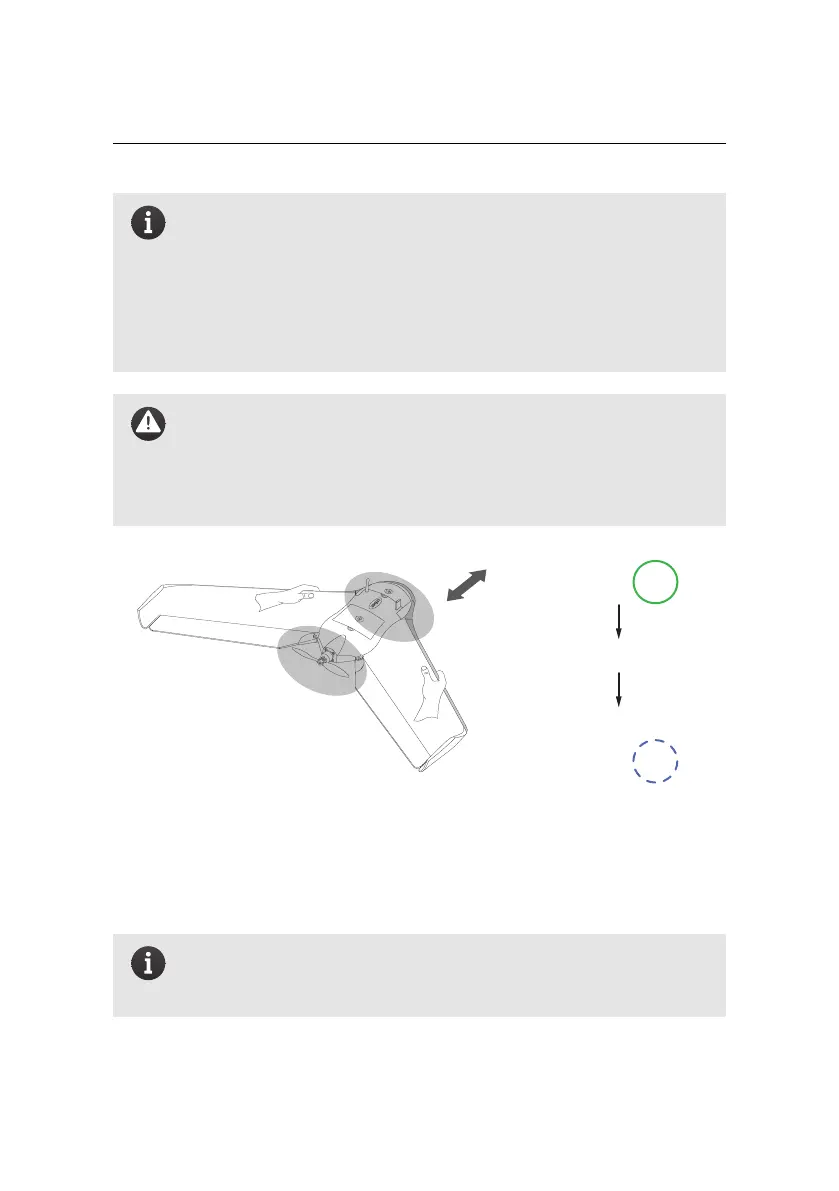
shake 3x
n
o
h
o
l
d
i
n
g
z
o
n
e
d
a
n
g
e
r
z
o
n
e
shake 3x
motor startup begin
green
solid
status LED:
blue
pulse
status LED:
Step 2: Switch the motor on
Shake the eBee back and forth 3 times longitudinally (within approx. 3 seconds)
to begin the motor power-up sequence. The status LED will pulse blue until the
motor is at full power and ready for take-off.
Note: You do not need to hurry to launch the drone. In case you want
toshut off the motor, just repeatthe back and forth action three times
and the motor will stop.
42



 To Next Page