Advanced functionalities
Note: The ground sensor height indicates the height above the
ground detected by the ground sensor. The sensor can typically de-
tect distances below 60 m, depending on available light and surface
contrast.
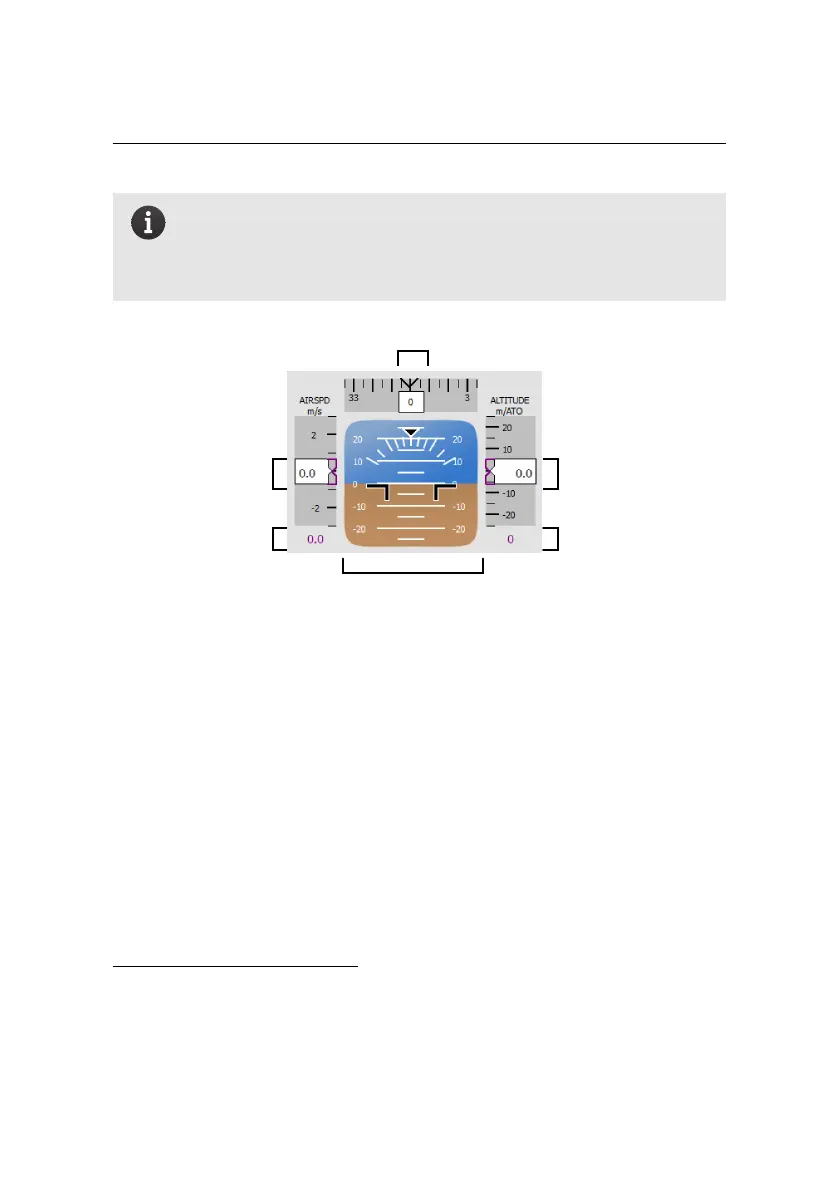
current altitude over
take-off location
current heading in degrees
attitude with respect
to artificial horizon
desired altitude over
take-off location
current air speed
desired air speed
• Instruments: This display mimics the classical primary flight display used
in manned aircraft. The column on the left displays the current air speed of
the eBee as well as the desired air speed, in metres per second. The column
on the right displays the drone’s current altitude over take-off location, as
well as the desired altitude over the take-off location, in metres. The bar at
the top displays the current heading of the drone³⁵. North is indicated as
0
◦
, East as 90
◦
, South as 180
◦
and West as 270
◦
.
• Identification: This displays the serial number of your eBee and the num-
ber of the Drone Flight log for the current flight. This number can be used
as a reference when importing flight data after a flight³⁶.
• Payload information: This section displays the payload currently selected
and the number of photos that has been taken since take-off³⁷.
³⁵ this feature is only accurate when in flight
³⁶ see section ‘Importing images and flight data’ on page 48
³⁷ see section ‘Camera tab’ on page 111 for instructions on changing the payload type
94



 To Next Page