(most to almost none) will be assessed as breaths and reliable breath detection may be hindered. This can be
the case in spontaneously breathing patients with irregular breathing rate and/or varying tidal volumes or in
patients breathing rather shallowly. If the
Plethysmogram
exhibits very weak or no clear breathing pattern and
instead is dominated by non-breathing-related
Lung Impedance
changes such as for example cardiac-related
Lung Impedance
changes, the LuMon System will typically detect no breaths. For example, this may be the
case in very shallowly breathing patients, in patients being ventilated at frequencies above a few Hz or on
extracorporeal lung support or during apnea or breath holds.
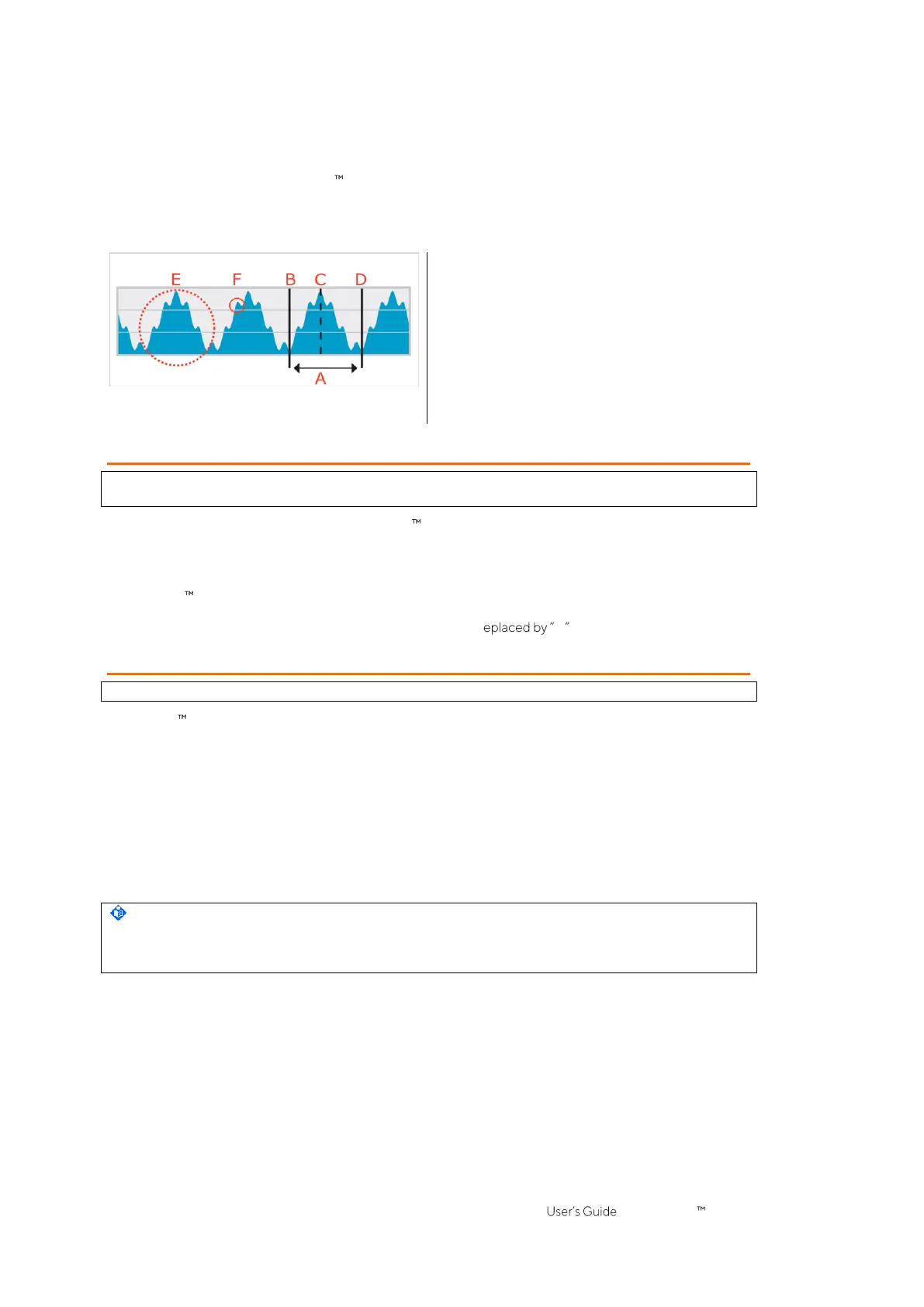
Figure 9-8: Visualization of the last detected breath on the Plethysmogram (in BB mode only).
A. Last detected breath
B. Minimum → End of previous expiration and start of
inspiration
C. Maximum → End of inspiration and start of expiration
D. Minimum → End of expiration and start of next
inspiration
E. Breathing-related
Lung Impedance
changes
F. Cardiac-related
Lung Impedance
changes (here approx.
6-times smaller than breathing-related changes)
9.6 Respiratory Rate
The details view of VentView (6.4.1) and the minimized VentView (Figure 6-1) display
Respiratory Rate
(RRi). The
trend view of VentView provides an auto-scaled RRi-trend (6.4.2).
On the basis of detected breaths (9.5) the LuMon System calculates and displays RRi irrespective of the
selected
Analysis Mode
(9.7). The calculation of a
Respiratory Rate
value requires at least three consecutive
detected breaths that are similar to each other and the displayed RRi value is a moving average over the last
four detected breaths.
If the LuMon System is unable to detect a breath, for example if a patient is breathing rather shallowly, or if the
calculated
Respiratory Rate
is outside its specified display range (13.1), then the last calculated
Respiratory Rate
value continues to be displayed for up to 40 seconds and is then r -- in all
Analysis Modes
.
9.7 Analysis Modes
The
Analysis Mode
can be selected in ScoutView (Figure 6-6).
The LuMon System features three operator adjustable modes to analyze the
Plethysmogram
, specifically, to
determine end-expiratory and end-inspiratory time points needed for the calculation of
breathing-related EIT
images and indices
as well as the mean of the
Plethysmogram
over an
Analysis Interval
. Furthermore, the extent
of available
EIT data
depends on the selected
Analysis Mode
. Available
Analysis Modes
are
breath-based
(BB)
mode and
time-based
(TB-I and TB-II) modes with
BB mode
being the power-on default mode.
It is important to check the adequacy of the selected
Analysis Mode
• after initiating monitoring (8)
• while monitoring the patient (9) before evaluating
breathing-related EIT images and indices
or at least
every 8 hours
• when reviewing trend data.
Sub-section 8.5 and in particular Table 8-1 provide further guidance.
NOTE
Breathing-related EIT images and indices
are available in
BB mode
and
TB-I mode
, whereby those obtained
with
BB mode
may differ from those obtained with
TB-I mode
. Moreover,
breathing-related EIT images and
indices
are not available in
TB-II mode
,
Aeration
is shown instead.



 To Next Page