SCORPIO 38’ - 45’ - CONTROL DISPLAY INFORMATION - Operation menu
Version 1.02 May 27, 2022
52
4.2.3 SETTINGS MENU
4.2.3.1 LEVELING
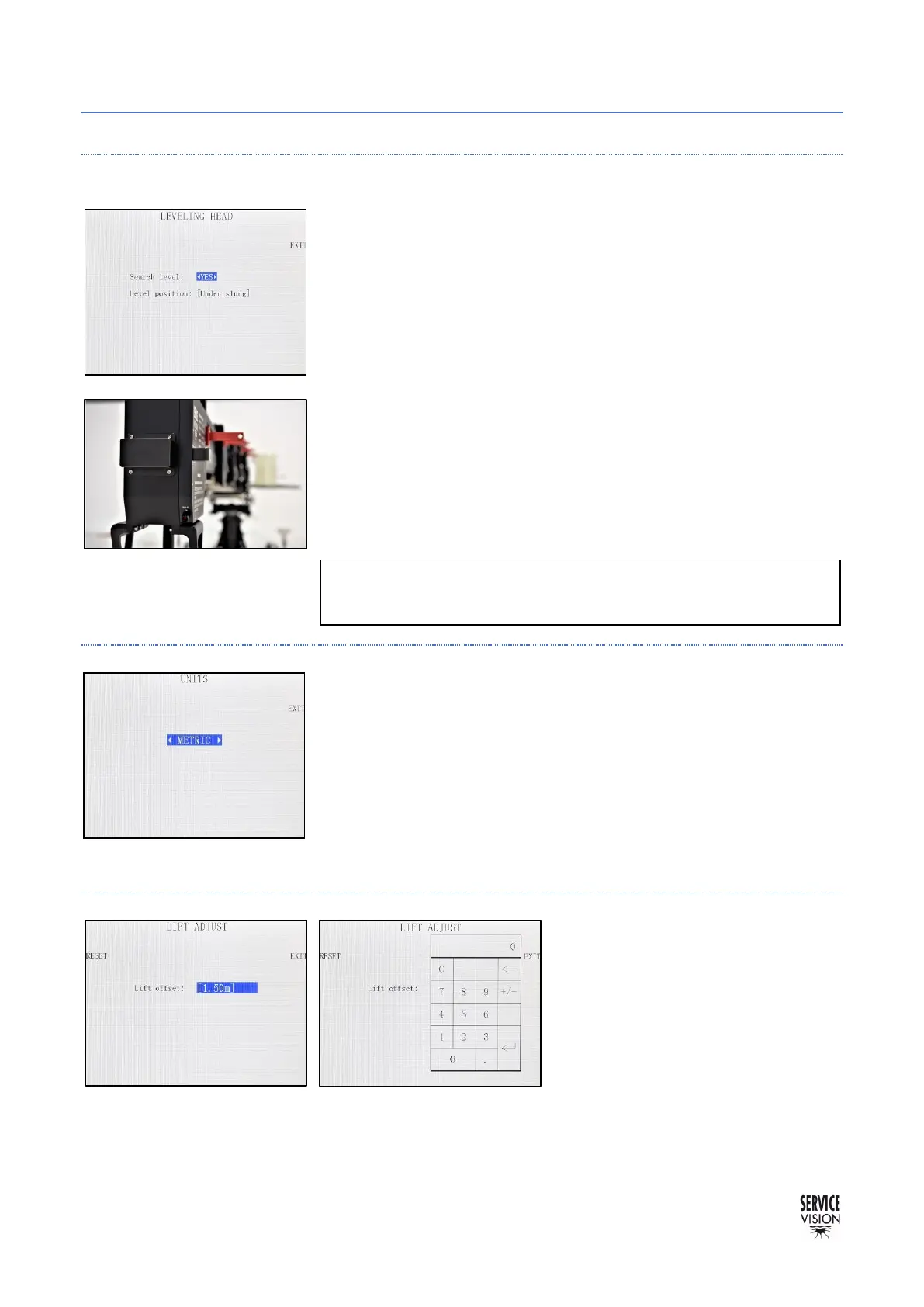
In this screen is possible to choose if the leveling head needs to
search the level when the crane starts (Search level YES) or if we
want to set the level manually.
To set the level manually, put the Search level option in NO, then
restart the crane with the brake on the leveling head OFF
(fig.02.110). Once the crane is restarted with the switch OFF, it will
be waiting for the leveling head. Manually move the Mitchel base
from the Leveling Head to the desired level and change the brake to
ON again. That will be the level maintained by the LH when the arm
goes up or down.
In case we change the position of the leveling head from Underslung
to Over slung it is needed to change the Level position in this menu in
order to make the leveling head correct in the proper direction.
4.2.3.2 UNITS
In this menu is possible to select how the distance information is
displayed: Metric system or Imperial system.
4.2.3.3 LIFT
To introduce a lift offset, with the
crane still measure the lens height.
Introduce that distance using the
keypad and when the crane moves it
will calculate the height change of the
lens and it will display in the main
screen.



 To Next Page