SCORPIO 38’ - 45’ - CONTROL DISPLAY INFORMATION - Operation menu
Version 1.02 May 27, 2022
54
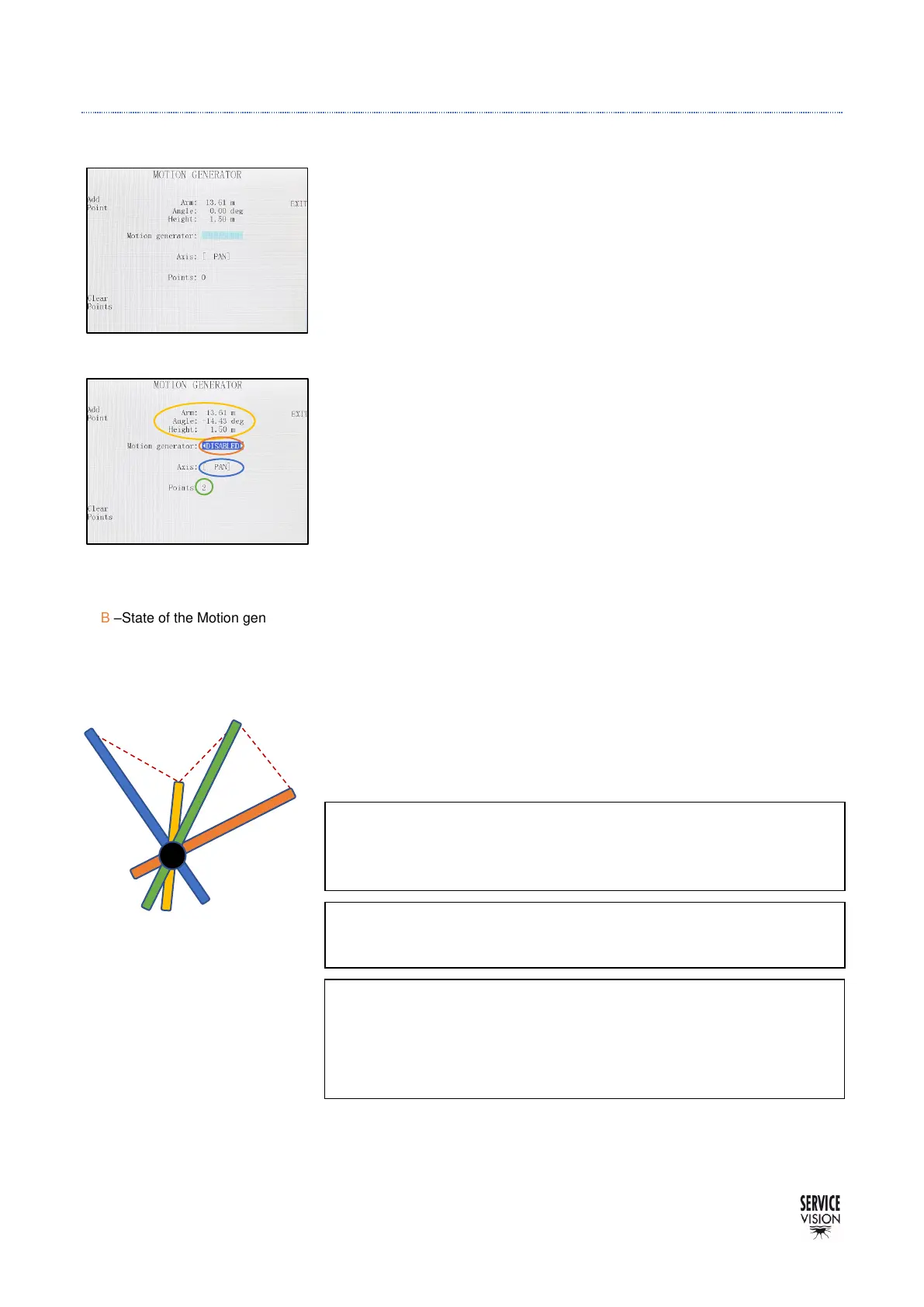
4.2.3.6 MOTION GENERATOR
The Motion Generator feature allows the user to set some key
frames of the extension of the arm respect to the degrees of one of
the axes Pan OR Tilt. This means that while the user swings the crane
in one axis (Pan or Tilt) the crane will automatically retract or extend
in order to pass through this extension points in the desired degrees.
To start using it, select the working axis (PAN or TILT). The Pan or
Tilt encoder is the one who will generate the arm movement. If the
Pan axis is selected, set the Tilt in the horizontal position and brake
the Tilt axis. If working in the Tilt axis, lock the position of the Pan
axis using the Pan brake.
Once the axis has been selected, move the extension of the arm in
one desired keyframe for a certain degree and press the Add Point
button. Now change the degrees in that axis and adjust a new
extension for the arm to set another point.
Repeat this procedure to save as many points as desired.
Once all the points are recorded, enable the Motion Gen. Now the
extension of the arm is automatically moved by the system while the
crane is being moved in order to pass through the key points. The
operator cannot control the arm while the Motion generator is
engaged.



 To Next Page