SCORPIO 38’ - 45’ - CONTROL DISPLAY INFORMATION - Operation menu
Version 1.02 May 27, 2022
56
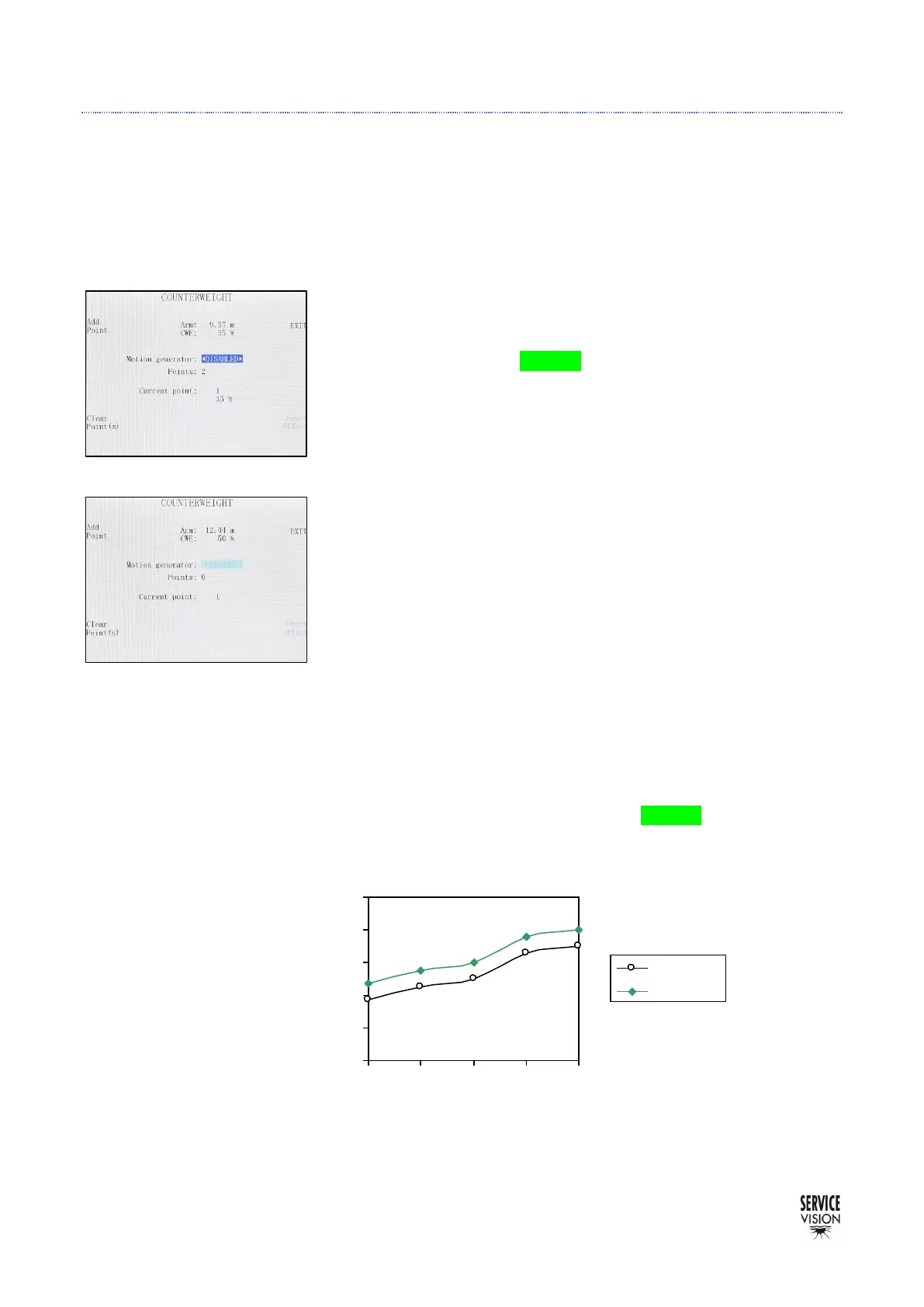
4.2.3.9 CWE GENERATOR
With the counterweight generator is possible to change the position of the counterweight carriage
depending on the extension of the arm. This function helps to balance the arm during all the extension
of the crane.
To start using it, move the arm to the maximum extension and, in
this position, move the counterweight carriage using the rocker of the
Hand Command while the GREEN button is being hold.
Once the counterweight is in the desired position for this extension
of the arm, press the Add Point button.
From this point, start retracting the arm and as soon as the balance
of the arm is not good, move again the counterweight carriage and Add
another Point.
Keep adding points along the range of the arm. Normally with 4-5
points is enough. Once all the points have been recorded. Enable the
counterweight generator and the carriage will move automatically as
the arm extends or retracts.
In case one point is not recorded properly can be erased by getting
close to the point and pressing Clear Point while the system is
disabled.
More points can be added in between once the rest has been
recorded.
An Offset can be added to all the points once the system is on by
moving the carriage with the cursor and the GREEN button. The points
will be the same but all of them will be displaced.



 To Next Page