SCORPIO 38’ - 45’ - F.A.Q. / COMMON PROBLEMS - Possible problems related to the electronics
Version 1.02 May 27, 2022
80
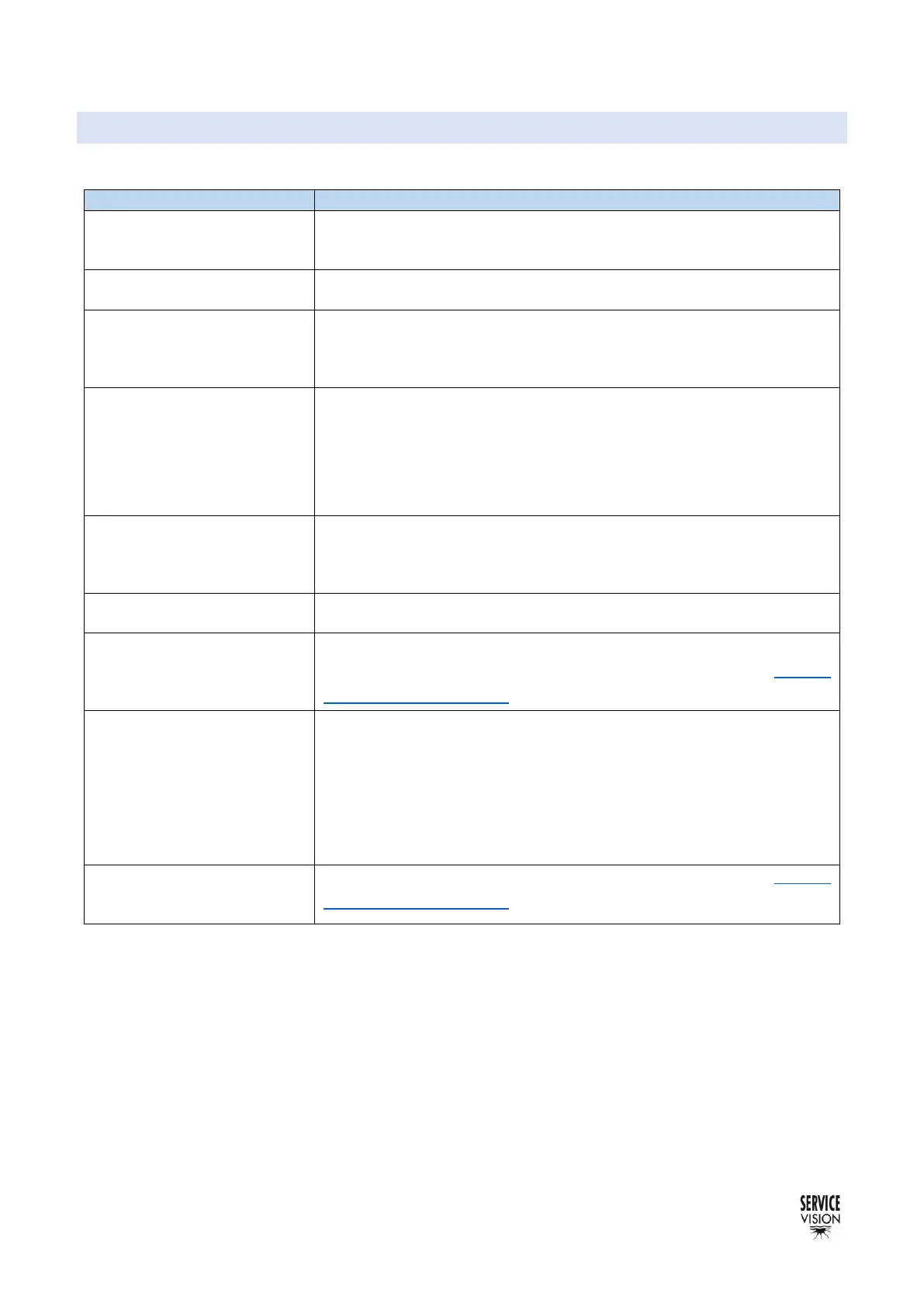
7.2 POSSIBLE PROBLEMS RELATED TO THE ELECTRONICS
The most common problems related to the Arm are:
There is no Alarm, but the
Arm does not move
-Check the speed of the Hand Command.
-Check if there are limits sets on the movement of the Arm.
-Check if there is something blocking the movement of the Arm.
There is no light in the
screen
-Check the cable for the display
-Contact Servicevision
The system does not start
-Check if all the securities are connected (Hand Command,
Emergency stop, start button).
-Change the cable for the Hand Command.
The crane only moves in
one direction
-Check if there is something blocking the movement of the crane
-Check in the TTL screen to see if the crane detects one of the
magnetic limits. If so, that magnetic limit is broken, either the cable
is broken/disconnected, or the sensor is broken
-Contact Servicevision
In the display appears
“Motor burnt or motor cable
disconnected”
-Check if the motor of the cable is connected.
-Check if the magnetic limits of the crane are arriving into the
electronic box (both LEDs of the Relay board are ON)
There is a bad movement of
the crane at 100% speed
-Check if there is enough power arriving to the crane.
The crane arm drift by itself
-Restart the crane
-Calibrate the potentiometer from the Hand Command (chapter
Command adjust 4.2.4.2)
The counterweight motor
does not move
-Check if there is an ALARM in the main screen. If so, check if the
counterweight chain is connected.
-Verify that the counterweights chain is properly connected.
- Verify that both counterweights’ limits are not pressed at the same
time (by a branch or other things for example).
-Contact Servicevision
The telescopic arm moves
faster in one direction than
another
-Calibrate the potentiometer from the Hand Command (chapter
Command adjust 4.2.4.2)



 To Next Page