Configuration and Operation CDHD
34 Servotronix
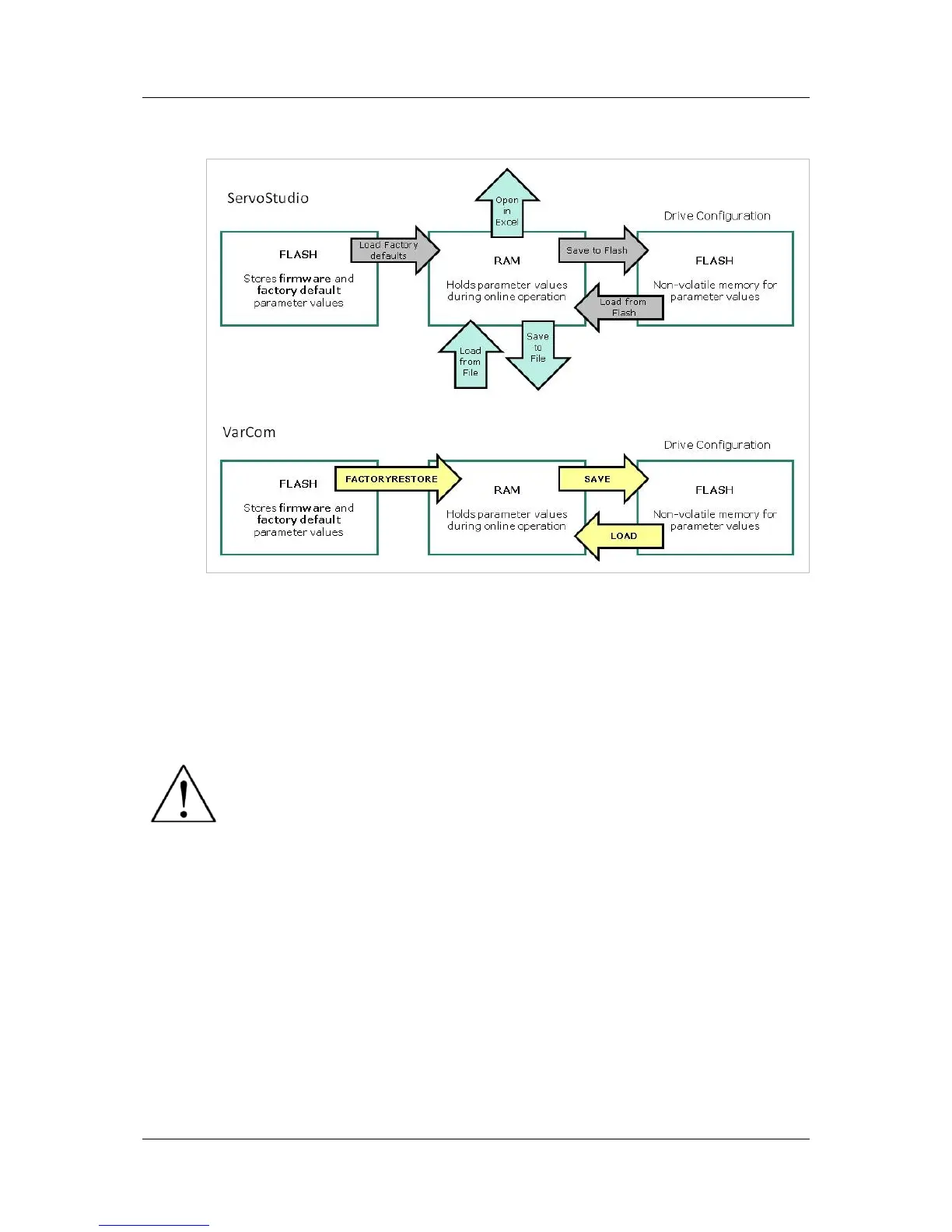
The following diagram illustrates the relationships among the different types of
memory in the CDHD drive.
Figure 4-2. Drive Memory Architecture
For more information on the commands for saving and loading parameters, refer
to the CDHD VarCom Reference Manual.
4.6 Configuring Parameters Using ServoStudio
Disable the drive before manipulating motor and feedback
parameters.
Many parameters can be modified while the drive is enabled.
Exercise caution, however, as motor behavior will change.
If a parameter cannot be modified while the drive is enabled, ServoStudio
will prompt you to disable the drive.
While setting the parameters, pay close attention to any warning or error
messages displayed by ServoStudio.
4.6.1 Tuning and Testing
In the Motion screen, various types of motion can be executed. In this screen
the values of actual current, velocity and position are displayed. This is not real-
time data, however, and the update rate depends on such factors as the host
computer processing power and the drive mode of operation.
Drive tuning is generally performed in the Scope screen. This screen allows the
you to record drive parameters, and to configure the record trigger to match the
specific motion being recorded.



 To Next Page