13
4 Normal Operaons
4.1 Powering On/O
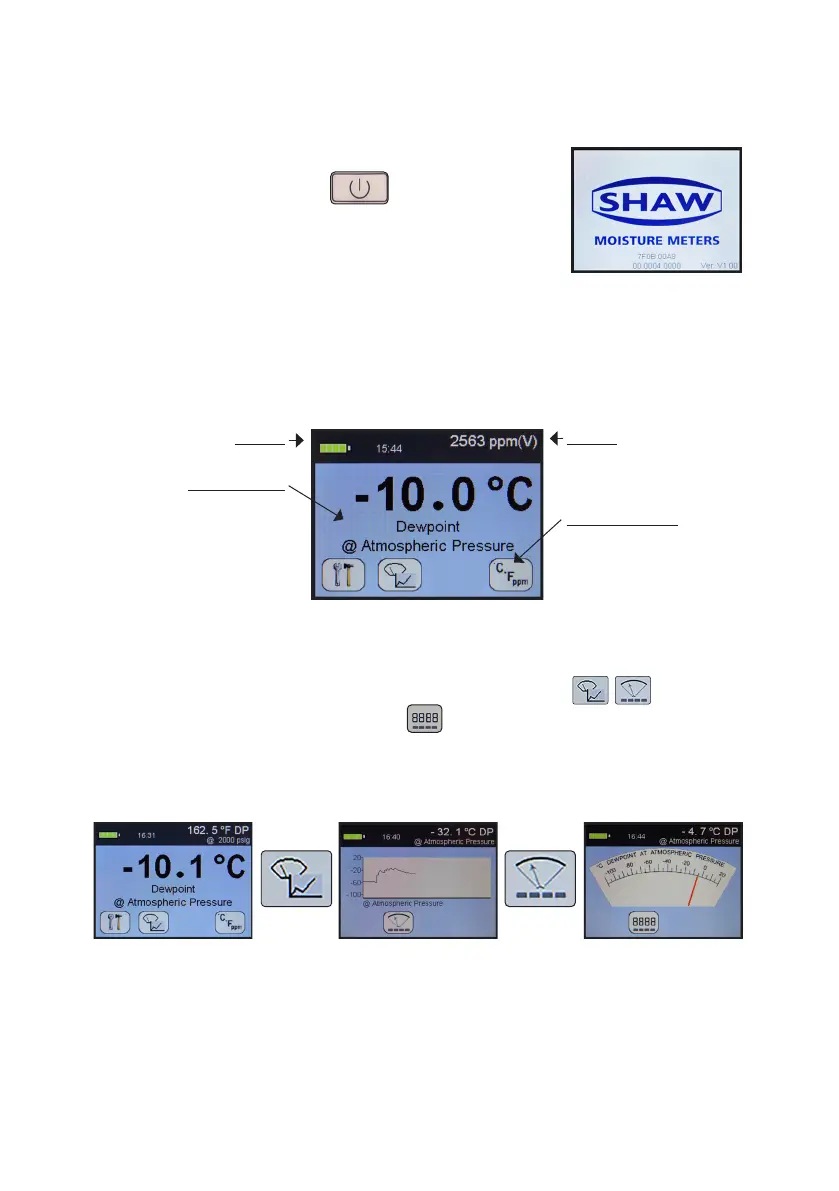
To switch on (and o), press , the SDHmini
briey displays a splash screen showing instrument
status, error informaon and rmware version number.
4.2 Graphical Viewing Opons
The start up screen is soon replaced by the normal measurement mode screen
(see below) displaying the current moisture measurement in a variety of views.
The last used or last selected mode will be ulised automacally.
4.3 Display Opons
The display can be changed by pressing the following keys to cycle
through all of the graphical views and will take you to the home screen.
Here is a view starng as a digital number followed by simulated strip chart and
moving coil instruments.
The digital display mode has the benet of showing the moisture measurement
in main choice of engineering units but also a secondary display with perhaps
alternave engineering units. This mode also allows applicaon of pressure
dewpoint to evaluate the measurement in other samples pressures.
Top Bar
Secondary Display or
Measurement Value
Buon Icon Area
These are so keys which
are always visible to assist
users in navigang through
the graphical screens.
Top Bar
Baery Status - Time
Viewing Portal
Main display resides here
but can also show alternave
Measurement Data,
Informaon Screens and
Conguraons in a variety of
formats.


 To Next Page