28
10.5 Sengs
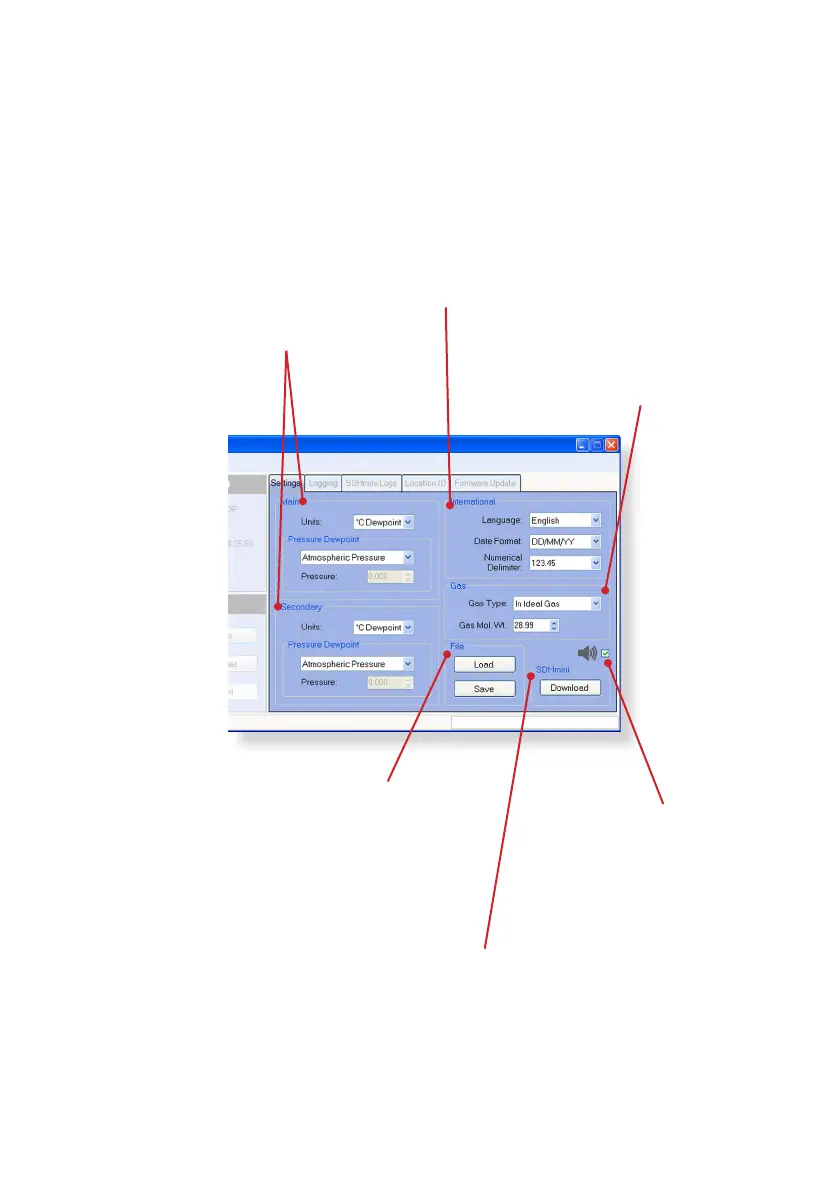
The Instrument Sengs panel allows changes to the following features, which
are explained further in the relevant instrucon manual:
Main and Secondary Displays
• Engineering units
• Pressure dewpoint
• Pressure
Internaonal
• Language (on the instrument)
• Date format
• Numerical delimiter – from “.” to “,”
Gas
• Gas type
• Gas molecular weight
File
• Loads les to the instrument that
contain already set parameters and
is parcularly useful for the mulple
setup of instruments
• Save – save sengs to a PC le to
enable uploading for future use
SDHmini
Click download to apply
all/any changes to the
instrument that are made
in this screen.
Sounder/buzzer
Can be selected and
deselected for the
instrument.


 To Next Page