27
10.4 Ulies
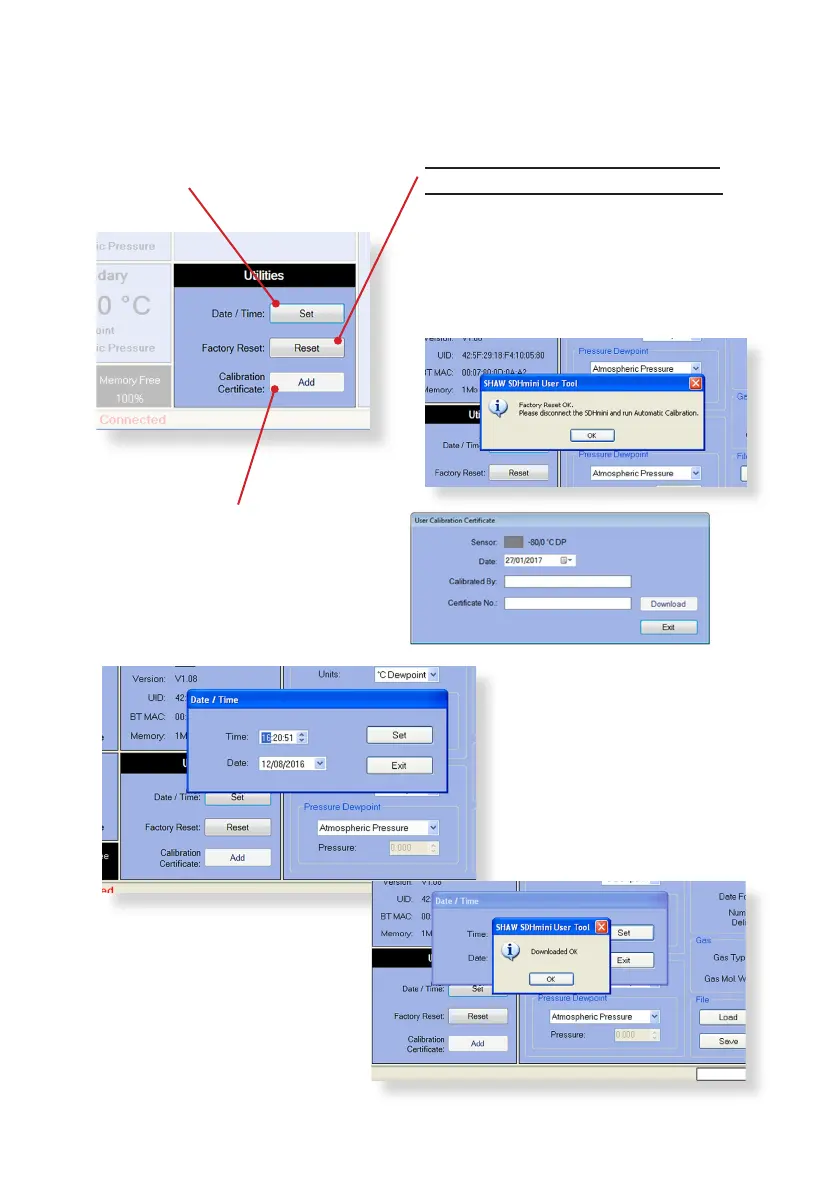
Date/Time: Click on Set in the
Ulies panel to reset the
date and me.
The me and date can
be selected manually or
automacally synchronised
with your PC. To save the new
sengs, click “Set”.
Once you have selected “Set”
a dialogue box will appear,
“Downloaded OK”. Click OK to
complete.
Date/Time – Set
The date and me can be set
via the PC.
Factory Reset – Reset
Warning: Performing a factory reset
will erase all saved sengs and data.
If connuing with the Factory Reset
opon, a dialogue box “Auto Calibraon
Required” will appear. Please refer to
secon 5.2 Auto Calibraon (AutoCal)
of the instrument’s instrucon manual.
Calibraon Cercate – Add
Useful for users to enter the
last calibraon check date
aer a factory calibraon.


 To Next Page