30
10.7 Factory Reset
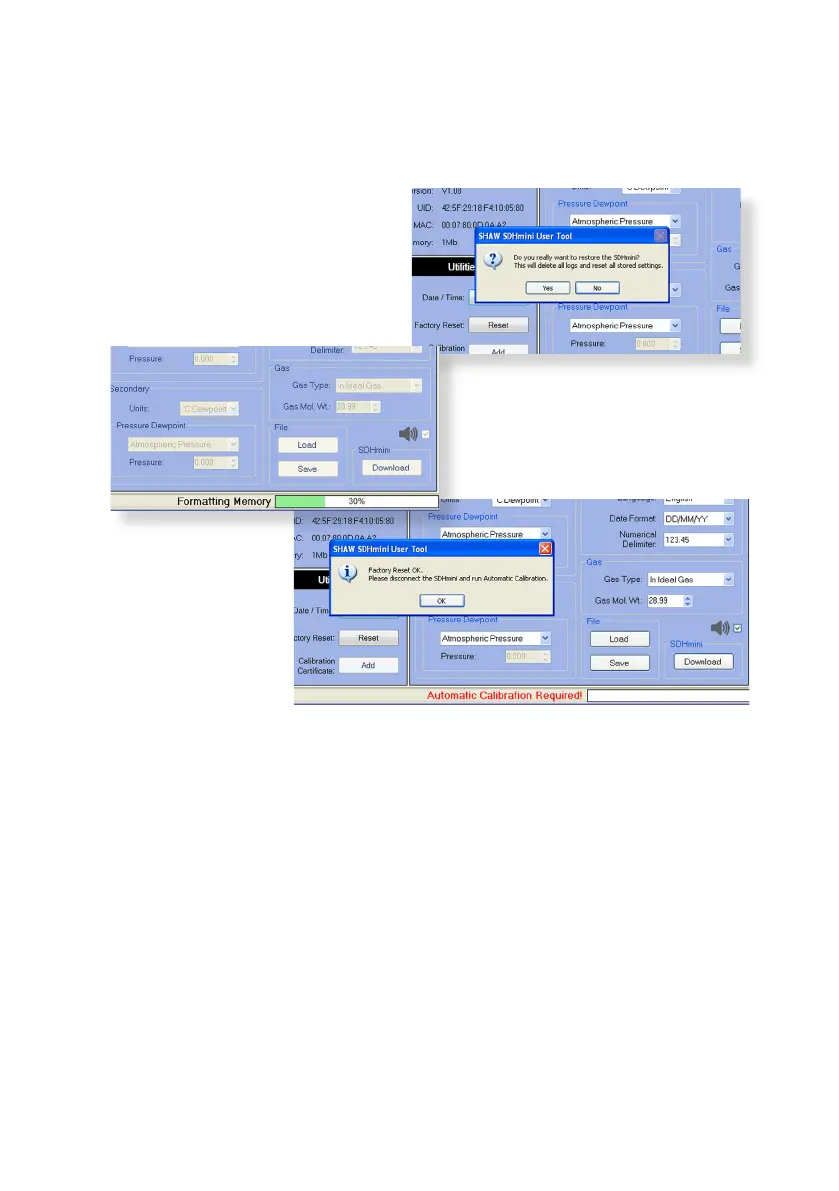
A factory reset can be performed using the Reset buon within the Ulies
panel in the SDHmini User Tool soware.
Click Reset and you will see the
following messages.
• “Formang memory”
• “Creang le system”
• “AutoCal required”
Warning:
Performing a factory
reset will erase all
saved sengs and
data and default the
following to factory
sengs: date
format, language, main display units, secondary display, gas weight, gas type,
AutoCal value and numerical delimiter.
Please contact your distributor for advice before proceeding with a factory reset.
If connuing with the factory reset opon, a dialogue box “Auto Calibraon
Required” will appear. Please refer to secon 5.2 Auto Calibraon (AutoCal).


 To Next Page