17
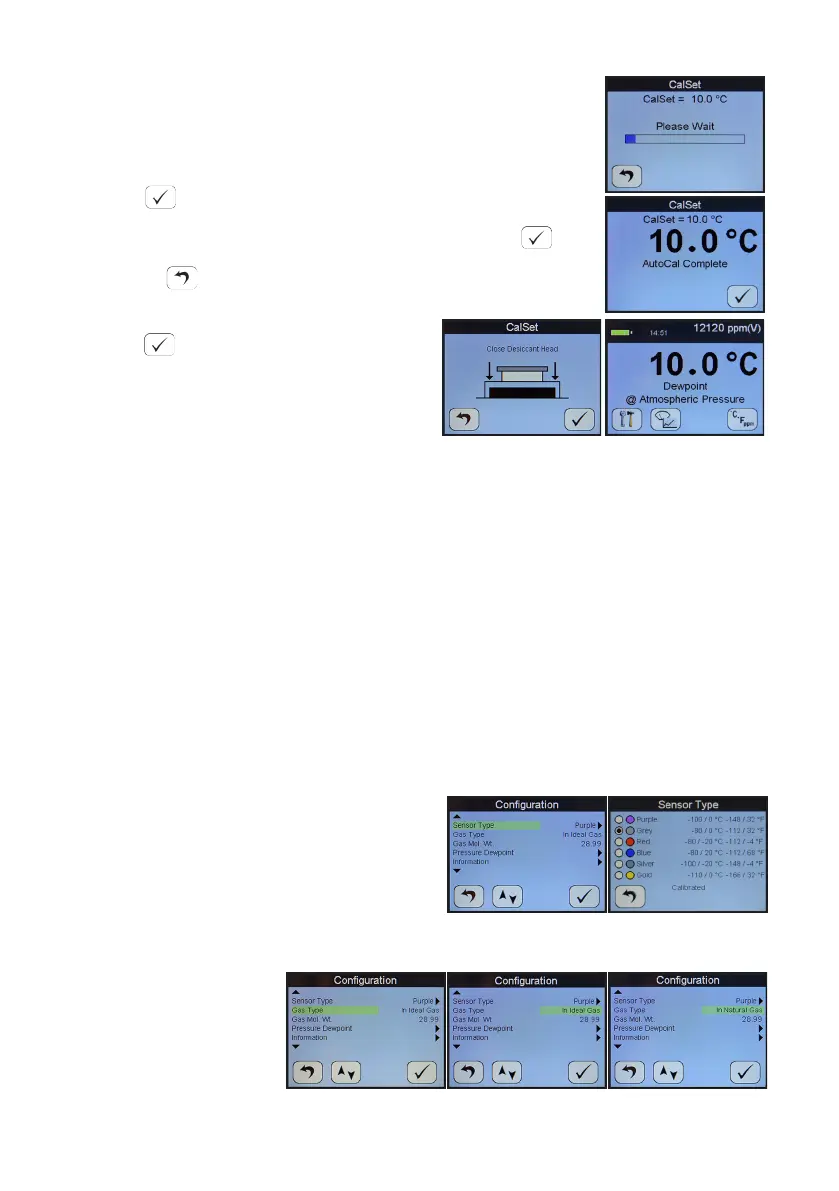
The SDHmini will display a moving bar unl it assesses that
the sensor has stabilised (up to 10 minutes).
The full scale value, 10 °C dewpoint, is now displayed.
Press when complete.
Close the desiccant head when instructed and press .
Pressing during CalSet aborts the process and the value
present at the start of the aborted CalSet process is reinserted.
Press to connue/accept changes.
The SDHmini will return to the normal
operaonal mode.
5.3 Calibraon Procedure Error Messages
If the instrument fails calibraon, a message will be displayed on the screen unl
acknowledged by the user, e.g.
AutoCal Failed
Sensor Open Circuit
or
AutoCal Failed
Sensor Short Circuit
This will mean replacing the sensor or its interconnecng cable in some cases.
6 Sensor Related Sengs
On the Conguraon screens there exists a collecon of measurement sengs
associated with the sensors and its environment.
6.1 Sensor Type
Here you may view the type of sensor
installed in the SDHmini and its range.
6.2 Selecng Gas Types
The SDHmini default seng is for ideal gas behaviour, however, there is an opon
to change the seng
to natural gas which
uses the appropriate
calculaon.


 To Next Page