16
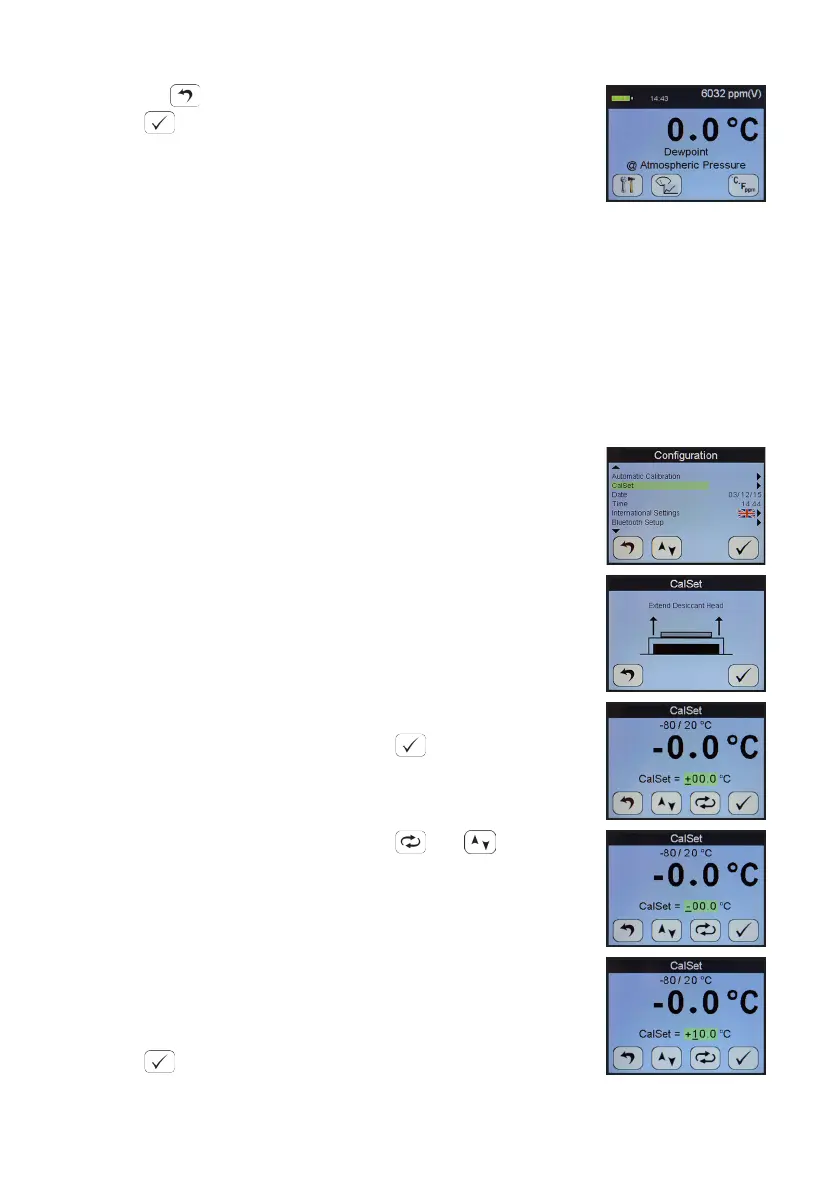
Pressing during the AutoCal aborts the process.
Press to accept.
The value present at the start of the aborted AutoCal process
is reinserted.
The SDHmini will return the instrument to normal measurement mode.
Note: Avoid carrying out the AutoCal procedure on a SDHmini with a full scale value of 0 °C
dewpoint on days when the ambient may be below this value, for example a dry day when
the ambient temperature is below approximately 12 °C.
The entered AutoCal value must not be pressure compensated.
5.2 Calibraon Setpoint (CalSet)
The funcon CalSet is suitable for sensors with an upper
range limit of +20 °C dewpoint, for example the Blue range
-80 to +20 °C dewpoint, where this upper range limit will
exceed typical ambient condions.
The unit may be checked against a known moisture
level, for example from a moisture generator or other
reference standard, such as a chilled mirror hygrometer or a
psychrometer using the funcon CalSet.
Select CalSet from the Conguraon Menu.
Extend the desiccant head and press .
Whether the instrument is being checked against the
measured ambient level or against a known calibraon
standard from a moisture generator, and are used
to set the value accordingly.
Selecng +10 °C for instance involves changing the sign and
number by use of both keys.
The entered CalSet value must not be a pressure
compensated one and must be within the range of the
sensor.
Press when done.


 To Next Page