14
4.4 Choice of Units
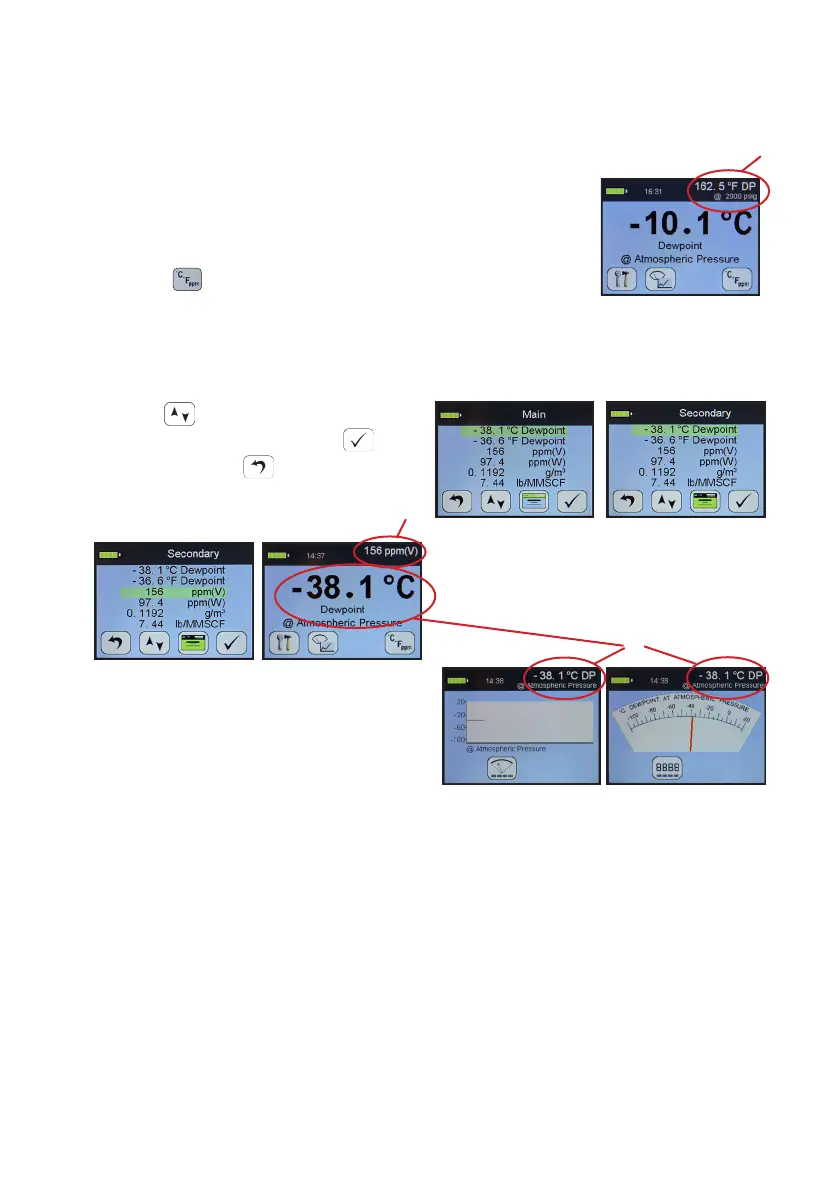
In normal measurement mode. The secondary display is the measurement
displayed in the top bar on the right hand side (A). It allows alternave
engineering units or concentraons to be displayed
alongside those chosen in the main display.
To choose the engineering units to be displayed, select the
units key from the main digital view.
You will be presented with the following screen to select engineering units for the
main and secondary displays. You may toggle between adjusng the main and
secondary displays by pressing the key 3.
Use the key to move to the desired
measurement type and press to
select it. Pressing will exit the
current screen without making any
further changes.
Here the secondary display is being
changed to ppm(v) engineering units
(B).
Please note: when you change the
display to either the moving coil meter or
the strip chart the secondary engineering
units display is replaced with the primary
units (C).
This connues to allow high precision measurement whilst having the benet of
the graphical display.
5 Calibraon
Field calibraons of the SDHmini may be performed periodically, every two to three
months, to ensure accuracy between laboratory calibraons by checking the span
of the instrument and correcng for any deviaon. These funcons can be used to
verify operaon of the SDHmini if conrmaon of an unexpected result is required.
This may be accomplished by two similar in built calibraon funcons, namely
AutoCal and CalSet.
A
B
C


 To Next Page