29
10.6 Firmware Update
From me to me in the life cycle of the instrument, a number of product
improvements or updates in the rmware will be made available. The facility
exists for the user to update their instrument without having to return to the
manufacturer.
The rmware update le will be sent via email. Please save the rmware update
le (*.hex) from the email in a locaon on your PC.
Please ensure the instrument is switched on.
Press the power buon and key 4 for 2-3 seconds. The
Program Loader will me out aer 30 seconds if not used.
Plug in the USB cable. Please Note: On rst me use,
Windows will load a driver for this Program Loader facility.
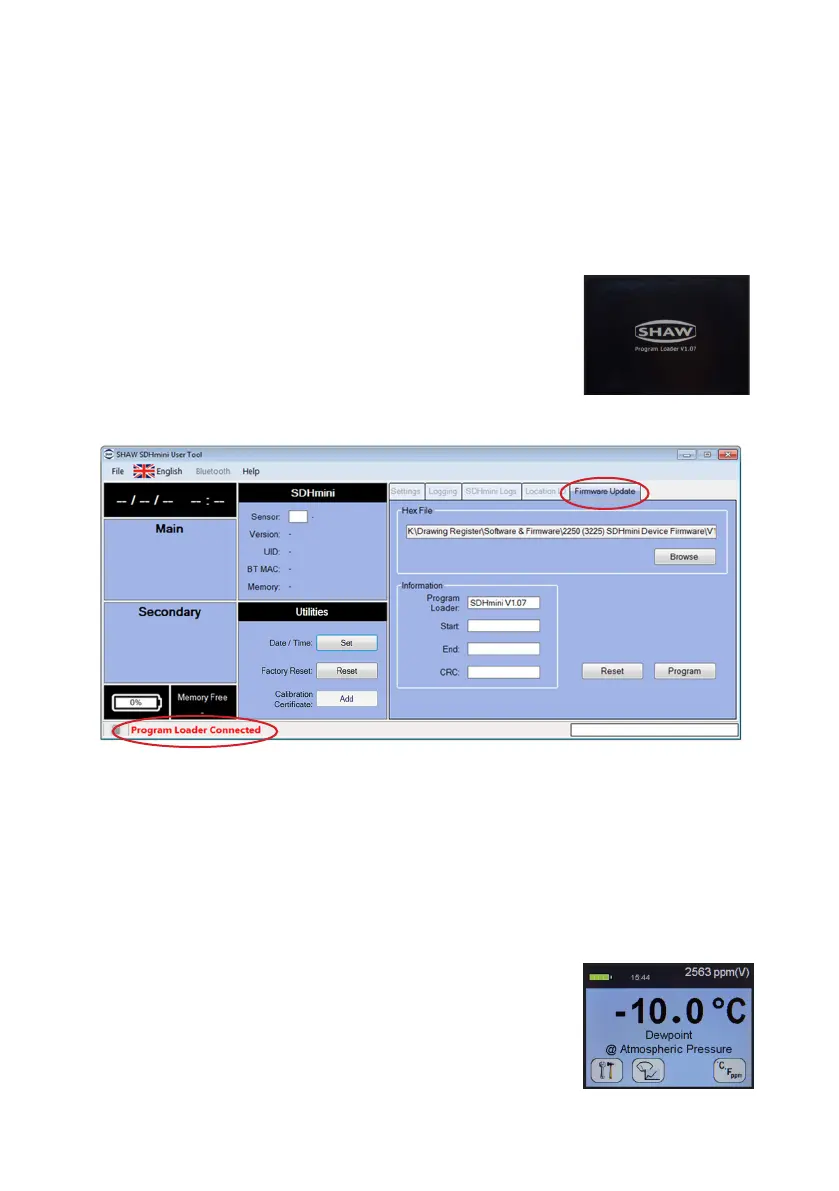
Note: the Firmware Update tab is now accessible and there is a “Program
Loader Connected” message in the boom strip.
Click Browse for the previously saved rmware update (*.hex) le.
Click Program. Do not unplug the USB cable throughout this process.
The progress bar will show the following messages:
• “Erasing Memory”
• “Programming Memory”
• “CRC OK”
Click Reset to return to the instrument main screen
and you will see the message “Program Loader Reset”
in the progress bar.
Reset the me and date - see secon 10.4 Ulies
•
•
•
•
•
•
•
•


 To Next Page