19
7 Non Measurement Related Conguraon Funcons
7.1 Changing the Date
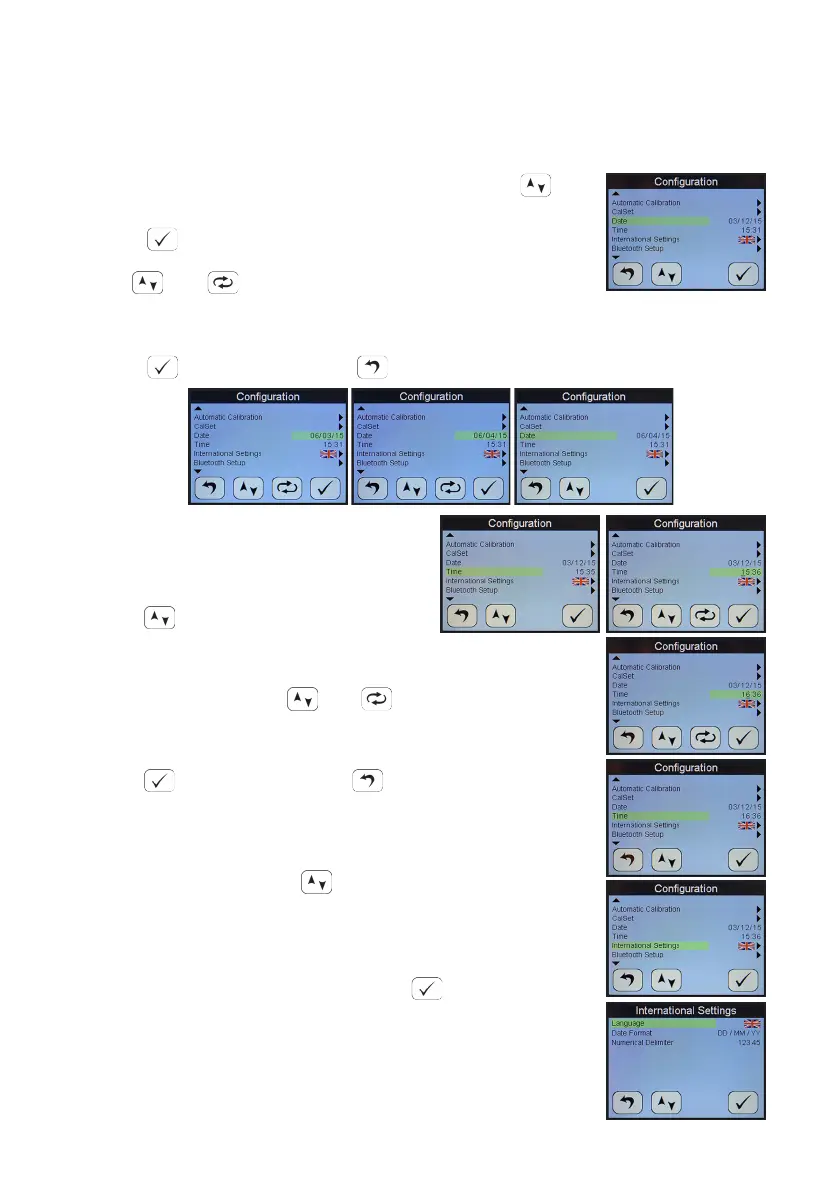
In order to change the present date press the arrow key
to select the Date funcon from the Conguraon menu.
Press .
Use and to change the date.
Here for example the date is changing from 06/03/15 to 06/04/15.
Press to enter new date or to abort changes.
7.2 Changing the Time
In order to change the present me
press to select the Time funcon
from the Conguraon menu.
To change the me use and .
Here for example the me is changing from 10:48 to 11:48.
Press to enter new me or to abort changes.
7.3 Changing Internaonal Sengs
Use the selecon cursor to select opons to change the
sengs for Language, Date Format and Numerical Delimiter.
Select Internaonal Sengs from the Conguraon Menu.
To change the Language opon select .
The language choice area is highlighted. A ag of a country
most associated with one of the pre-installed languages
indicates which language is currently selected. The


 To Next Page