Chapter 4 Basic Operation
4-8
AA-6800/6650 Instruction
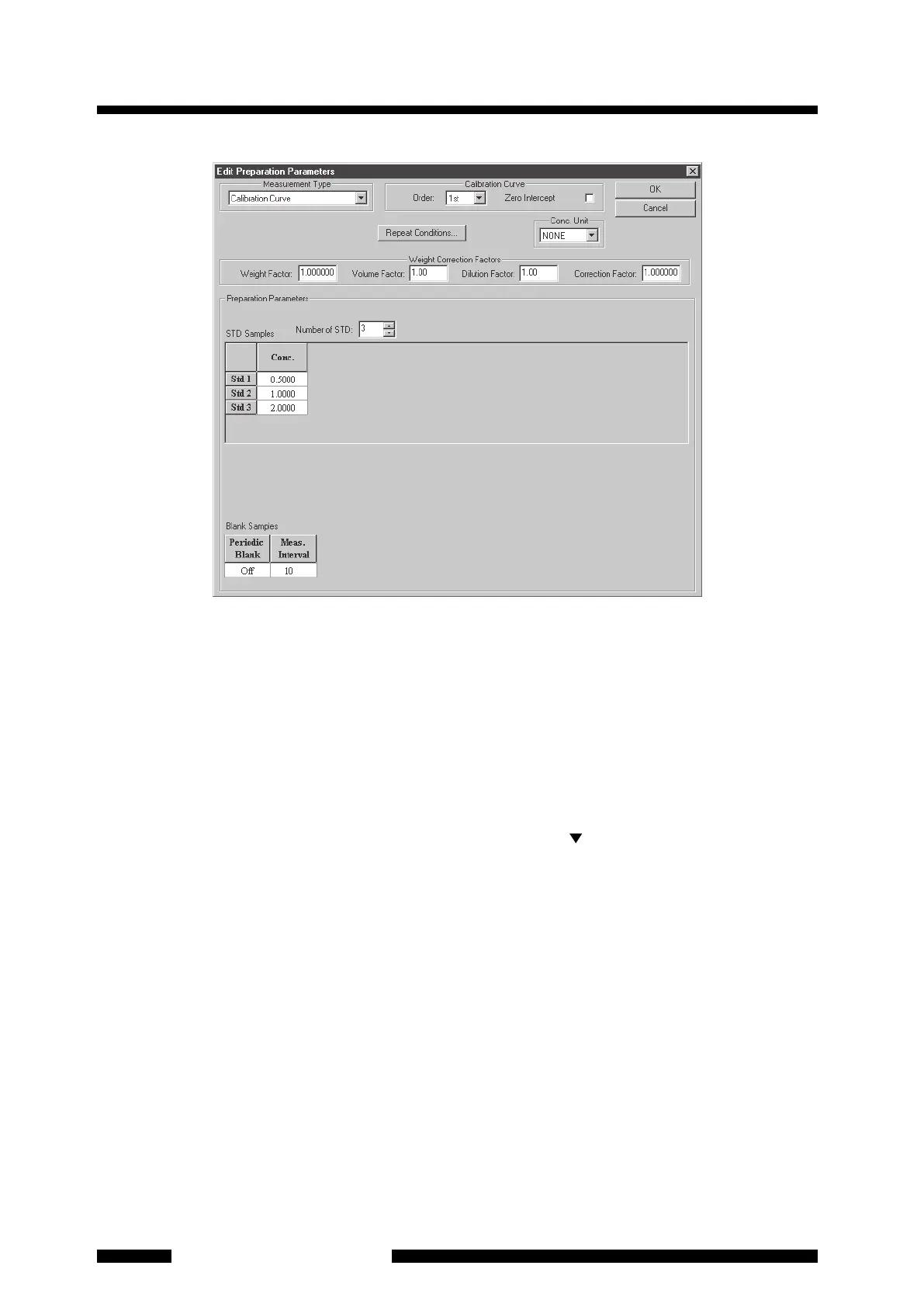
Figure 4.8 [Edit Preparation Parameters] Page
(1) Select [Calibration Curve] for [Measurement Type]. If you need to select [SMSA] (Simple Standard
Addition Method) or use standard addition method, refer to section 4.9.
(2) S
elect [1st] for [Order] of equation if the calibration curve is straight. You may also select [2nd] or [3rd] if it
is curved. Anyway, you can change the order after measurement. So, select [1st] here. Loading and saving
of preparation parameter files are not available.
(3) Pressing the [Repeat Conditions] button displays the [Repeat Measurement Conditions] page. The number
of measurements for the same one sample is set here. The default value of the number of measurement
repetitions is "1" in the case of flame measurement.
(4) Select [Conc. Unit] of the prepared standard samples. Click on the [ ] button to select it from the list.
(5) Input [Weight Correction Factors]. These factors are necessary for calculating the actual concentration.
[Weight Factor], [Volume Factor], [Dilution Factor] and [Correction Factor] are used in the following
equation.
Actual concentration = (Conc.) u [Volume Factor] u [Dilution Factor]
u [Correction Factor] / [Weight Factor]
The actual concentration is calculated with the above equation. Note that the unit is not converted
automatically. Convert the unit using [Correction Factor] if necessary (Refer to the example below).
If the above calculation for actual concentration is not necessary, leave all the factors as "1".
Each factor is expressed in MRT worksheet and data print as follows.
[Volume Factor] [VF]
[Dilution Factor] [DF]
[Correction Factor] [CF]
[Weight Factor] [WF]










 To Next Page