4-15
4.2 Software Basic Operation
AA-6800/6650 Instruction
(11) After all the settings are completed, click on [Next] to proceed to the [Atomizer/Gas Flow Rate Setup] page.
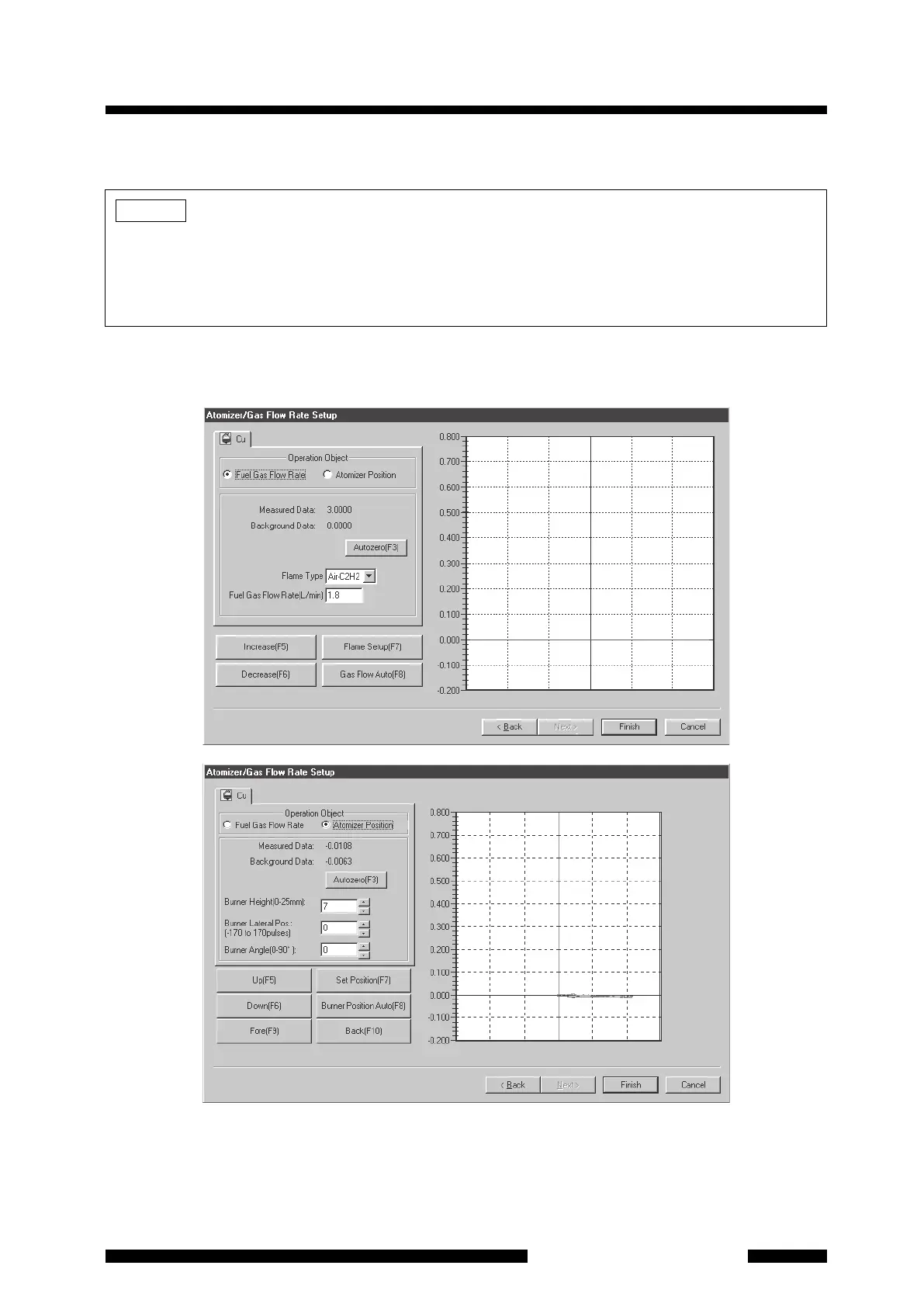
4.2.1.9 Atomizer/Gas Flow Rate Setup (AA-6800)
Figure 4.16 [Atomizer/Gas Flow Rate Setup] Page (AA-6800)
In the [Atomizer/Gas Flow Rate Setup] page, the burner position and fuel gas flow rate are set. Select the
operation object [Atomizer Position] or [Fuel Gas Flow Rate] by clicking on the radio button to switch the page
display. You can set either of them first.
NOTE
When measuring plural elements, you cannot set parameters for the elements other than the current
measurement one on the [Optics Parameters] and [Atomizer/Gas Flow Rate Setup] pages. If you use the
ASC to measure plural elements automatically and you need to modify the parameters for other elements
than the current measurement one, you can change these parameters by using the [Edit Parameters] button
in the [Element Selection] page.




 To Next Page