4-21
4.2 Software Basic Operation
AA-6800/6650 Instruction
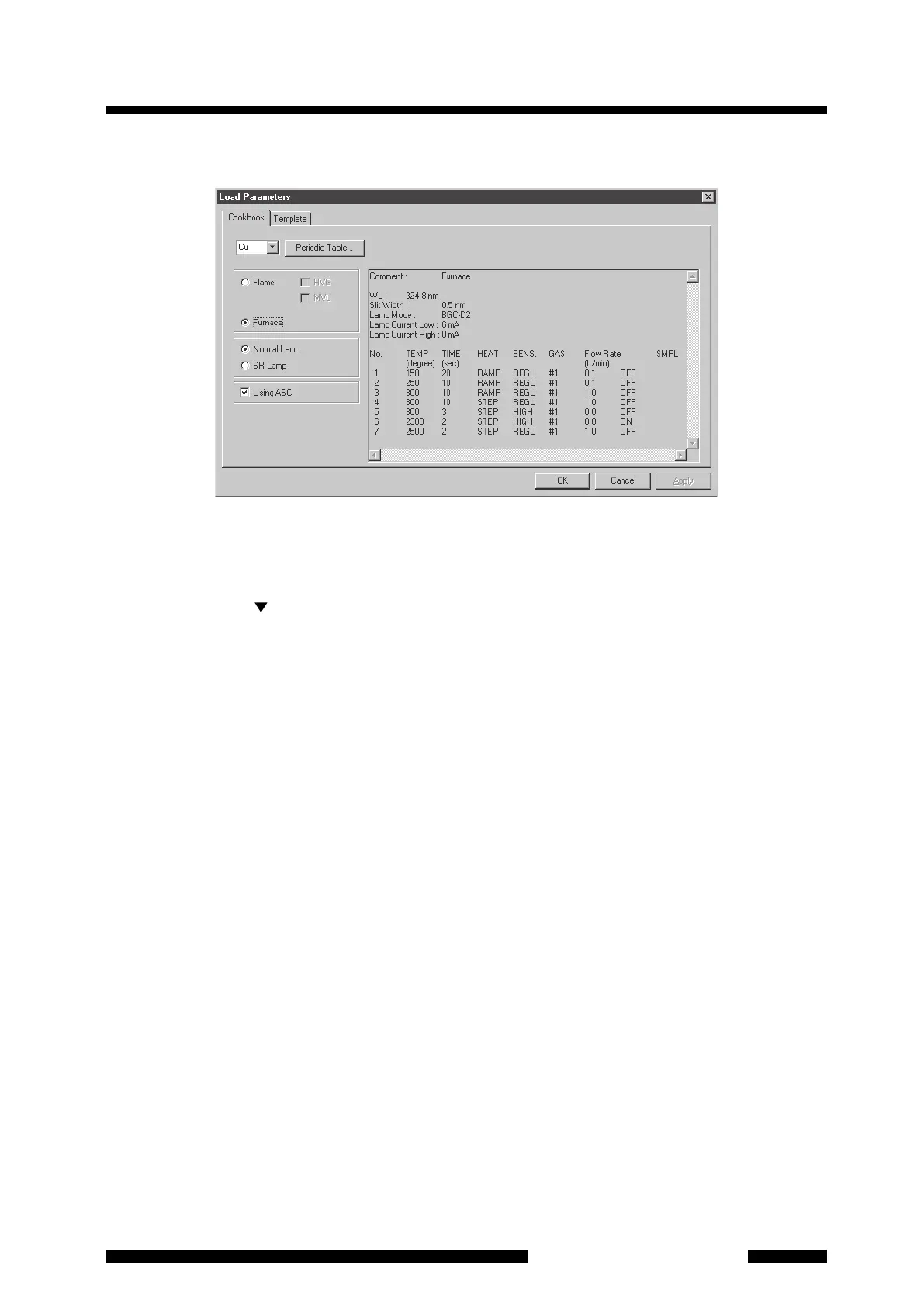
(1) First, click on the [Select Elements] button. Then the [Load Parameters] page will appear.
Figure 4.20 [Cookbook] Sheet in [Load Parameters] Page
(2) In this page, select the element first. You can use one of the methods below to select the element.
1. Enter the element symbol directly in the element field from the keyboard.
2. Click on the [ ] button at the right of the element field, and select the element from the element
symbol list shown in alphabetical order.
3. Click on [Periodic Table] and select the element from the periodic table.
(3) Next, select [Furnace] for the measurement method by clicking on the radio button.
(4) Select [Normal Lamp] when using a normal hollow cathode lamp ([SR Lamp] is selected only when the SR
method is used as the background correction method).
(5) When using the autosampler, click on the [Using ASC] check box.
(6) After completing the settings, click on the [OK] to return to the [Element Selection] page (
Figure 4.19). At
this
time, a message about lamp setup is displayed. Press the [No] button here. The lamp setup is also
possible later. The selected element is shown in the table on the page.
(7) When plural elements are to be analyzed, return to this [Element Selection] page once and then click on
[Select Elements] again to select the next element. Repeat the procedure below as required.
Click on [Select Elements] o Select the element o Click on the [OK] button
(8) When returning to the [Element Selection] page after selecting an element, the selected elements are
listed one by one. In the automatic measurement using the ASC, the measurement is executed in this
order. To change the order of automatic measurement, click on and highlight the row whose order is to be
changed first, then click on the button [Up] or [Down] at the right on the screen to move the row. To delete
any of the elements, click on and highlight the row then click on the [Delete] button.
(9) The [Measurement Element] field at the right lower of the page indicates the element to be analyzed first.
In the case of ASC automatic measurement, the measurement is started from the element shown for
[Measurement Element] and the elements located above this element in the table are not to be measured.




 To Next Page