32
7. Calibration
7. 2 Calibration Execution
Notes
• Setting before shipment is as the following:
UPX Series: Span calibration using the built-in weight ([i-CAL])
UPY Series: Span calibration using external weights ([E-CAL])
The type of calibration can be changed (See 7.3).
• Calibration will not be performed when the weight on the pan is not near
zero, or the balance is not stable.
7. 2.1
Span Calibration Using the Built-in Weight (UPX Series Only)
The balance is adjusted using the built-in calibration weight.
1 Verify that the balance is in mass display and that
the pan is empty.
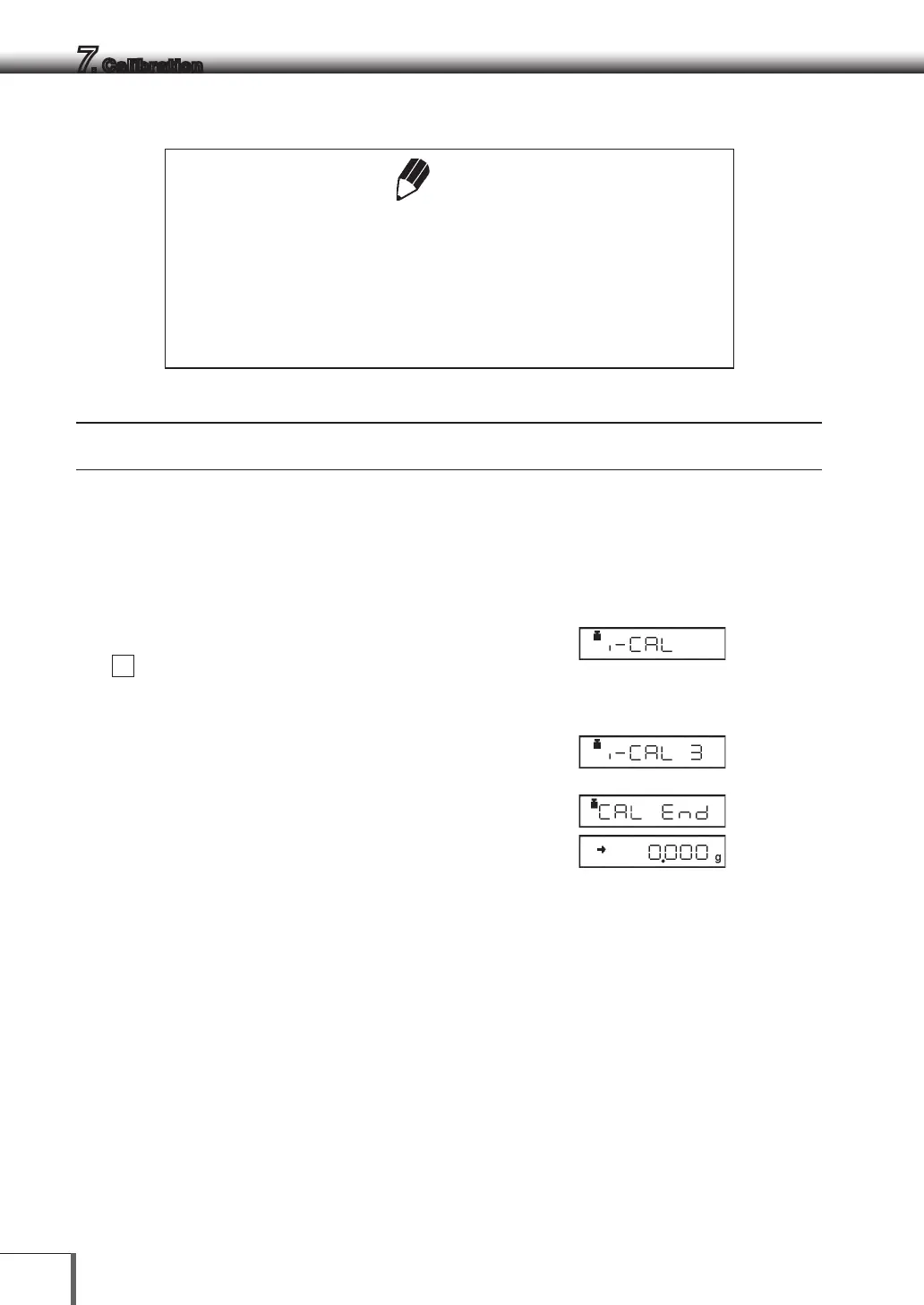
2 Press the [CAL] key once. “i-CAL” is displayed.
If this indication is not displayed, select menu
1
.
Press and hold the [POWER] key for three
seconds after selecting to return to the g display.
3 Press the [O/T] key
[ i-CAL3 ] ~ [ i-CAL 1], [ SEt ], [ CAL End] will be
displayed in that order. Then the mass display
will appear indicating the completion of span
calibration.
…



 To Next Page