Attention
Connect all data cables before supplying power.
Disconnect power supply before connecting or disconnecting data cables.
DMX Connection
DMX-512 Protocol
Use a DMX-512 controller to create DMX programs and send them to the TR-512 Install where they will be
stored on the microSD card.
The TR-512 Install has 3-pin DMX signal IN and OUT Phoenix terminal connectors.
The pin assignment is as follows:
● 3-pin: pin 1 (ground), pin 2 (-), pin 3 (+)
Note:
● Maximum recommended DMX data link distance: 300 m
DMX Cables
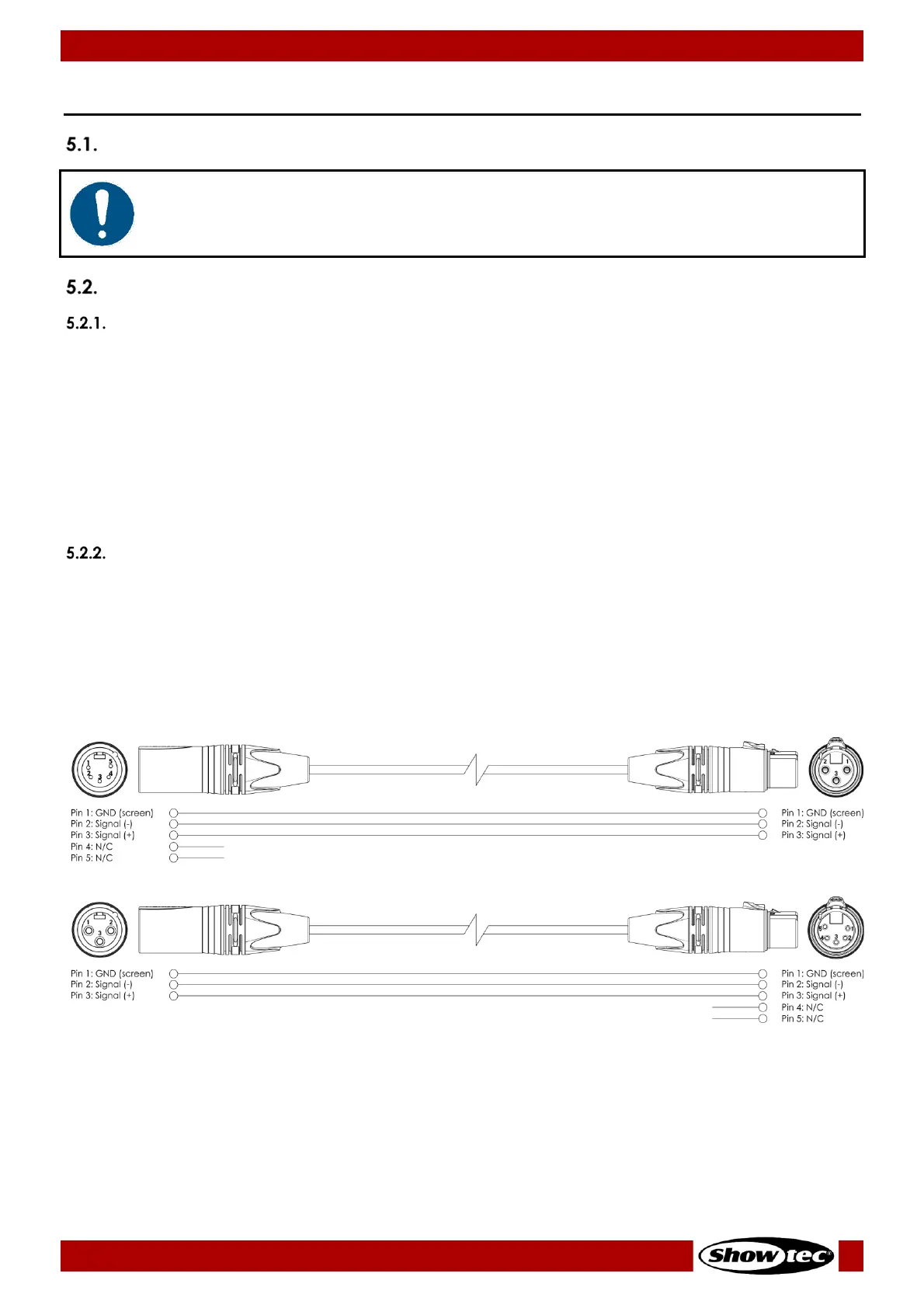
Shielded twisted-pair cables must be used for reliable DMX connection. You can purchase DMX cables
directly from your Highlite International dealer or make your own cables.
If you use XLR audio cables for DMX data transmission, this may lead to signal degradation and unreliable
operation of the DMX network.
When you make your own DMX cables, make sure that you connect the pins and wires correctly as
shown in Fig. 07 on page 13.













 To Next Page