26/72
Building Technologies User Manual OCI600 74 319 0002 0 c
HVAC Products Local setting up 15.07.2005
3.3 Setting up the individual bus
users
3.3.1 Setting up the controllers
3.3.1.1 General remark
Each controller is given an unambiguous identification in the
form of the segment and the device number, because every
address in an LPB system may only be assigned once.
The addressing guidelines are described in Data Sheet
N2030 (Basic System Data).
3.3.1.2 Operating steps on the controllers
1. Turn off the controller’s power supply.
2. Remove the controller’s LPB connection.
3. Apply power again. Do not yet connect the LPB.
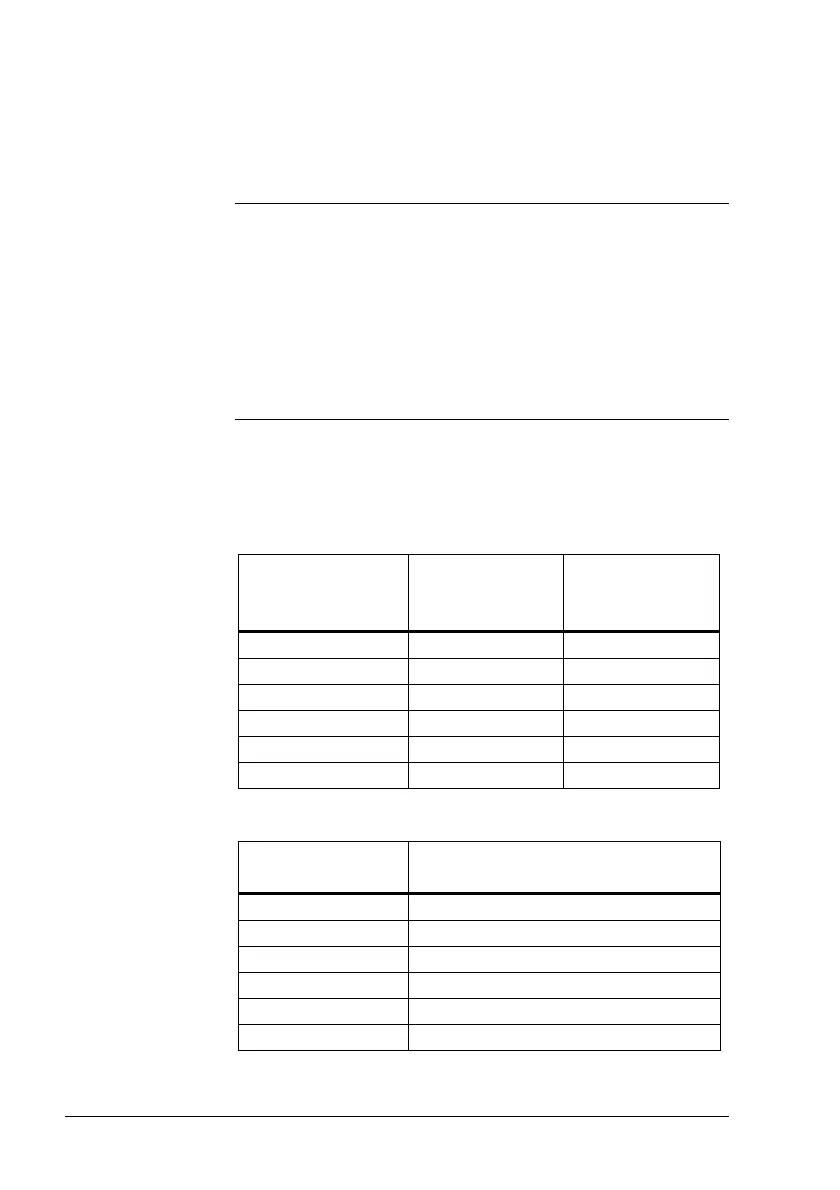
4. Address the controller on operating lines Segment
number and Device number.
Type of
controller
Operating line
for segment
number
Operating line
for device
number
RVP3..., RVL4... 170 169
RWI65.01 79 78
RWI65.02 68 69
RVD2... 132 131
RVP5... 851 850
RVA... 851 850
5. For all controllers, set parameter Bus power supply on
the relevant operating line to “Off”
Type of
controller
Operating line for bus power
supply
RVP3.../RVL4... 179
RWI65.01 83
RWI65.02 72
RVD2...
134
RVP5...
852
RVA...
852
Addressing
guidelines







 To Next Page