35/72
Building Technologies User Manual OCI600 74 319 0002 0 c
HVAC Products Setting up the OCI600 with the ACS7.. software 15.07.2005
2. Double-click on the relevant line to open the entry field
for entering the controller’s name (maximum 16 charac-
ters), the device number and the segment number. Both
the device number and the segment number must agree
with the settings made on the controller.
3. Repeat step 2 above for all additional controllers.
4.2.2 Integrating the AEW2.1 pulse adapter
into the OCI600
Before starting to parameterize a pulse adapter, ensure that
• power is supplied to the pulse adapter
• the address plug is fitted
• the LED on the device flashes
When these preconditions are satisfied, make the settings in
the ACS7... operating software:
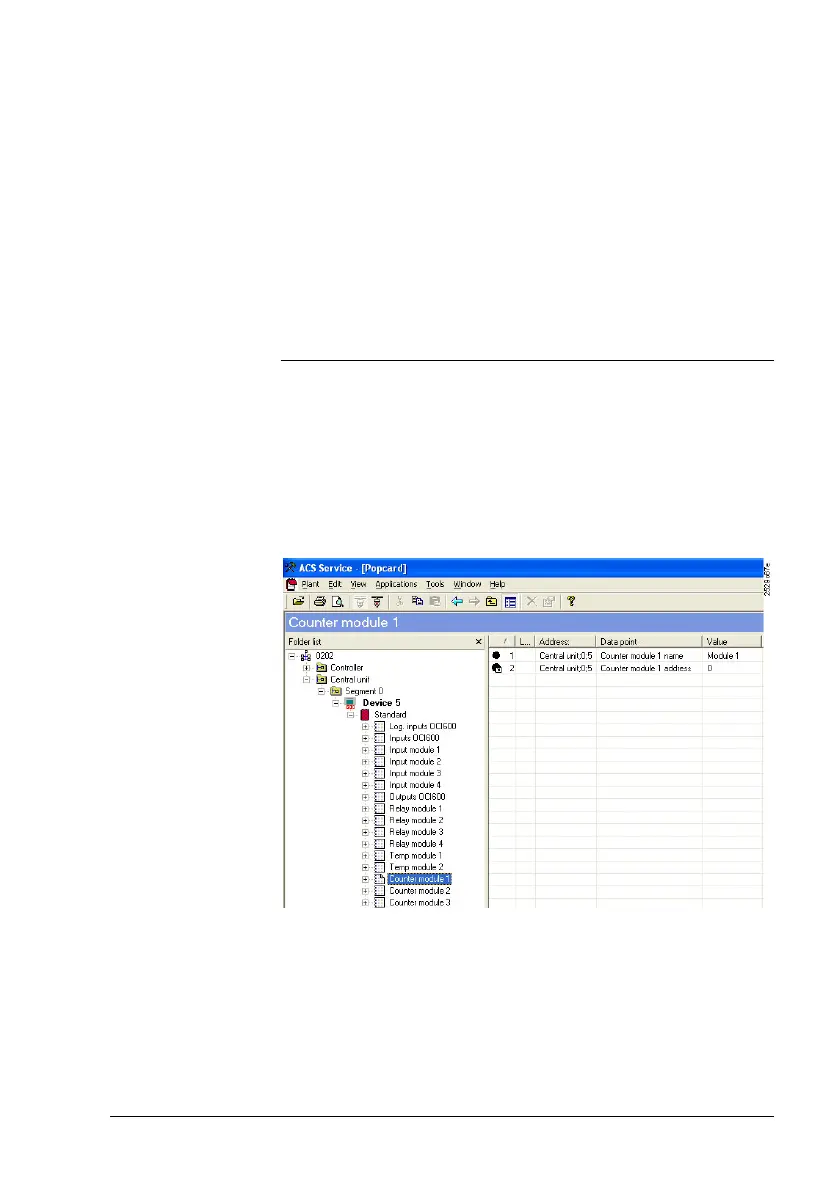
1. On the View menu, deactivate Consider dependencies
to also show devices that have not been configured.
2. From the Applications > Popcard… menu, select oper-
ating page “Counter module n“. Then, the right half of the
Preparatory
work
Settings in
ACS7...







 To Next Page