57/72
Building Technologies User Manual OCI600 74 319 0002 0 c
HVAC Products Communication and delivery of alarms 15.07.2005
5.4 Sending alarms
5.4.1 Sending alarms to the directly
connected ACS7...
1. On the OCI600, on line number 11 of operating card 3,
select:
3 = PC local with alarms.
2. On line number 08 of operating card 3, select:
4 = 9600 Baud.
3. Establish the cable connection between PC and central
unit.
4. Start ACS Alarm via the ACS Alarm icon on your desk-
top or via Start > Programs > ACS > ACS Alarm.
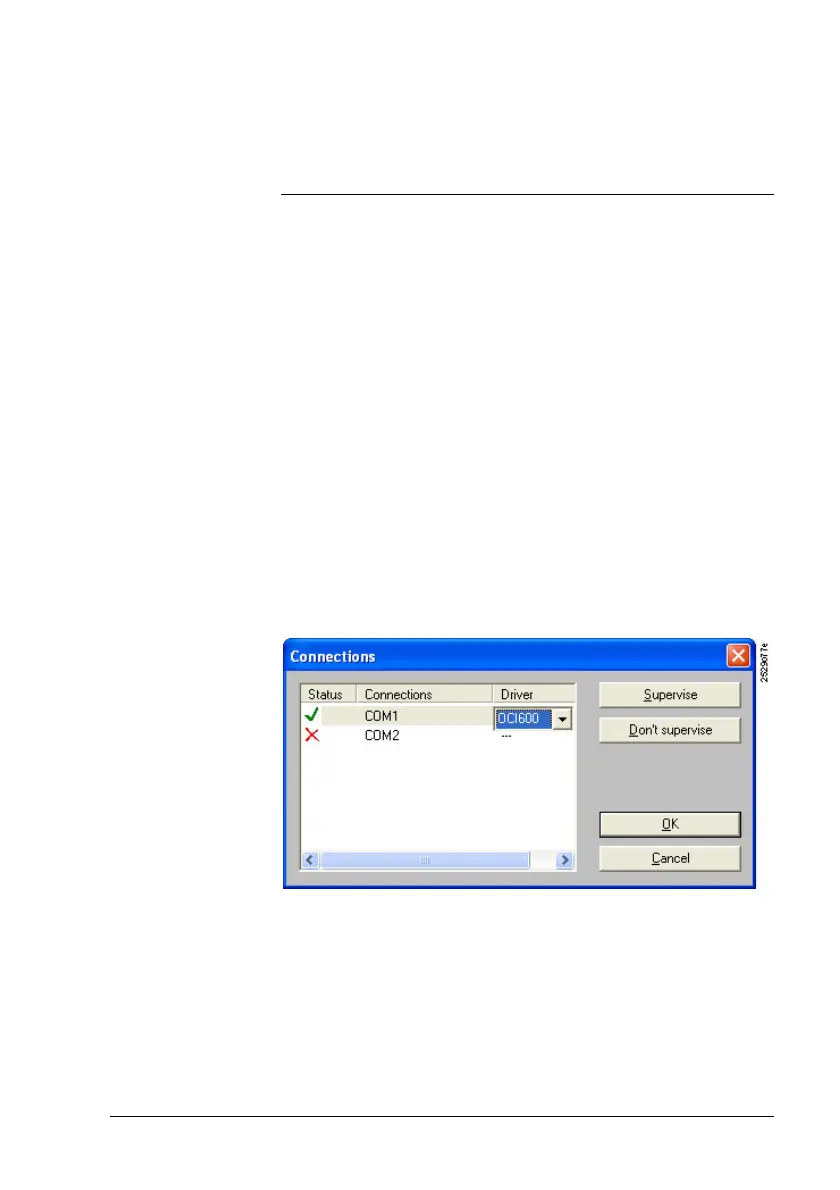
5. Open the Extras > Connections… menu.
6. Select the line with the PC port to which the cable is con-
nected (e.g. COM1) and double-click on the respective li-
ne in the “Driver“ column.
7. Select the type of central unit “OCI600“ and close by
choosing “Supervise“ and “OK“.
Procedure



 To Next Page