33/72
Building Technologies User Manual OCI600 74 319 0002 0 c
HVAC Products Setting up the OCI600 with the ACS7.. software 15.07.2005
8. At “Connection:“, select the communication port (e.g. :
COM1).
9. Choose Finish: You can adopt the remaining settings
(the default settings).
10. Confirm query “Refresh device list“ by choosing Yes.
11. On completion of the above steps, you are on the “ACS
Service – [Popcard]“ application, which you can also
start up via Applications > Popcard....
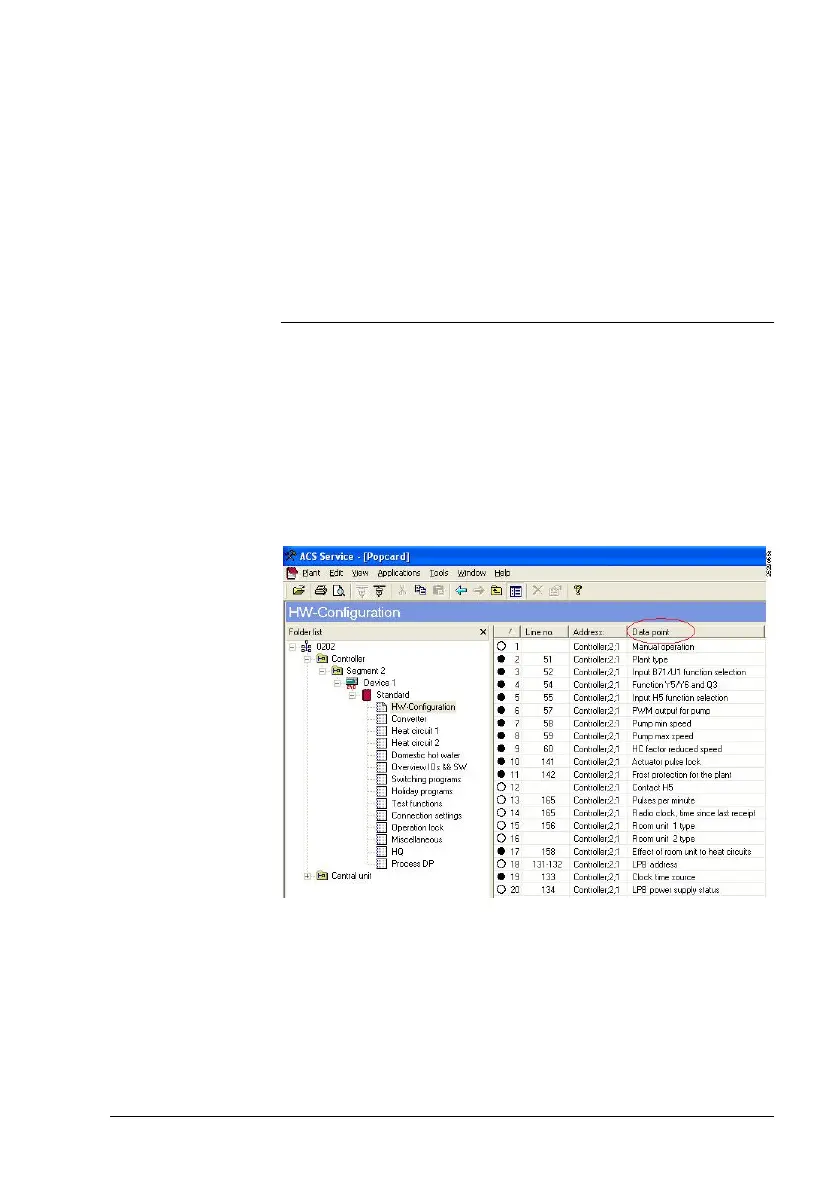
4.1.4 Term “Data point” in ACS7..
On the Popcard application, the devices in the left part of the
window are administered in the form of a menu tree.
Each device uses a Popcard, which consists of a number of
operating pages.
Each operating page contains data point information, which
is shown in the right section of the window. Column “Data
point“ contains the adjustable and/or readable variables.
These variables are referred to as data points.
For information about the meaning of the symbols, refer to
Online Help of your ACS7... software under “Displaying data
points in Popcard“.
Uploading the
devices







 To Next Page