39/72
Building Technologies User Manual OCI600 74 319 0002 0 c
HVAC Products Setting up the OCI600 with the ACS7.. software 15.07.2005
4. Parameterize the 4 inputs of each input module as de-
scribed in subsection “4.2.6 Parameterizing the digital
inputs of the OCI600“.
5. Repeat steps 2 to 4 above for all input modules.
4.2.5 Integrating the DOE4RE Batibus relay
modules into the OCI600
Before starting to parameterize a Batibus relay module, en-
sure that
• power is supplied to the DOE4RE module
• the address is set
• the LED on the device flashes
When these preconditions are satisfied, make the settings in
the ACS7.. operating software:
1. On the View menu, deactivate Consider dependen-
cies.
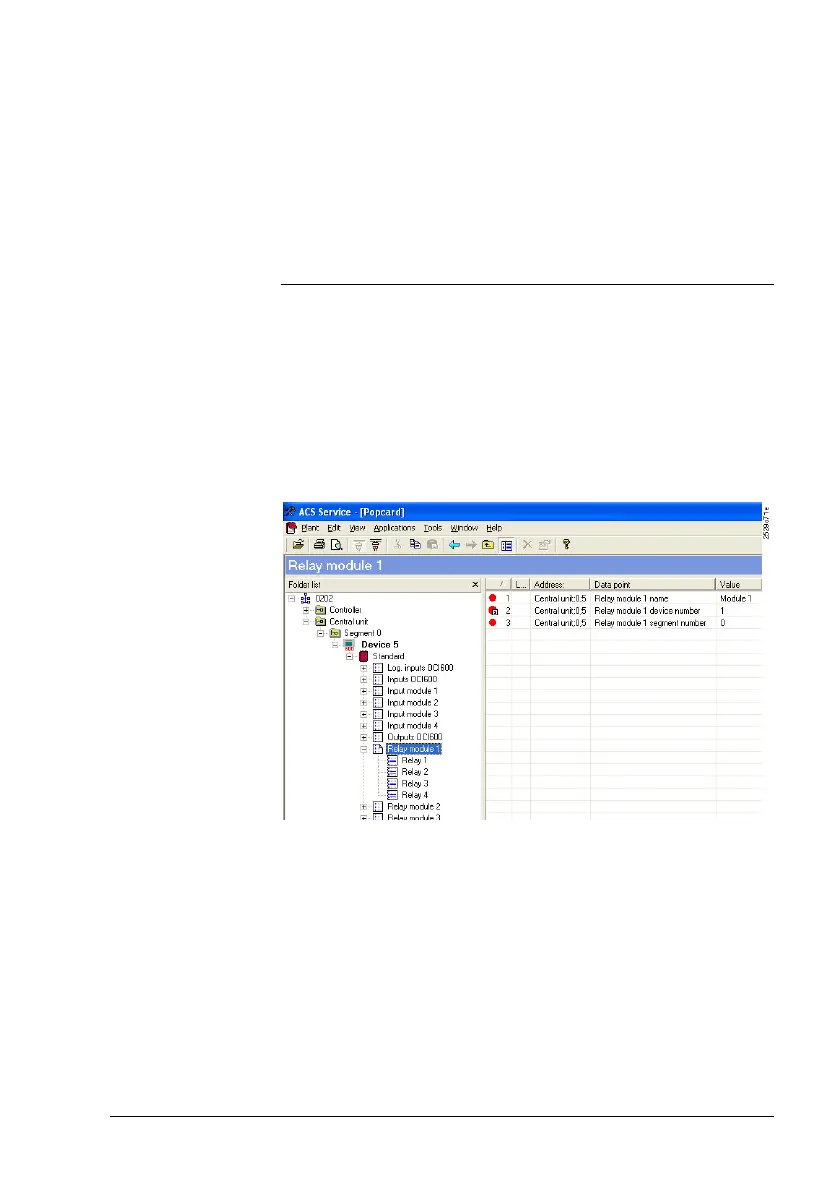
2. From the Applications > Popcard… menu, select oper-
ating page “Relay module n“. Then, the right half of the
screen will show you data points “Relay module n na-
me“, “Relay module n device number“ and “Relay mod-
ule n segment number“ for each relay module.
Preparatory
work
Settings in
ACS7..



 To Next Page