34/72
Building Technologies User Manual OCI600 74 319 0002 0 c
HVAC Products Setting up the OCI600 with the ACS7.. software 15.07.2005
4.2 Integration and parameterization
of the devices
4.2.1 Integrating the controllers into the
OCI600
Before starting to parameterize a controller, ensure that
• power is supplied to the controller
• the controller is correctly addressed
• the controller’s bus power supply is turned off
• the controller is connected to the bus
After the settings on the controllers, make the settings in the
ACS7... operating software.
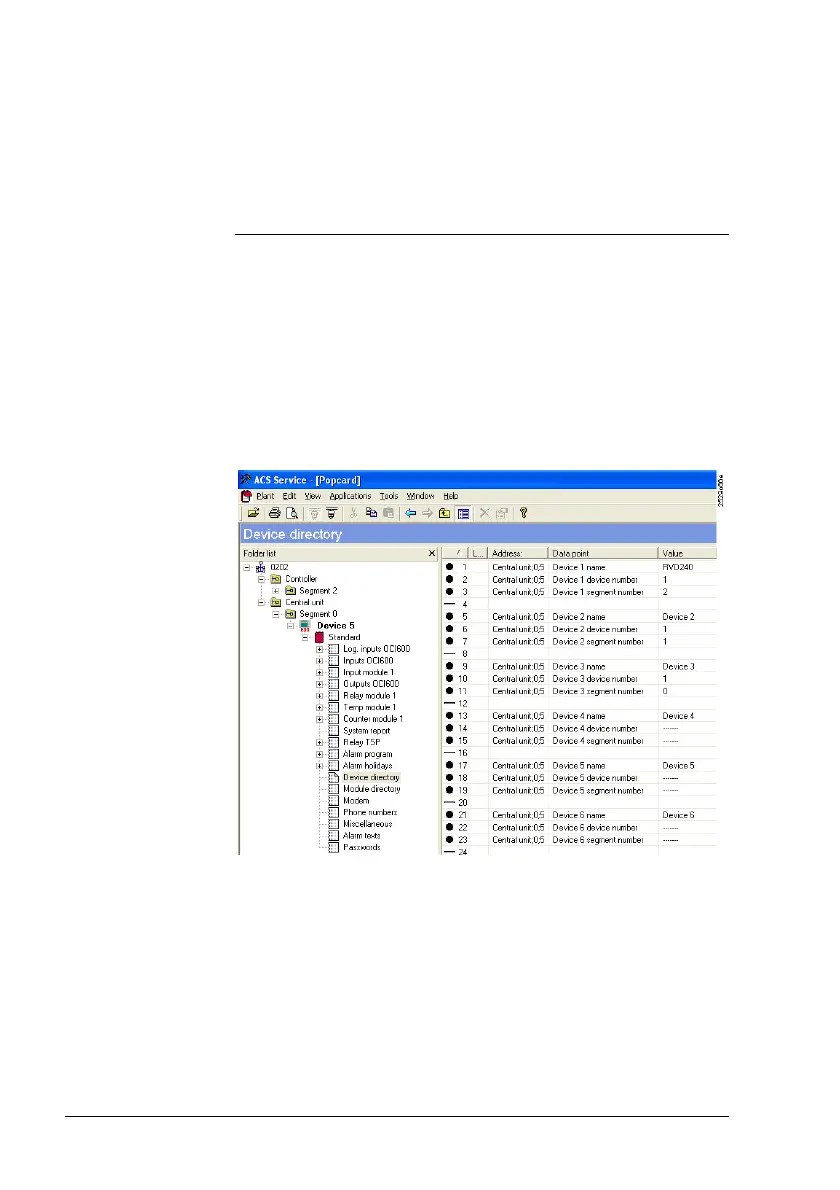
1. From the Applications > Popcard… menu, select op-
erating page Device directory. For the 16 controllers
that can be connected, the right window shows you the
data points “Device n name“, “Device n device number“,
and “Device n segment number“.
Note: In this User Manual, index “n“ denotes a consecu-
tive number (here controllers 1 to 16).
Preparatory
work
Settings in
the ACS7..







 To Next Page