28/72
Building Technologies User Manual OCI600 74 319 0002 0 c
HVAC Products Local setting up 15.07.2005
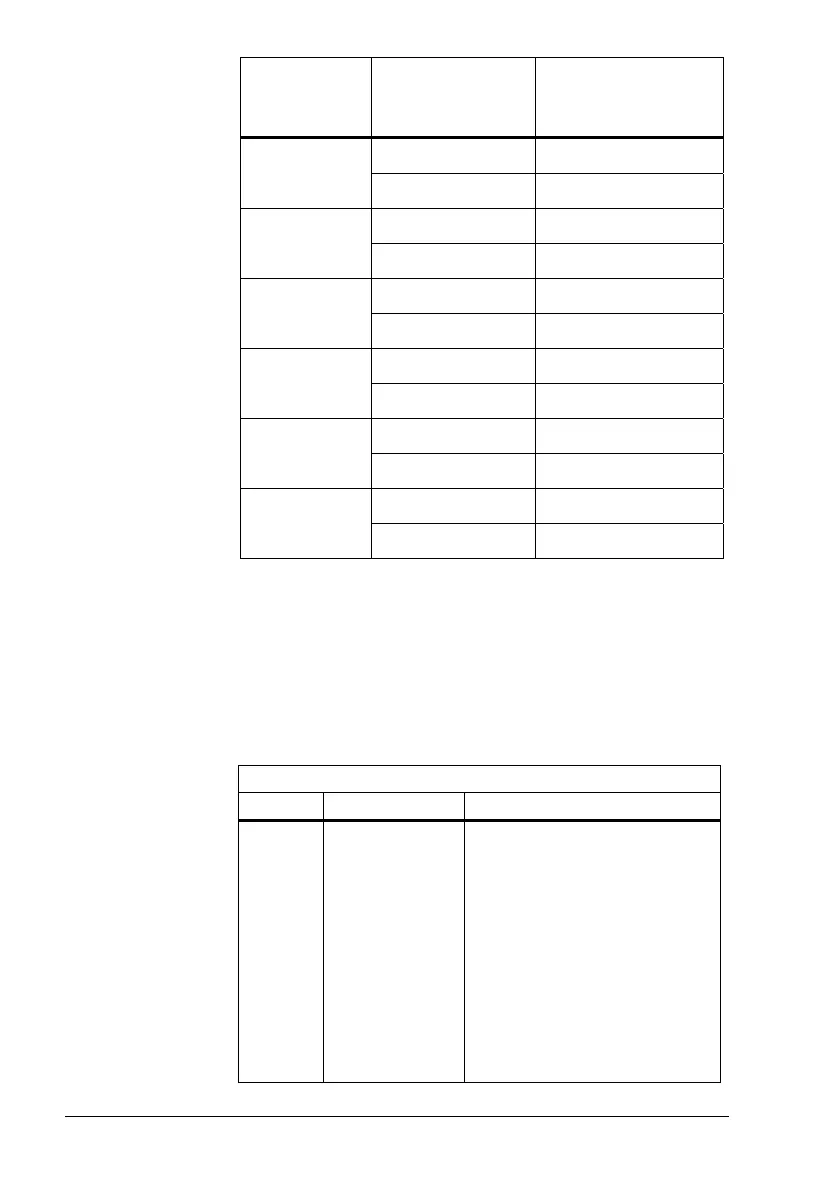
Pulse adapter
address plug
Counter number
and connection
Counter number of
the central unit
(apartment 0)
Counter 1 (P1–M) Counter 1 121
Counter 2 (P2–M) Counter 2
Counter 1 (P1–M) Counter 3 122
Counter 2 (P2–M) Counter 4
Counter 1 (P1–M) Counter 5 123
Counter 2 (P2–M) Counter 6
Counter 1 (P1–M) Counter 2 124
Counter 2 (P2–M) –
Counter 1 (P1–M) Counter 4 125
Counter 2 (P2–M) –
Counter 1 (P1–M) Counter 6 126
Counter 2 (P2–M) –
Addresses 1...48 must not be used because they are in the
range of the apartments with the OZW30.
If several OCI600 are connected to the LPB, the same condi-
tions apply to the assignment of addresses. An address can
only be assigned once.
State of LED on the AEW2.1 as a checkback signal with the
following procedure:
LED…
flashes is not lit is steady on
Normal
opera-
tion
No operating
voltage
(G1 and G2:
AC 16...24 V)
• No address plug fitted
• Wiring error:
MB and DB interchanged
• Poor contact
• Wrong parameterization of
the type of pulse source
(AZW30 operating line 91):
01 = with Namur circuitry,
02 = without Namur cir-
cuitry
LED



 To Next Page