45/72
Building Technologies User Manual OCI600 74 319 0002 0 c
HVAC Products Setting up the OCI600 with the ACS7.. software 15.07.2005
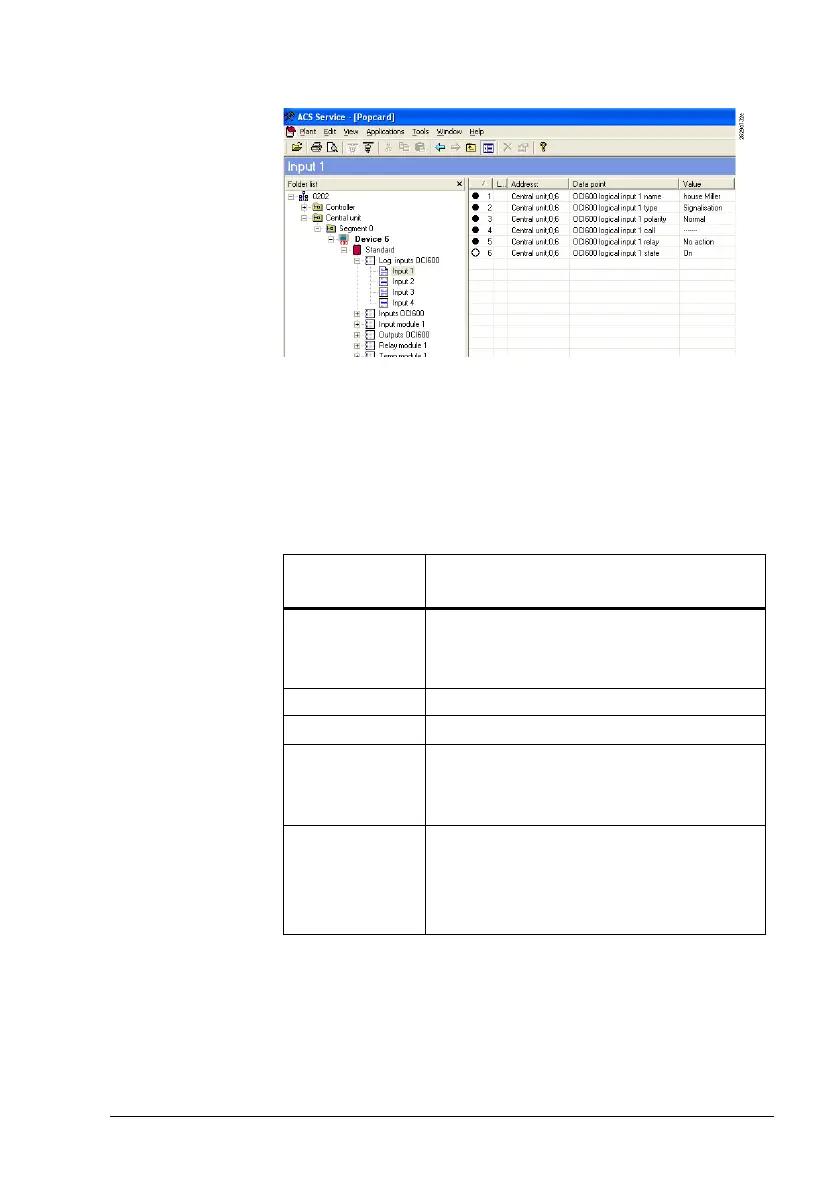
From the Applications > Popcard… menu, select operating
page “Log. inputs OCI600“.
The 4 logical inputs of the OCI600 are presented as a mod-
ule to which a freely selectable name with a maximum of 16
characters can be assigned. For each of the 4 logical inputs,
edit the relevant values of the data points listed below.
For each input, a freely selectable name with a maximum of
16 characters can be entered.
Parameter
value
Description
Signalization The state of the logical input is displayed,
e.g. input 1: Communication error present
or not present.
Operating hours No function.
Service No function.
Alarm at the
time of occur-
rence
When the logical input is activated, an
alarm is automatically sent to the associ-
ated alarm receiver.
Alarm at the
time of occur-
rence and
disappearance
When the logical input is activated, mes-
sages are sent to the associated alarm
receiver at the time of occurrence and
disappearance.
Recommendation: Set the polarity to “Normal“ (delivery of
alarms when there is no alarm, and vice versa, makes no
sense).
Procedure
Data point:
“Logical input n
name“
Data point:
“Logical input n
type“
Data point:
“Input n
polarity“







 To Next Page