Expanding and assigning parameters to the device
7.3 Expansion modules (FLEX MODULE)
SIMATIC IPC MD-57A
68 Operating Instructions, 09/2023, A5E52775302-AA
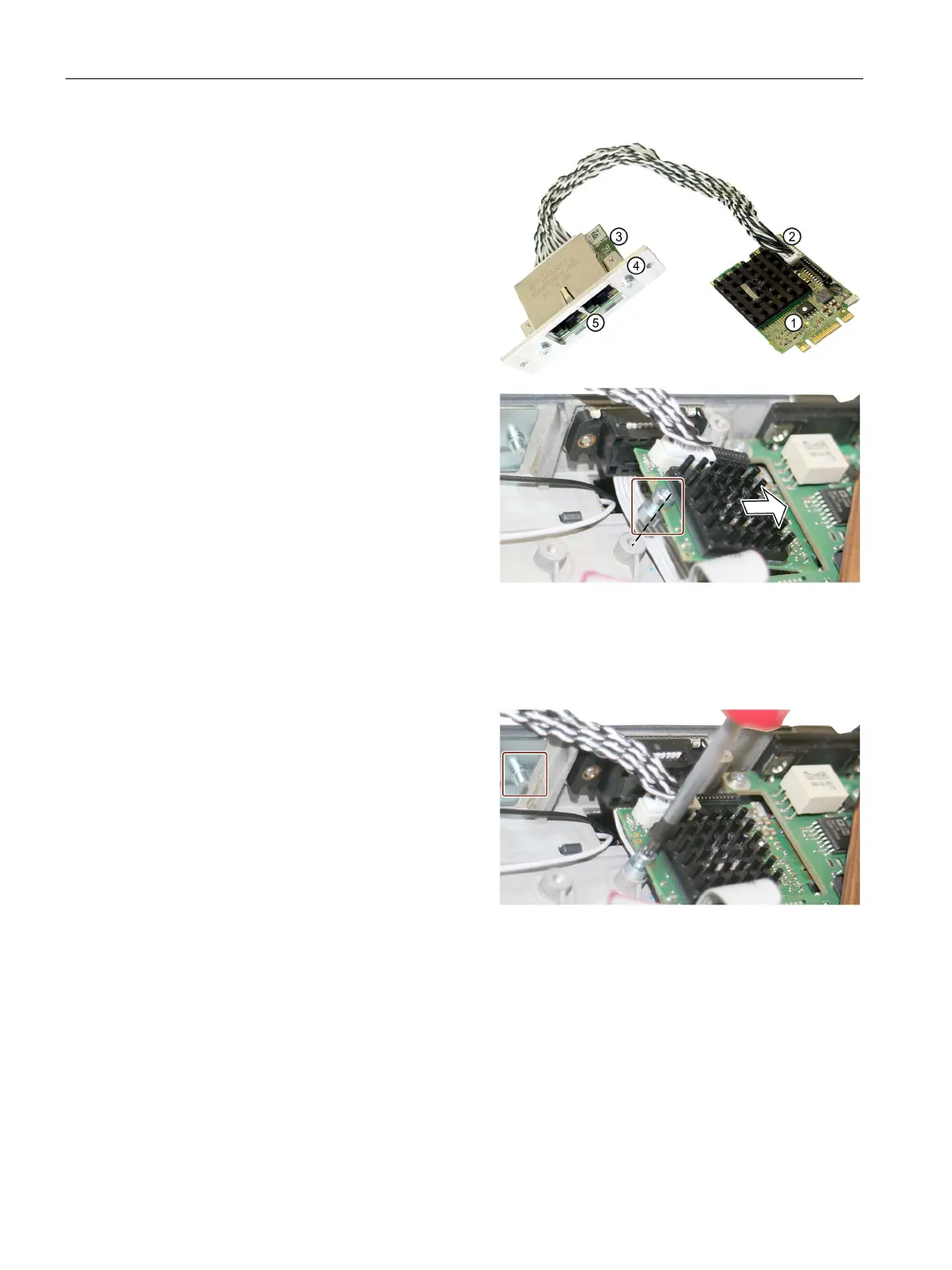
Remove the expansion module (M.2)
from the packaging:
① Slot
② Plug-in connector
③ Interface board
④ Adapter plate
⑤ External interfaces
: Do not touch the contacts of
Loosen the illustrated locking screw
and place it on the M.2 module's
plug
-in board.
Ensure that the plug-in board is
always between the head and the
spacer of the screw.
Only use the original screw with
Use the locking screw to push the
M.2 module into the slot (arrow) until
the screw is above the thread
(dashed line).
: The cut-out (coding) on the
-in board lies against the cut-out
Tighten the locking screw in the
thread.
From the outside, loosen the two
screws of the blanking cover, marked
in the figure.
Remove the blanking cover.



 To Next Page