Expanding and assigning parameters to the device
7.5 Main memory
SIMATIC IPC MD-57A
Operating Instructions, 09/2023, A5E52775302-AA
75
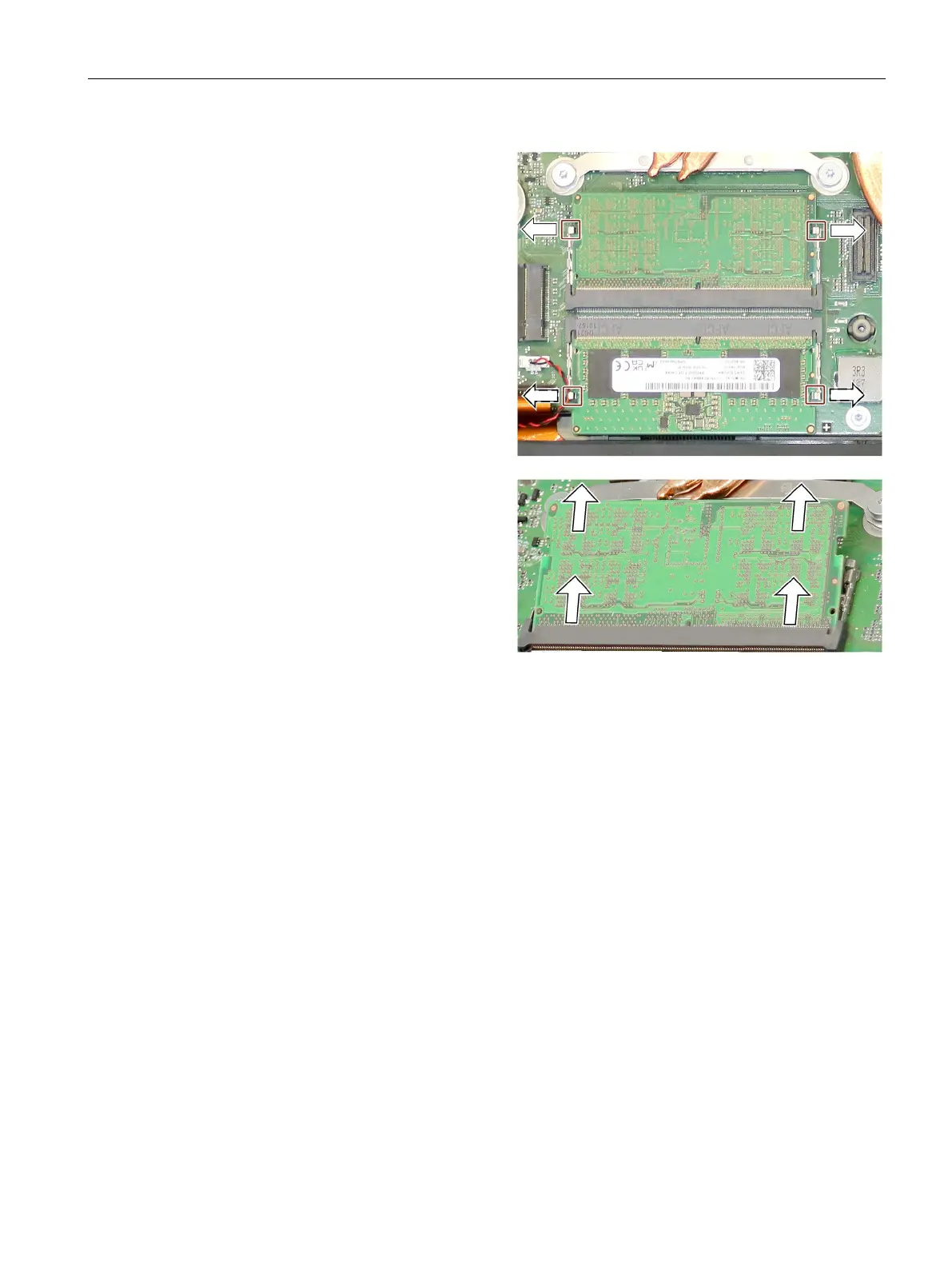
In the following, you replace the
upper memory module. The proce-
dure is mirrored accordingly for the
lower memory module.
Press the marked handles of the fix-
ing brackets evenly to the left and
right to the side until the memory
module flips upwards by approx.
30°.
Pull the memory module evenly out
of the slot in the 30° inclined posi-
tion without tilting it.
Place the new memory module in
the 30° inclined position with the
connection contacts facing down-
wards.
: The recess (anti-rotation de-
vice) of the contacts lies against the
recess on the slot.
Push the memory module into the
slot as far as it will go.
: Push evenly on the left and
right without exerting too much
force and without tilting.
Carefully push the memory module
down until the two fixing brackets
snap into place.
Again, see first illustration above.
Reconnect the battery and close the
device.
Display of the current memory configuration
The memory expansion is automatically detected. The RAM configuration is indicated in the
BIOS Setup, "Main" menu.



 To Next Page