Blocking Protection for Pumps with SIMOCODE pro V
Article ID: 109478058, V2.0, 09/2020
Outputs of the basic unit
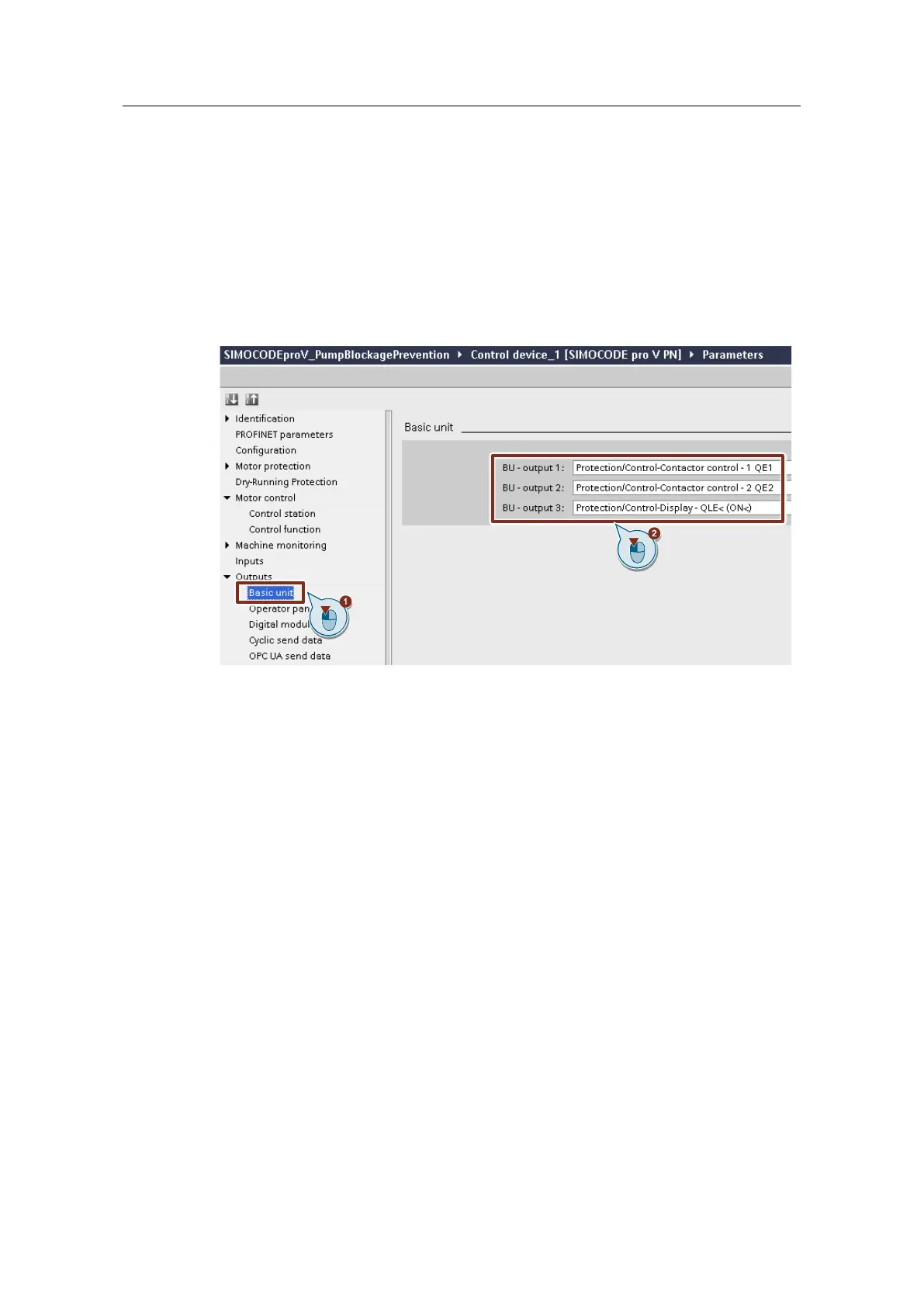
1. Open "Outputs > Basic unit".
2. Interconnect outputs 1-3 of the basic unit (BU outputs) with the following plugs
of the "Protection/Control" function block.
– BU output 1: Plug "1 QE1"
– BU output 2: Plug "2 QE2"
– BU output 3: Plug "QLE< (ON<)"
Figure 3-6
Outputs for operator panel LEDs
1. Open "Outputs > Operator panel LEDs".
2. Assign LED 1 of the operator panel to the binary connection block "Status -
remote mode".
3. Interconnect LEDs 2-4 of the operator panel with the following plugs of the
"Protection/Control" function block.
– LED 2: Plug "QLE< (ON)"
– LED 3: Plug "QLE> (ON>)"
– LED 4: Plug "QLA (OFF)"




 To Next Page