NANYTE BEAM Manual
NANYTE BEAM Manual BM-001-A3 / V1.1a Page 28 of 33
Calibration
To achieve the accuracy and precision necessary for nanolithography, numerous calibrations are
required. While calibration is performed in the factory and should be performed by qualified
personnel, it is advantageous for the user to understand how each calibration setting affects the
patterning performance. The purpose of this section is not to encourage operators to perform
calibration, but rather for better understanding of the operation principles of the system.
Three coordinate systems are used by NANYTE BEAM:
1. Stepper coordinates (microns, 100 nm resolution)
2. Camera coordinates (pixels, ~500 nm per pixel)
3. Galvo coordinates (code, 8 nm resolution)
All three coordinates are linked to the camera coordinates, and the various calibrations serve this
purpose. The accuracy demanded by a lithography system means that a higher order calibration.
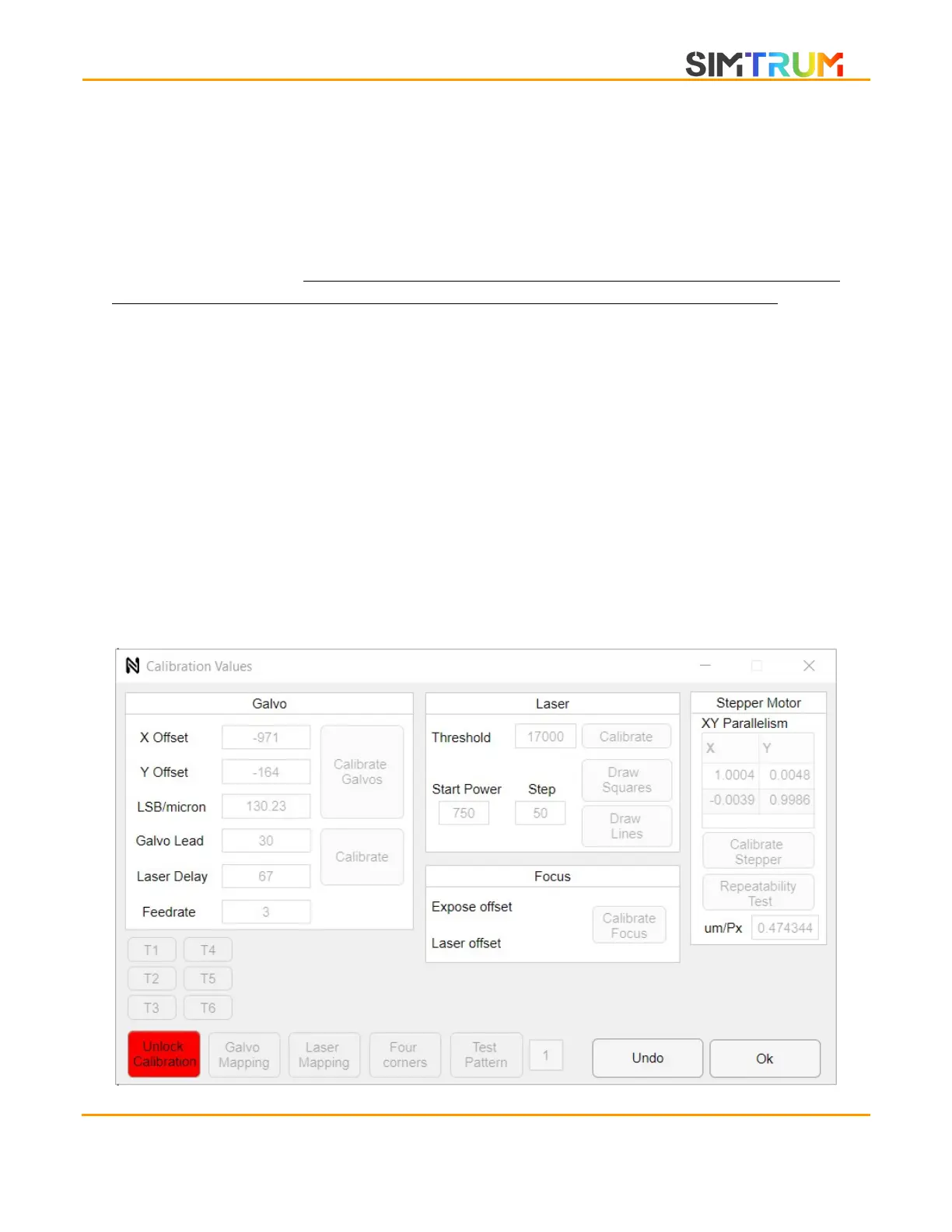
To access the calibration window, click on the calibrations button on the main window. The
following window will pop up. The calibration buttons are greyed out. Upon clicking the unlock
calibration button, a warning dialog appears and dismissing the warning will enable all settings.
CAUTION Changing the calibration settings to erroneous values can severely degrade system
performance. Always back up a copy of the data.mat in the program folder before changing any
values.
www.simtrum.com


 To Next Page