
 Need help?
Do you have a question about the SIMTRUM NANYTE BEAM and is the answer not in the manual?
Ensures safe operation by outlining essential safety guidelines and warnings for using the NANYTE BEAM.
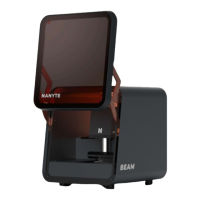
Provides a summary of the NANYTE BEAM, highlighting its capabilities as a compact maskless UV lithography system.
Details the technical specifications related to the patterning process, including resolution and exposure time.
Outlines specifications for the stage movement system, covering encoder resolution and stage repeatability.
Specifies the necessary hardware and OS for the host computer to operate the NANYTE BEAM software.
Describes the optical objectives used for focusing the UV laser beam and their specifications.
Explains the function and modular nature of the BEAM ENGINE, the core component of the lithography system.
Details the connections on the BEAM ENGINE for power, motion control, and encoder feedback.
Explains the status indications provided by the LED indicator on the BEAM ENGINE.
Describes the main power switch used to control the system's AC power supply.
Explains the USB 3.0 port for digital control and live image streaming from the BEAM.
Acts as a minimap of the sample stage, showing loaded patterns and current exposure areas.
Details the controls within the XPLORER software for managing the camera feed and settings.
Outlines the software controls necessary to perform patterning operations, including file loading and exposure.
Covers the initial steps of preparing the substrate and loading it into the system for patterning.
Explains how to load design files in GDS format for patterning, including layer selection.
Details the process of initiating and monitoring the UV laser exposure to pattern the photoresist.
Calibrates the galvo system to map laser beam positions accurately to camera coordinates.
Calibrates the stepper stage to map its movement accurately to camera coordinates for precise positioning.
Involves calibrating the laser output, particularly the PI curve, for consistent exposure.
Ensures the stage is parallel to the axes, critical for achieving uniform focus across the sample.
Calibrates the autofocus system to ensure reliable and accurate focusing on the sample surface.
Adjusts the laser beam focus offset to optimize resolution and sidewall profiles.

 To Next Page
 General