NANYTE BEAM Manual
NANYTE BEAM Manual BM-001-A3 / V1.1a Page 15 of 33
Loaded Pattern
When a compatible file is loaded for exposure, it is shown in blue. During exposure, red shapes
are overlaid on top to indicate which area has been exposed.
Terminal Output
The terminal shows important information through text. These can be:
1. system information,
2. error messages,
3. system status updates
4. calibration results.
Focus Output
Shows focus status. Three possible modes are possible:
1. Fine focus if the focus is close to correct,
2. Coarse focus when the focus is too far and the optics has to hunt for the focal point,
3. Fail, due to reasons such as insufficient brightness, sample overly tilted.
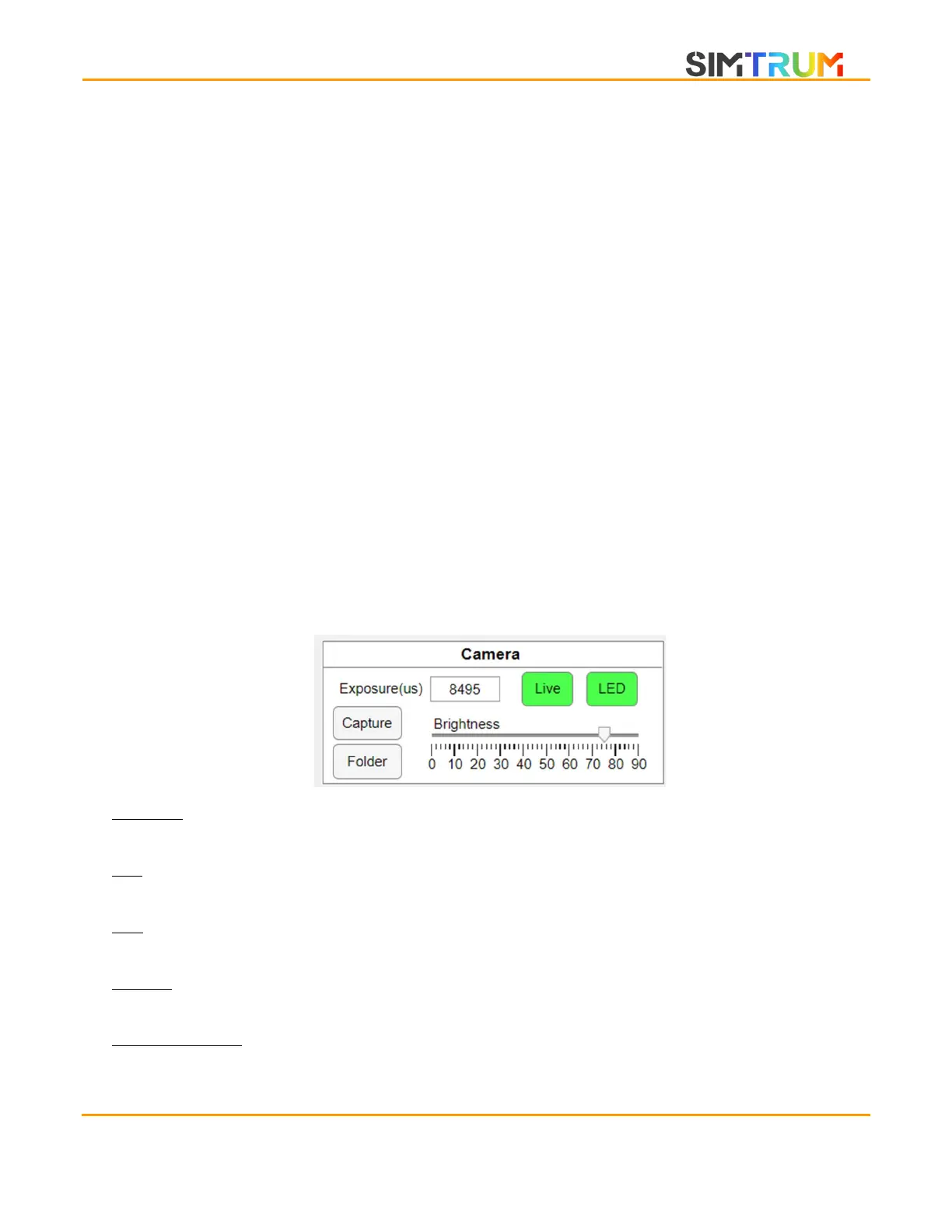
Camera controls
Exposure: Changes the exposure time of the camera. This setting is usually not required as the
automatic brightness adjustment can set the correct exposure.
LED: Turns the LED on/off. Also indicates LED status (On/Green). During certain calibrations, the
LED may be turned off.
Live: Used to turn off the camera live stream. This may be useful to reduce energy consumption
of laptop.
Capture: Performs a screen capture of the live stream feed. Images are saved in .png format and
accessed by clicking the Folder button.
Brightness slider: Used to quickly set the brightness. The numbers represent % of maximum
brightness. Since 100% brightness is essentially white and contains no information, the maximum
www.simtrum.com


 To Next Page