SITA Messtechnik GmbH - Operating Instructions SITA ConSpector
Carry out a device inspection
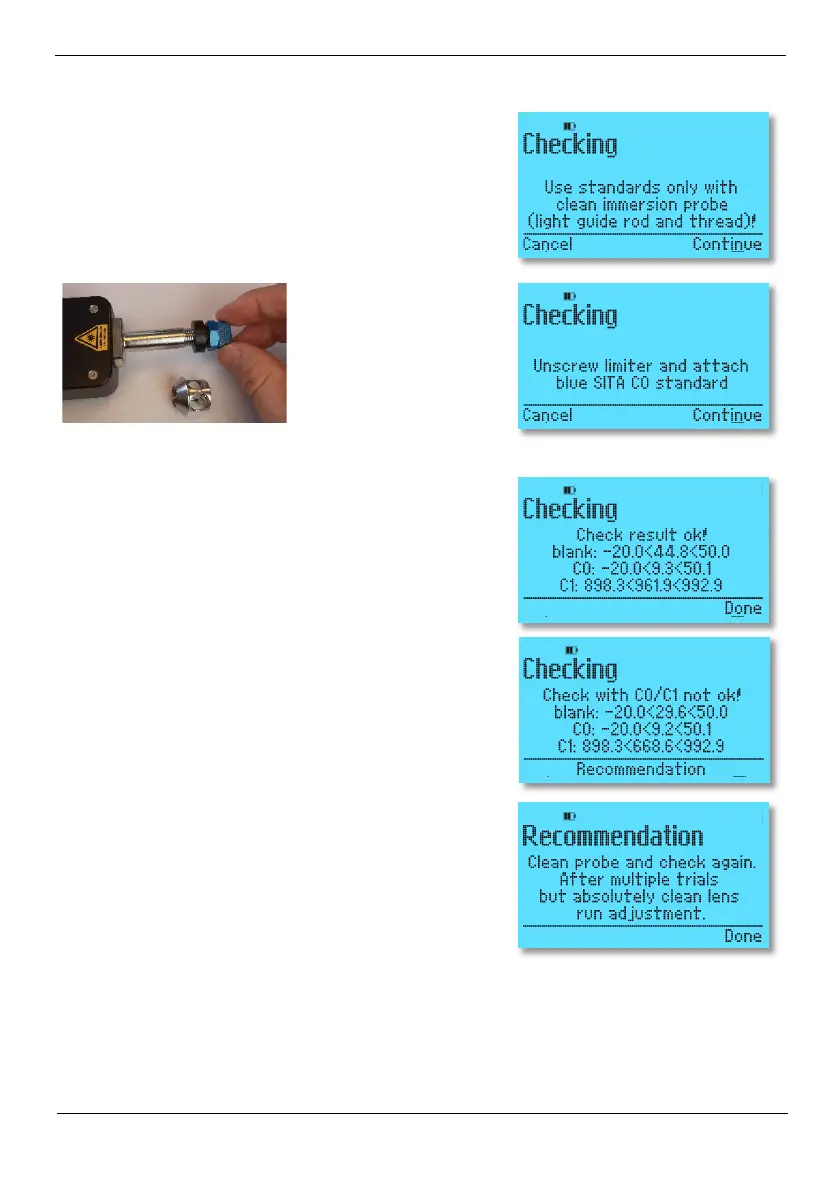
Before screwing on the standards, make sure that the glass
rod and thread are clean so as not to contaminate the
standards. The SITA calibration standards are carefully
screwed onto the sensor head by hand in a clockwise di-
rection without any additional tools. No force is required to
screw on and unscrew the SITA working standards. Remove
the limiter beforehand.
By pressing the software button Continue, the SITA Con-
Spector starts the check on the SITA calibration standard
C0.
Then you are asked to screw on the SITA calibration stand-
ard C1 with the serial number shown in the display. By
pressing the software button
Continue, the SITA ConSpec-
tor starts the test on the SITA working standard C1.
If the test was successful, this is indicated on the display and
you return to the Test menu by pressing the Done software
button. The time of the successful test is stored in the unit.
If the test is not passed because the measured values on the
calibration standards are outside the specified or set toler-
ance range, clean the limiter and glass rod (see section 8.2)
and repeat the test. If the test result is repeatedly outside
the specified tolerance range despite careful cleaning and
an absolutely clean glass rod, carry out an adjustment with
the SITA calibration standards (see section 8.3).


 To Next Page