Tuner type. Select ATV+DTV OR ATV, DTV ONLY and press OK. Select DVB-C from
this menu and press OK if you want to search for cable TV broadcasts.
Select these menus, enter the required values, and press OK to make manual tuning
for ATV manual search or Cad manual tuning.
Select Photo, Music, Movie, Movie, Text from the menu that appears, depending on
what information you have stored on the USB. Press the OK button if there is more
than 1, select the ones you want to start, and press the OK button, and it will start.
MEDIA PLAYER FUNCTIONS
Insert the USB flash drive into the TV and press the source button. Using the up/down
directional T-keys, select the Media option. Select the media type you want to play
with the right/left arrow keys, and then select the file you want to play from the drop-
down menu.
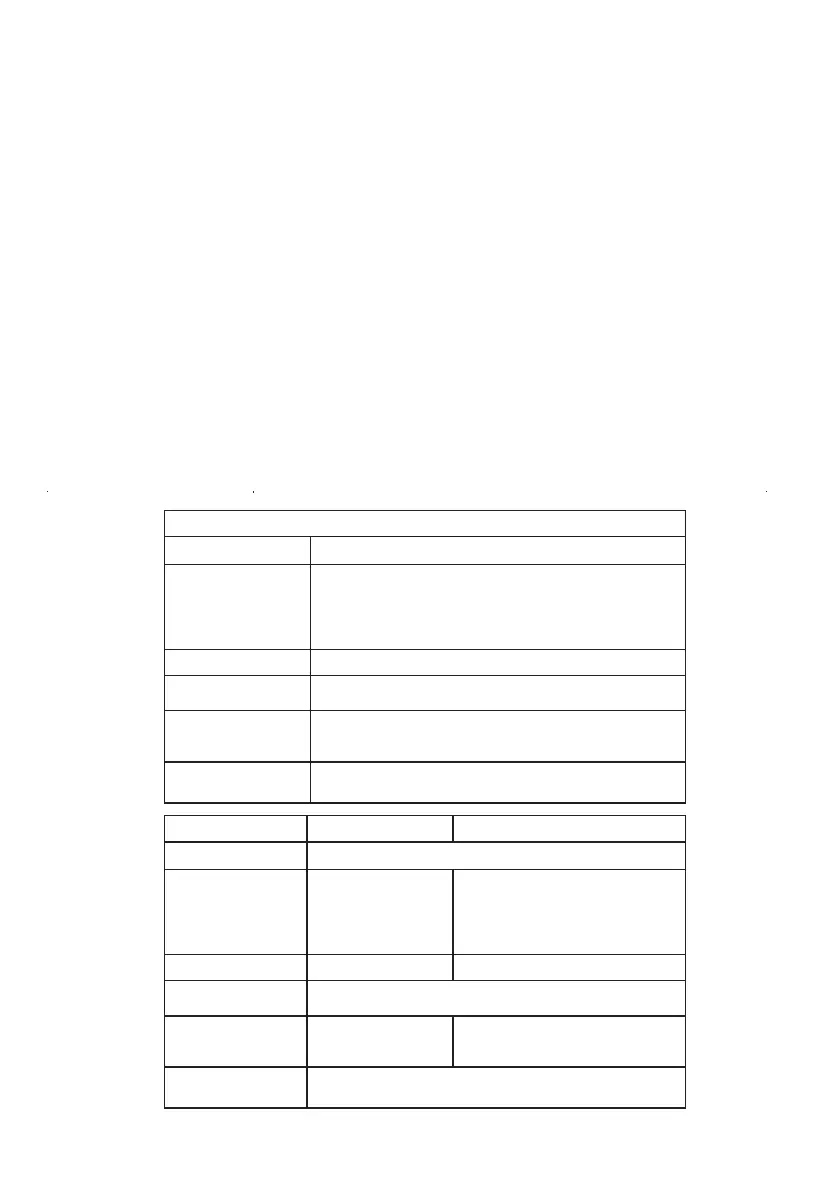
TECHNICAL SPECIFICATIONS
32ST1000 / 32ST1001
Viewing Angle
Input / Output
Speaker Output
Operating Voltage
Power
Consumption
Accessories
178° (Horizontal) / 178° (Vertical)
2x8W2x3W
AC 100-240V 50/60Hz
56W
36W
User Manuel, Remote Control, 2x AAA Batteries
Built-in satellite (DVB-S/S2),
Suitable for terrestrial and cable
broadcasting (DVB-T/T2,DVB-C),
1x Terrestrial antenna input,
3xHDMI, 2xUSB, 1xAV,
1xCI Module input,
Dijital Audio Output
Built-in satellite (DVB-S/S2),
Suitable for terrestrial and cable
broadcasting (DVB-T/T2,DVB-C),
1x Terrestrial antenna input, 3xHDMI,
2xUSB, 1xAV, 1xCI Module input,
1xLNB, Dijital Audio Output
24ST1000
32ST2000
Viewing Angle
Input / Output
Speaker Output
Operating Voltage
Power
Consumption
Accessories
178° (Horizontal) / 178° (Vertical)
2x8W
AC 100-240V 50/60Hz
Input: 1xTerrestrial Antenna, 1xLNB Input (Satellite Dish
Antenna), 2xHDMI, 1x Mini AV, 1x Mini YPbPr, 1xVGA,
1xPC Audio Input, 1x USB Output, 1x CI Module input
Output: Headphones,Dijital Audio Output
60W
User Manuel, Remote Control, 2x AAA Batteries
27



 To Next Page