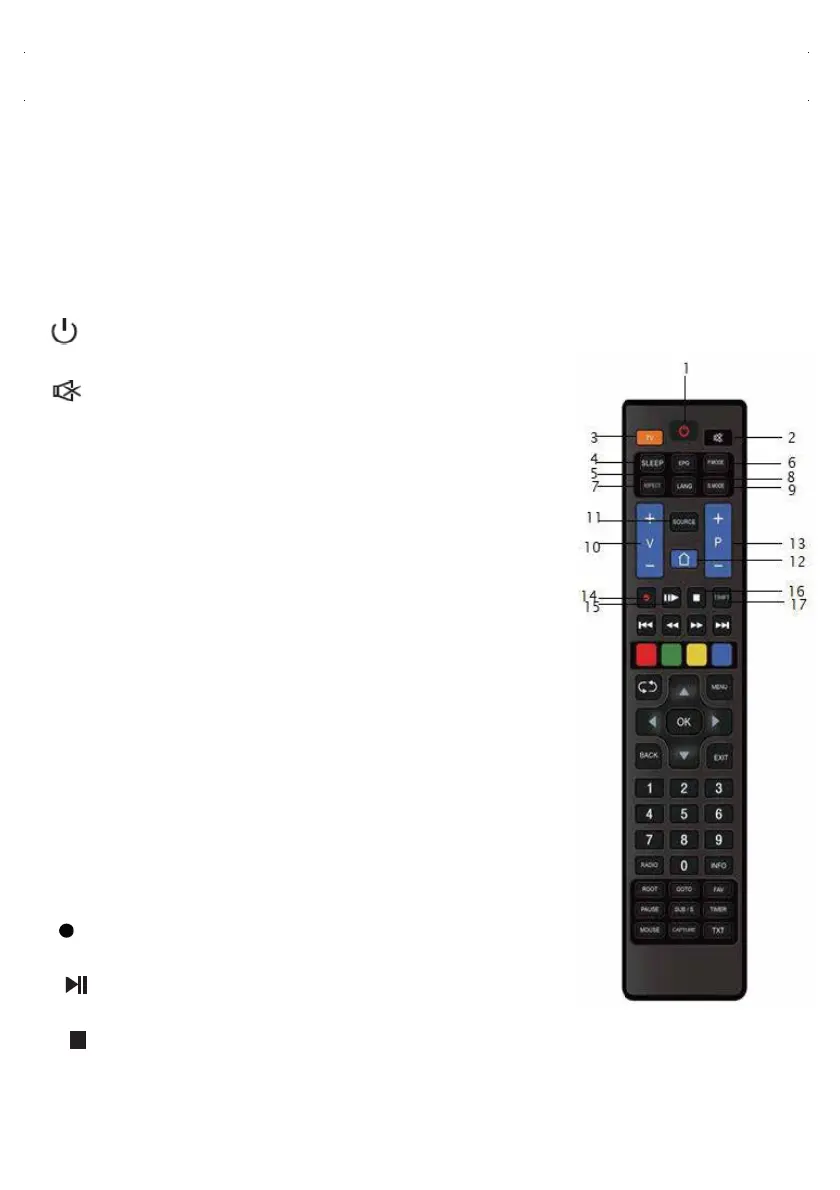
REMOTE CONTROL FUNCTIONS
32ST2000 / 32ST2100 / 40ST2102 / 42ST2102 / 43ST2103
50ST2104 / 55ST2104 / 65ST2104
WARNING: Do not allow small children to play with the remote control and remote
control batteries, and keep the remote control out of the reach of children. Swallowing
remote control batteries or accessories can be life-threatening. In case of battery
swallowing, contact a health care provider immediately.
3. TV: When in broadcast mode, switches between antenna
types (aerial, cable, and satellite). Switches to Satellite
Mode while on the S
martTV screen.
4. SLEEP: Auto power off timer.
5. EPG: Displays the broadcast program and program
description for the channel being watched.
(For supported satellite broadcasts)
6. P. MODE: Changes the picture mode.
7. ASPECT: Changes the screen aspect ratio.
8. LANG: Changes the audio language of the channel
being watched. (For supportedsatellite broadcasts)
9. S. MODE: Changes the audio mode.
10. VOL + / VOL- : Increase/decrease the volume.
11. SOURCE: Changes the Input Source.
12. HOME: Switches to the SmartTV home page.
13. P + / P-: In
creases / decreases the channel number.
17. T. SHIFT: Initiates time shift (USB memory required.)
2. Mute: Mutes the sound completely, when pressed
again unmutes the sound.
1. On/Off: turns the screen on while in standby state
and turns it off in standby state when the screen is on.
14. REC: Records the current broadcast.
15. Stops multimedia files. Press again
and playback resumes.
16. Ends the started recording. Closes the multimedia
file being watched.
(USB memory required.)
9



 To Next Page