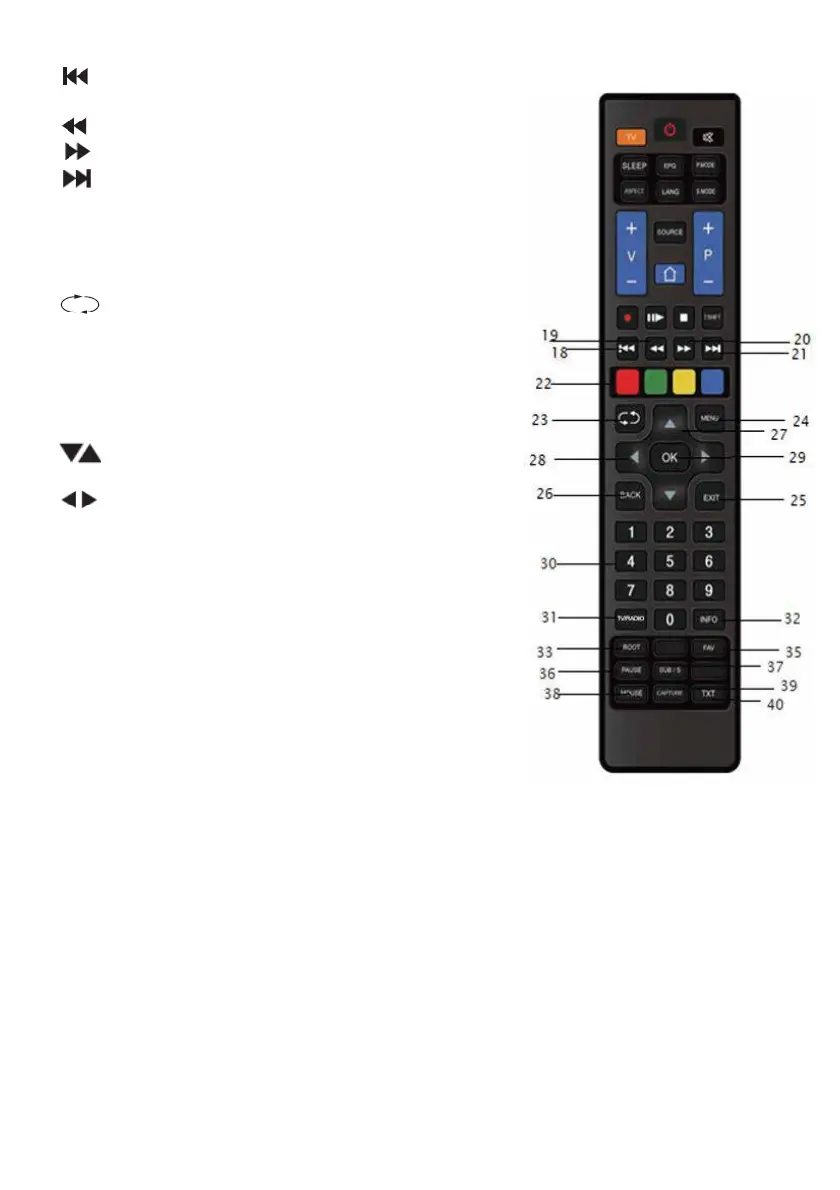
18. : while playing a multimedia file,
19. : Fast rewind while playing a multimedia file.
20. : Fast forward during multimedia file playback.
21. : Moves to the next file while the multimedia
file is playing.
22. RED/GREEN/YELLOW/BLUE: Selects the
NEWS/SPORT/WEATHER/ECONOMY
categories on the Teletext screen.
23. : Returns to the previously opened channel.
24. MENU: Opens and closes the menu, returns
to the upper menu.
25. EXIT: Closes the current menu.
26. BACK: Returns to the upper menu.
Returns to the previous operation.
27. : Keys to select the section t
o be adjusted.
Increases / decreases the channel number.
28. : the selected section can be set with
these buttons.
29. OK: Used to save/confirm the selected or set
30. 0-9 Number Buttons: Navigates to the channel
whose number is entered. Allows entry of numeric
values from the menu.
31. RADIO: Switches to Radio channels while watching
satellite broadcasts. Pressing again returns to
Satellite Channels.
32. INFO: Provides information about the current
monitoring mode. Provides information about the
currently playing multimedia file. Shows the registration
informa
tion during registration.
NOTE: The functions of some keys may change depending on software development.
33. ROOT: Opens the media center.
34. FAV: Opens the favorite channel list.
35. PAUSE: Stops the multimedia file while it is playing.
36. SUB/S: Shows subtitle options for supporting broadcasts.
37. MOUSE: Activates the mouse while on the SmartTV home screen.
38. CAPTURE: Takes a screenshot of the image being viewed.
39. TXT: Displays the Teletext.
returns to the previous file.
menu options.
10



 To Next Page