24ST1000 / 32ST1000 / 32ST1001 / 32ST1100 / 40ST1102 / 43ST1102
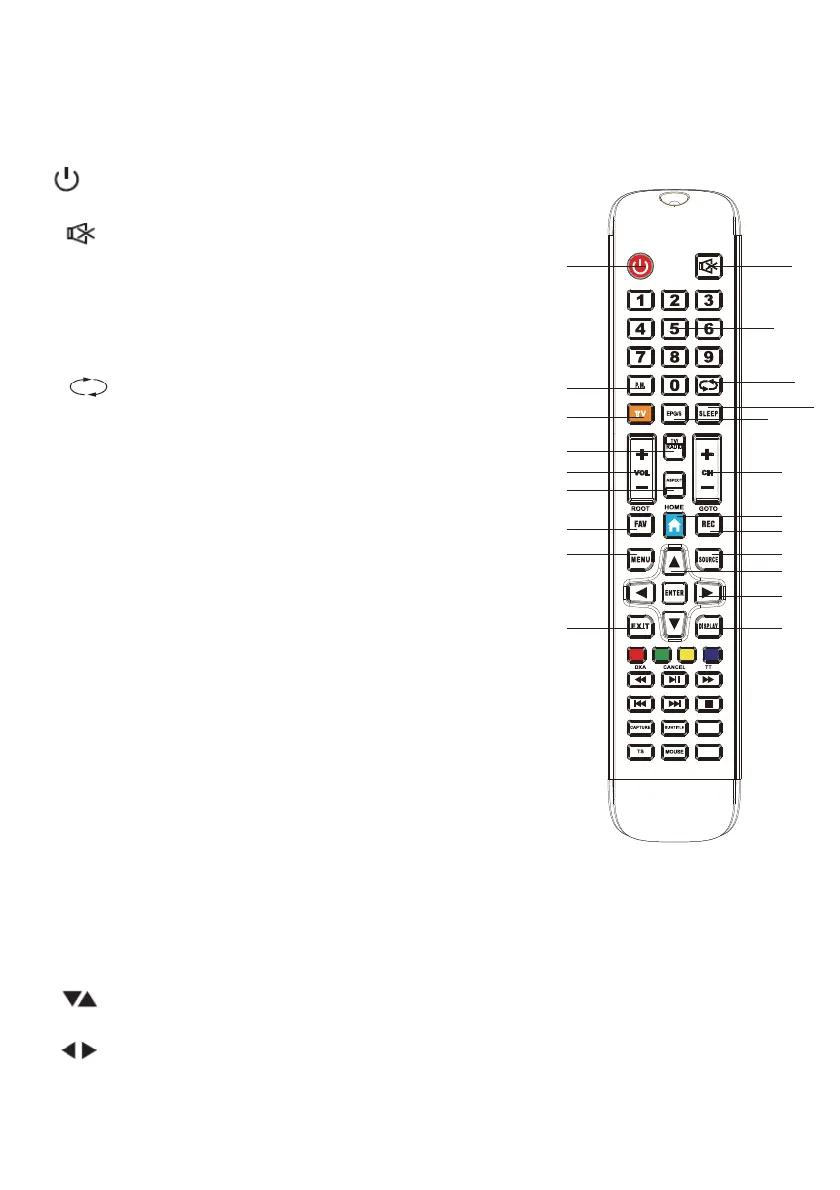
50ST1104 / 55ST1104 / 65ST1104 Remote Control Funcons
1. On/Off: turns the screen on while in standby state
and turns it off in standby state when the screen is on.
2. Mute: Completely mutes the sound, when pressed
again turns the sound back on.
3. 0-9 Number Buttons: Navigates to the channel whose
number is entered. Allows entry of numeric values from
the menu.
4. P. MODE: Changes the picture mode.
5. : Returns to the previously opened channel*.
6. TV: When in broadcast mode, switches
between
antenna types (aerial, cable, and satellite). Switches to
Satellite Mode while on the SmartTV screen.
7. EPG: Displays the broadcast program for the channel
being watched.
8. SLEEP: Auto power off timer
9. VOL + / VOL- : Increase/decrease the volume.
10. TV-RADIO: When pressed switches to radio channels,
when pressed again returns to the satellite channels.
11. ASPECT: Changes the aspect ratio of the displayed
image in the TV function.
12. CH + / CH-: Increases / decreases the channel number.
13. FAV: Opens the favorite channel l
ist.
14. HOME: Switches to the SmartTV home page.
15. REC: Records the current broadcast (USB memory required.)
16. MENU: Opens/closes the menu. Returns to the upper menu.
17. SOURCE: Changes the Input Source.
18. EXIT: Closes the current menu. Returns to the upper menu. Returns to the previous
operation.
19. DISPLAY: Provides information about the current monitoring mode. Provides
information about the currently playing multimedia file. Shows the registration
information during registration.
20. : Keys to select the section to be adjusted. Inc
reases / decreases the channel
number.
21. : the selected section can be set with these buttons.
1 2
3
4
5
6
7
8
9
10
11
13
16
18
12
14
15
17
19
21
20
11



 To Next Page