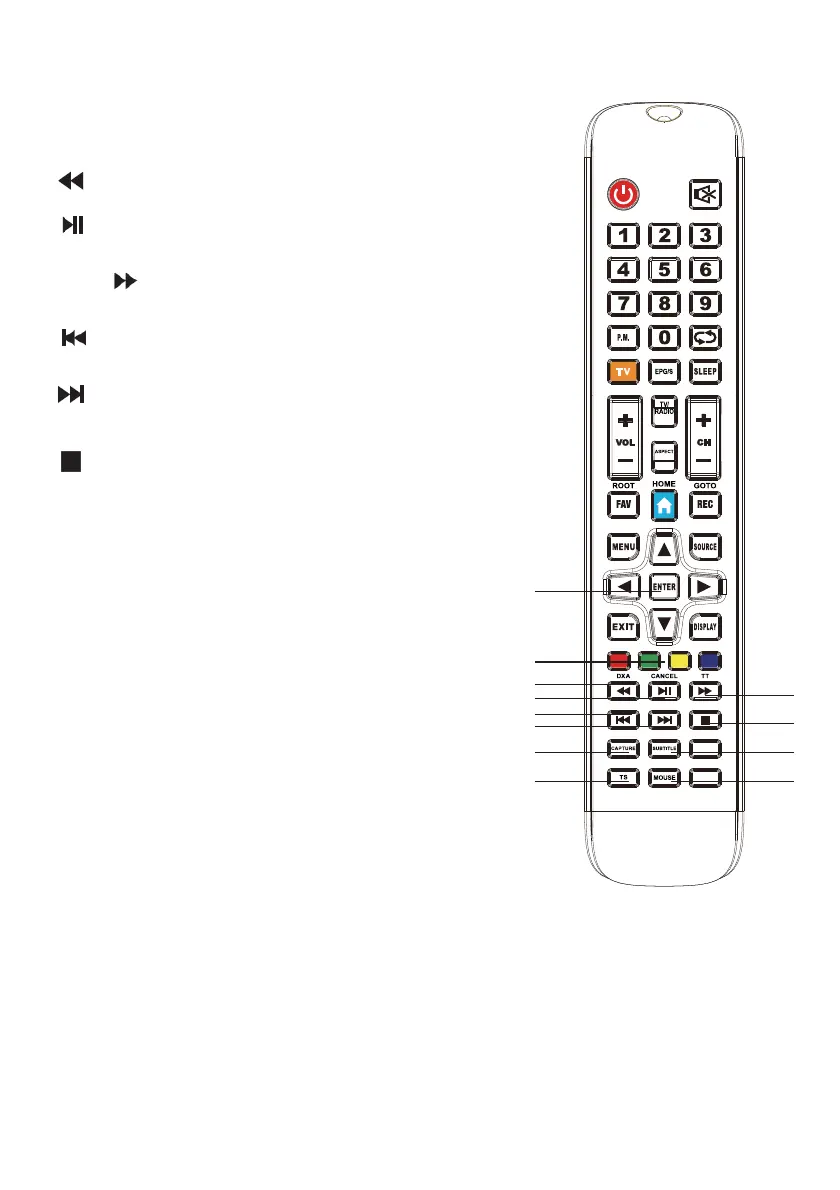
22. ENTER: Used to confirm or save the selected or set menu options.
23. RED/GREEN/YELLOW/BLUE: Selects news/sports/
weather/economy categories on the Teletext screen.
30. CAPTURE: Takes a screenshot of the image
being viewed.
31. SUBTITLE: Shows subtitle options for
supporting broadcasts.
32. T. SHIFT: Initiates time shift (USB memory required.)
33. MOUSE: When the button is pressed,
the SmartTV screen shows a mouse.
*Not valid for models without built in satellite receiver.
WARNING: Keep the remote control device away from direct sunlight, heat sou
rces,
fire, and radiation emitting devices.
Inserting the Batteries:
Open the battery compartment cover on the back of the remote control. Insert two
AAA batteries, paying attention to the + and - poles, into the battery compartment. Do
not use old and new batteries or different types of batteries at the same time. Replace
the battery compartment cover and make sure that it is tightly closed.
24. : Fast rewind while playing a multimedia file.
25. : Stops multimedia files and resumes
playback when pressed again.
22
23
24
25
27
28
30
32
26
29
31
33
26. TT / : Displays teletext on the TV tab. Fast forward
when playing multimedia files on the SmartTV screen.
27. : Returns to the previous file while the multimedia
file is playing.
28. : Moves to the next file while the multimedia
file is playing.
29. : Ends the started recording.
12



 To Next Page